EU Cryptoasset Transfer Rules: How to Verify a OneKey Self-Custody Wallet
Key Takeaways
• OneKey is a self-custody wallet. When you control the address, the wallet type should be set to "private wallet" or a similar option provided by the platform. • An electronic signature only proves that you control the address and does not move assets; a Satoshi test is a real small transfer and will incur a network fee. • The network, address, and amount must all be exactly correct. For the first transfer, start with a small test instead of sending all assets directly.
What does this rule affect?
The EU cryptoasset transfer information rule is often called the Travel Rule. It requires exchanges to collect the necessary sender and recipient information when a transfer is made. When funds are sent to or from a self-custody wallet, the platform may also ask who controls the address.
This article applies to the EU and the EEA. Requirements in the UK and Switzerland are different and cannot be copied directly.
Which wallet type should I choose for OneKey?
If the address was created in OneKey and you can sign or initiate a transfer with the corresponding account, it is a self-custody wallet address.
When an exchange asks for the wallet type:
- To send to your own or someone else's OneKey address: choose "private wallet", "self-custody wallet", or a similar option on the page.
- To send to another exchange's deposit address: choose "exchange or platform", and fill in the real platform and recipient information.
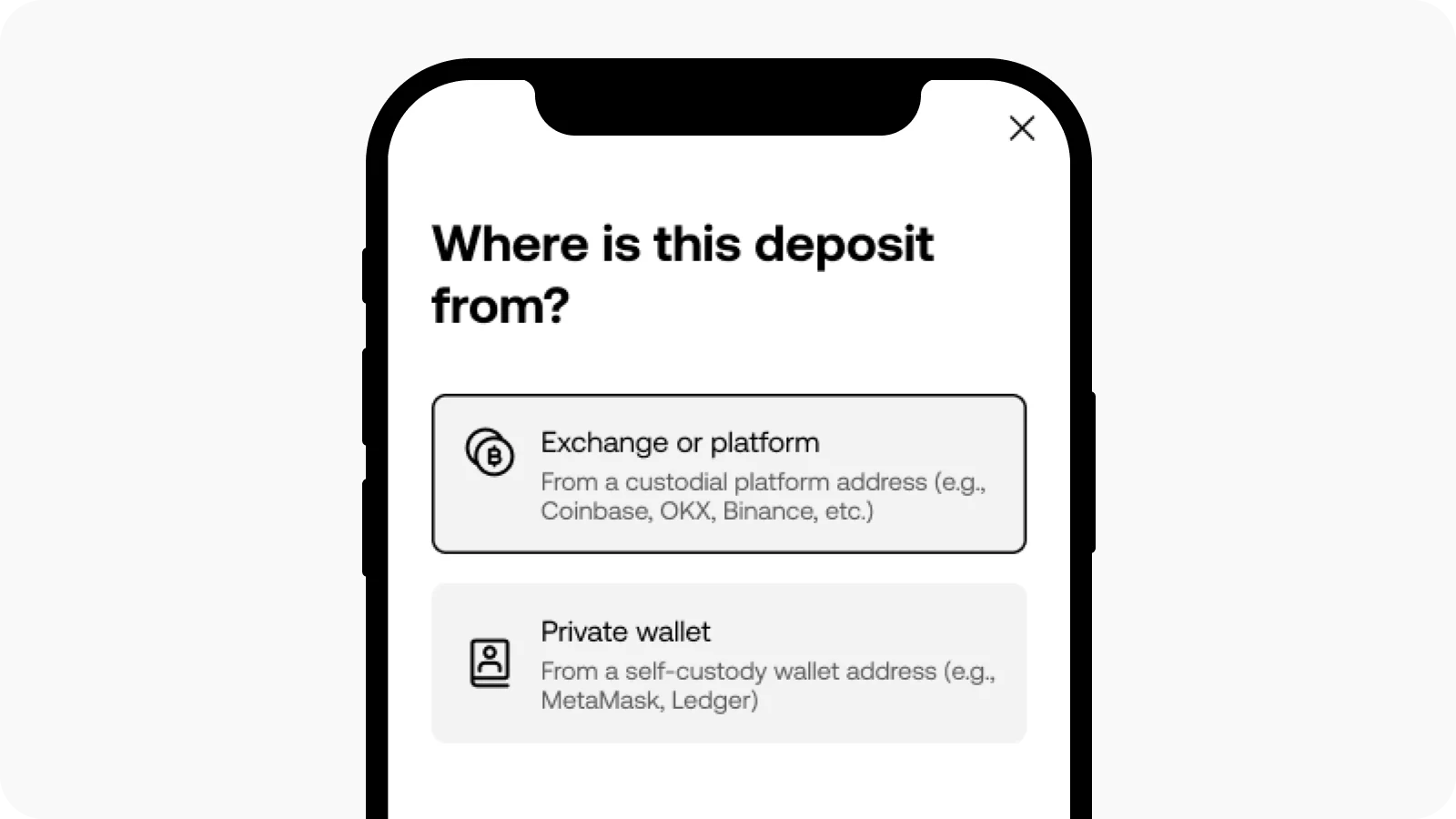 OKX requires you to choose an exchange or platform, or a private wallet
Do not enter an exchange address as a private wallet. You usually do not have the private key for an exchange deposit address, so you cannot complete address verification, and later transfers may also be blocked.
How should I understand the 1,000 euro threshold?
This rule does not start only at 1,000 euros. Below 1,000 euros, the platform may still ask for a name, country, or wallet type.
1,000 euros is an important threshold for additional verification of control over a self-custody address. Whether verification is triggered also depends on the platform, the account, the network, and risk checks, so follow the requirements shown in your account at the time.
Two common verification methods
Electronic signature
An electronic signature is when you sign a message provided by the platform with the wallet address to prove that you control this address. It does not move assets and usually does not cost any network fee.
When you do it, just remember three things:
- Confirm that you are using the exchange's official website or official app.
- In OneKey, choose the account and network that exactly match the receiving address.
- Read the message carefully before signing, and never enter your seed phrase or private key.
If the platform connects to the wallet through WalletConnect, you can connect OneKey as prompted on the page. WalletConnect is the name of the tool used to connect a wallet and a web page, and there is no reliable Chinese alternative, so this article keeps the original name.
Satoshi test
A Satoshi test is also called a small-amount transfer verification. The platform will provide the coin, network, receiving address, exact amount, and completion time. You need to send this small amount from the OneKey address being verified.
You must meet all of the following at the same time:
- Send it from the same address being verified;
- Use the network specified by the platform;
- Send it to the address specified by the platform;
- Make sure the received amount exactly matches the page requirement;
- Complete it before the countdown ends.
The network fee must be prepared separately and cannot be deducted from the specified received amount. OKX and Coinbase have different amounts and time limits, so do not use one platform's rules on another platform.
Hardware wallet users need one extra step
When using a OneKey hardware wallet, check the full receiving address on the device screen. The address shown on the device, in the OneKey app, and in the exchange must all match.
When signing or sending a test amount, also make sure the currently selected account is the same hardware wallet account. Neither the exchange, OneKey support, nor the verification page will ask for your seed phrase or private key.
Why are Bitcoin addresses more likely to fail verification?
Networks such as Bitcoin split balances into multiple spendable small units, and these records are called UTXO. When a wallet sends funds, it may automatically use the balance from another address, causing the on-chain source of funds to differ from the address being verified.
When doing a Bitcoin Satoshi test:
- Use an address that has already received coins and whose balance has been confirmed.
- Make sure the balance is enough to cover both the test amount and the network fee.
- If OneKey shows Coin Control, use it to specify the balance in the address being verified. Coin Control is the name of the function used to select specific spendable balances.
- If the source of funds cannot be confirmed, stop first and do not keep paying network fees to try again.
What should I do if verification fails?
- Signature failed: check the official website address, network, account, and signing address; if the page allows it, you can switch to a Satoshi test.
- Test amount is wrong or timed out: start the verification again and use the amount and address given on the new page.
- Bitcoin source of funds does not match: select the balance in the address being verified before sending.
- Name does not match: correct it according to the actual sender and recipient information, and contact exchange support if necessary.
- Deposit shows pending or asks for additional information: open the additional information page from the transaction details and fill in the real source of funds.
Checklist before transferring
- Are the exchange and OneKey using the same network?
- Has the address been checked on both the OneKey app and the hardware device?
- Have you tried a small test transfer first?
- Was the wallet type honestly selected as private wallet or self-custody wallet?
- Was the signature or test transfer sent from the address being verified?
Related guides
- How to Withdraw Crypto from OKX to OneKey: A Guide for European Economic Area Users
- How to Withdraw from Coinbase to OneKey: A Guide for EU Users
- How to Withdraw from Binance to OneKey: Choose the Right Network and Complete Wallet Verification
- How to Do the OKX Satoshi Test: Verify a Wallet Address with OneKey
- What to Do When an OKX Deposit Is Locked by Transfer Rules
References
- Regulation (EU) 2023/1113
- European Banking Authority: Guidelines on information requirements for cryptoasset transfers
- OKX: EEA Transfer Rules FAQ
- Coinbase: Sending and receiving crypto assets for EU users
- OneKey: Signature verification when withdrawing from an exchange using a OneKey wallet
Risk reminder: On-chain transfers cannot be reversed. Incorrect network, address, amount, or memo information may result in assets being unrecoverable. This article is for operational guidance only and does not constitute investment, legal, or tax advice. Platform rules may change, so please refer to the requirements shown in your account at the time and the latest official instructions.
FAQ's
No. OneKey is a self-custody wallet, and the private key is controlled by the user.
Not necessarily. The platform may still ask for a name, country, wallet type, or other information.
A normal address-ownership signature will not move assets. But do not sign transactions or approvals you do not understand, and never reveal your seed phrase or private key.
Because the platform is verifying that exact address. Even if another address also belongs to your OneKey, the platform may not be able to match the two.
There is no guarantee that it will remain valid forever. According to OKX's current instructions, some addresses verified through a Satoshi test can remain verified for about six months; other platforms have different rules, so follow the prompts in your account.