How to Buy USDT in OneKey App: On-Ramp, KYC, and Deposit Guide

Key Takeaways
-
The path in OneKey App is Buy & Sell > Buy; the selected third-party provider handles the order, payment, KYC, limits, and regional availability.
-
Before buying, verify the USDT network, receiving address, exchange rate, all fees, and final payout.
-
Save both the order number and TXID. Contact the provider when there is no TXID; once one exists, check it on the explorer for the relevant network.
You can buy USDT from inside OneKey App, but the service boundary matters. OneKey provides the self-custody wallet and the on-ramp entry point. The selected third-party provider handles the order, payment, identity verification, regional availability, limits, and quote. Creating a OneKey wallet does not mean the purchase channel is automatically KYC-free.
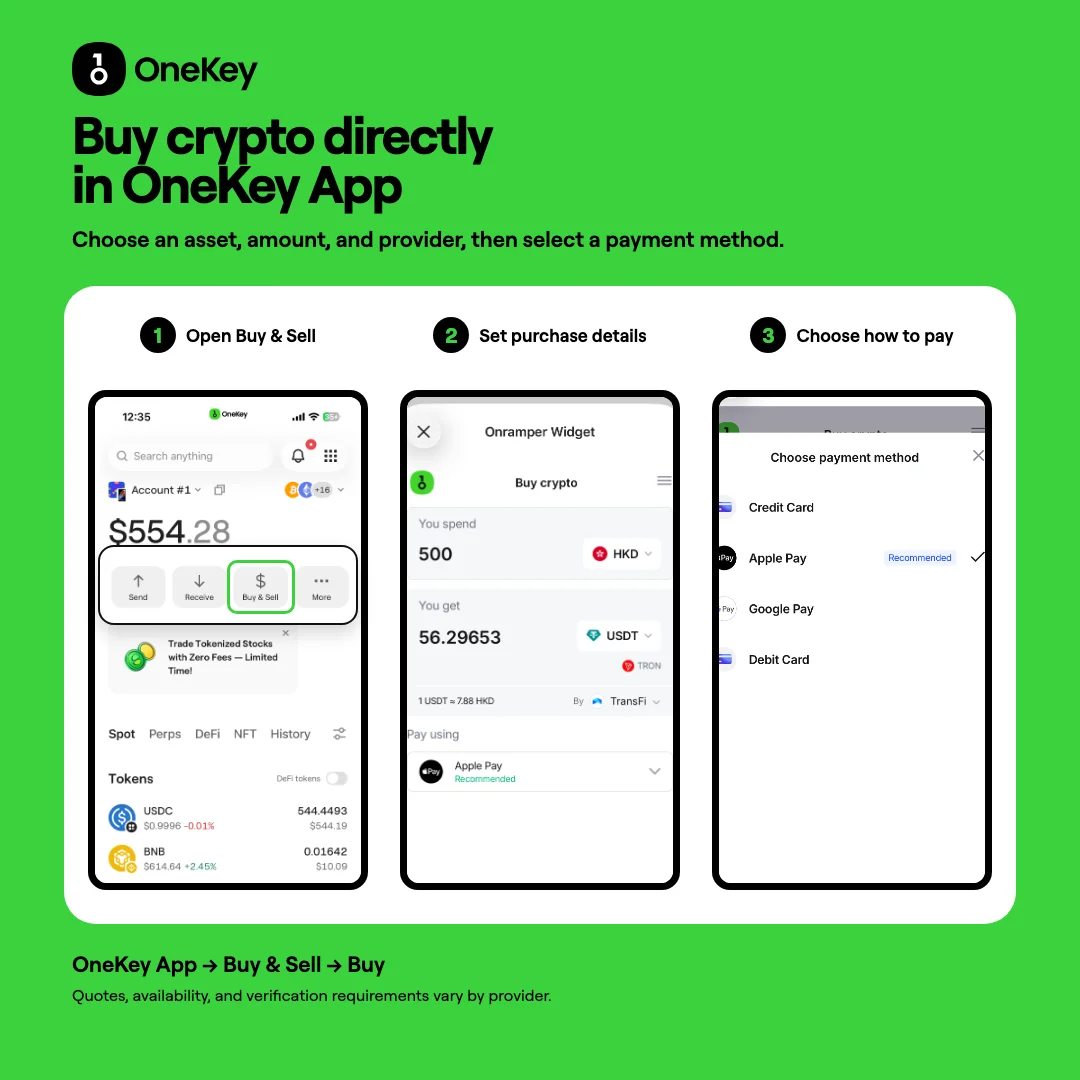 Three-step overview of buying USDT in OneKey App
Figure 1: The three-step route for buying USDT in OneKey App. Providers, quotes, payment methods, and available networks depend on the live page.
Step 1: Open the Buy entry in OneKey
Install the app from the official OneKey download page and prepare the wallet that will receive the funds. On the OneKey home screen, tap Buy & Sell, then select Buy. According to the official OneKey deposit guide, the app lets you choose an asset before entering the third-party payment flow. Menu names and positions may change between versions, so follow the current app.
Step 2: Choose USDT, the fiat currency, and the network
Select the fiat currency you will spend, choose USDT, and enter the amount. If the page asks for a receiving network, first decide whether you need TRON, Ethereum, or another network. USDT exists on multiple blockchains, and the same token name does not make those networks interchangeable. Before paying, confirm that the receiving address belongs to the selected network.
Do not look only at the estimated USDT amount. Record the fiat amount, exchange rate, service fee, network or channel fee, minimum purchase, and final amount you are expected to receive.
Step 3: Compare third-party provider quotes
OneKey shows the providers and quotes available under the current conditions. The list can change with the region, fiat currency, amount, and time. Before continuing, check:
- the provider name and destination domain;
- the final USDT amount and receiving network;
- currently available payment methods such as Apple Pay, Google Pay, or bank cards;
- KYC, limits, refunds, chargebacks, and order-processing rules.
A better quote from one provider today does not mean it will remain better in another region or at another time.
Step 4: Complete payment on the provider's page
After the redirect, submit the requested information only on the provider's official page. Before paying, recheck the asset, network, OneKey receiving address, fiat amount, and final quote. Save the order number after completing the order. When the provider creates the on-chain transaction, save the TXID as well.
OneKey is the self-custody wallet receiving the asset. It does not decide whether the provider approves KYC or accepts a particular card, and it cannot reverse a completed on-chain transfer. If an order is stuck and has no TXID, contact the order provider first. Once a TXID exists, use the appropriate block explorer to verify the on-chain status.
Step 5: Check whether the USDT arrived
Return to OneKey and check USDT on the correct network. If the balance has not refreshed, verify the selected network and token display, then look up the TXID. When using a provider for the first time, begin with an amount you can afford to test. Never send extra funds to an unfamiliar address to "unlock" an order.
Risk Warning
Third-party on-ramp services are subject to regional rules, identity checks, card-issuer policies, payment risk controls, and provider terms. Features and quotes can change at any time. This article does not guarantee that any payment method, provider, or network will be available, and it is not investment, legal, or tax advice. Never give OneKey, provider support, or a stranger your recovery phrase, private key, or hardware-wallet recovery phrase.
References
- OneKey: Deposit and on-ramp entry
- OneKey: Buy and Sell Cryptos in OneKey App
- Official OneKey download
- OneKey Service Agreement
- Tether Supported Protocols
FAQ's
You can open a currently available third-party on-ramp through Buy & Sell > Buy, but actual availability depends on the live page.
The third-party provider determines whether KYC is required and what it includes based on the region, amount, and payment method.
OneKey is the self-custody receiving wallet. A third party handles the order and payment, while you control the wallet keys after the funds arrive.
No. Availability depends on the region, provider, card issuer, and real-time risk controls.
Check whether the order has produced a TXID. Contact the provider if there is no TXID; if there is one, verify it on the explorer for the selected network.