How to Buy USDT with a Credit Card: Providers, KYC, Fees, and Chargeback Risk

Key Takeaways
-
A third-party provider and the card issuer process a credit-card purchase of USDT; OneKey is the self-custody receiving wallet.
-
Compare costs by checking how much USDT the same fiat amount finally buys, including provider fees, exchange-rate spread, and card-issuer charges.
-
Confirm the USDT network and address before paying. Contact the provider when a charge has no TXID; once a TXID exists, check the corresponding blockchain.
Buying USDT with a credit card usually does not mean that OneKey sells the asset directly after you swipe your card. You open OneKey's on-ramp, select a third-party provider, and finish payment on that provider's page. OneKey supplies the self-custody receiving wallet. The provider and card issuer determine merchant acceptance, KYC, limits, exchange rates, chargebacks, and refunds.
Check these 4 points before paying by card
- Is your region supported? The fiat currencies, card types, and verification requirements offered by the same provider can differ by country or region.
- Does your card issuer allow it? A bank may decline a crypto-related transaction or apply its own cross-border or cash-advance fees. Only the card issuer can confirm how it classifies the transaction.
- Is the USDT receiving network correct? TRON, Ethereum, and other networks are not interchangeable simply because the asset is called USDT.
- What is the real final payout? Compare the total fiat cost, exchange rate, provider fee, card charges, and final USDT amount instead of looking at a single "fee" line.
How to do it in OneKey
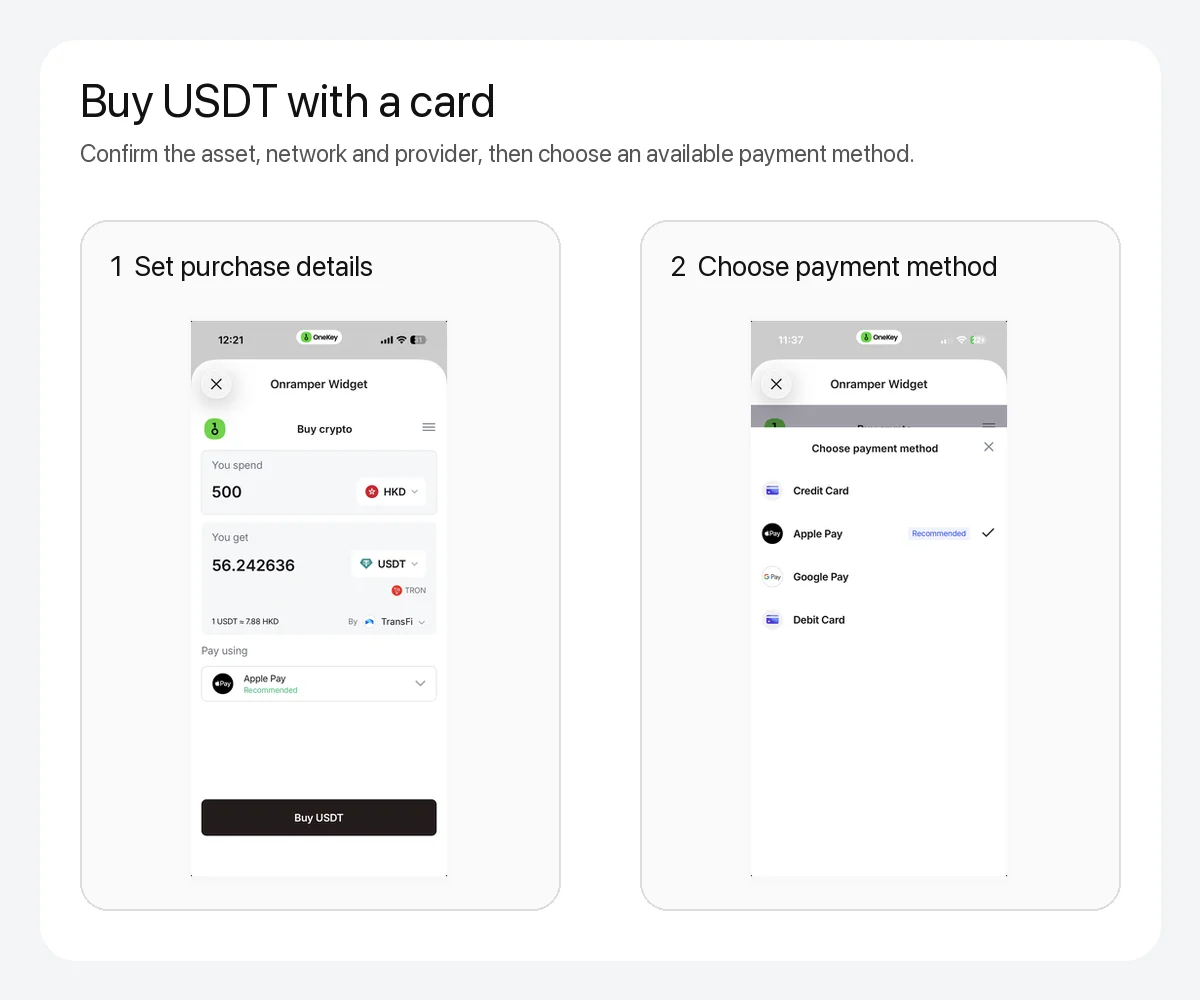 Purchase settings and payment methods on a OneKey third-party on-ramp page
Figure 1: In OneKey's third-party purchase flow, check the fiat amount, USDT, TRON network, and provider before selecting a currently available credit card, debit card, Apple Pay, or Google Pay option. Providers, quotes, payment methods, and KYC requirements depend on the live page.
Open OneKey App and go to Buy & Sell > Buy. Select USDT, the fiat currency, and the amount, then review the current provider quotes. If the page displays a credit card, debit card, Apple Pay, or Google Pay, that only means the provider currently offers the option under those conditions. It does not guarantee that your card will be approved.
After choosing a provider, you will be redirected to its payment page. Verify the provider domain, asset, receiving network, OneKey address, fiat amount, and final payout before completing identity verification and payment. Never enter a recovery phrase, private key, or hardware-wallet recovery phrase into a payment form. Legitimate purchase verification does not require wallet recovery data.
Why "0 fees" can still be expensive
A provider may incorporate costs into the exchange-rate spread, channel fee, network cost, or minimum purchase. The most practical comparison is to use the same time, fiat amount, and USDT network, then compare the final amount displayed by each provider while also checking any separate card-issuer charges.
If payment fails, do not retry rapidly and repeatedly. Ignore anyone who asks you to transfer money to "unlock" the order. Check the provider's order status and your card issuer's notice first. If your card was charged but no TXID exists, the provider should explain the order or refund status. Once a TXID is generated, query the transaction on the appropriate blockchain.
Choosing between a credit card, Apple Pay, and a debit card
These are different payment tools; they do not change the USDT network or your self-custody responsibilities. Prefer a method whose fees, dispute process, and limits you can verify. Whatever you choose, save the provider name, order number, payment receipt, receiving network, and TXID.
Risk Warning
Buying crypto by card may trigger identity verification, payment risk controls, cross-border charges, transaction-classification fees, chargeback restrictions, or tax obligations. The exact rules depend on your location, provider, and card issuer. This article does not guarantee that a credit card, Apple Pay, Google Pay, or any provider will be available, and it is not legal, tax, or investment advice.
References
- OneKey: Deposit and on-ramp entry
- OneKey: Buy and Sell Cryptos in OneKey App
- OneKey Service Agreement
- Official OneKey download
- Tether Supported Protocols
FAQ's
If your region and a current third-party provider support it, you can select a card through the OneKey on-ramp. Approval still depends on real-time conditions.
The provider, region, amount, and payment-risk rules determine the identity-verification requirements. You should not assume the transaction will be KYC-free.
The total cost can include exchange-rate spread, channel charges, or other fees. Compare total fiat spending with the final USDT payout.
Check the provider order and card-issuer notice. Do not retry repeatedly or pay an unfamiliar address an alleged unlocking fee.
No. Exit any payment page that asks for a recovery phrase, private key, or hardware-wallet recovery phrase.