Can USDT and USDC make private transfers? Network, contracts, and freeze boundaries

Key Takeaways
• USDT and USDC run on public ledgers by default; ordinary transfers typically leave queryable records of addresses, amounts, times, and token contracts, and switching to a different wallet app does not change this. • OneKey Private Send is used for wallet-to-wallet transfers, via the path “Wallet → Select Asset → Send → Fill in Receiving Address → Enter Amount → Private Send”; Privacy Mode is used for supported swaps, cross-chain, or same-chain asset movements under “Trade → Swap & Cross-Chain”. • Both features are intended to reduce direct one-hop association between wallets, rather than promising complete anonymity; issuer freezing or blocking capabilities, channel provider risk controls, potentially triggered identity verification, and network and contract risks still remain.
Yes, but “private transfer” here should be understood as: reducing the most direct public on-chain association between the sending wallet and the receiving wallet, not turning USDT or USDC into privacy coins, nor making the transaction disappear from the view of all observers, service providers, or issuers.
If you are simply sending the same stablecoin to another wallet, the corresponding feature in OneKey is Private Send; if you need to swap assets, bridge across chains, or perform supported same-chain asset movements on the trade page, the corresponding feature is Privacy Mode. The two have different entry points, use cases, and fee structures, and they should not be conflated into a single operation.
The short answer: choose the feature based on your actual goal
The most common mistake is to describe Private Send as “turning on Privacy Mode after entering the trade page.” Private Send is entered through the wallet’s send flow; Privacy Mode is entered from the trade page. If the app does not currently show the corresponding entry point, a valid channel, or a quote, do not treat a regular send, regular swap, or regular bridge as a private route.
Why regular USDT / USDC transfers are not private transfers
USDT and USDC are stablecoins managed by their issuers and deployed on multiple blockchains. They do not have protocol-native privacy just because their names contain “digital dollar.” Taking Ethereum as an example, a transaction includes information such as sender, recipient, signature, value, and input data, and is broadcast, executed, and written into a block; token transfers also interact with specific smart contracts. Solana transaction messages likewise include account addresses, signatures, and instructions, and transaction signatures can be used to look up transactions.
Therefore, regular stablecoin transfers typically expose at least four types of clues:
- Address relationship: The sending wallet and receiving wallet appear in the same transaction or consecutive transactions, forming a direct one-hop relationship.
- Asset and amount: The token contract or Mint, transfer amount, and balance changes can be parsed.
- Time pattern: Similar timestamps and identical or near-identical amounts may allow multiple records to be linked in analysis.
- External identity association: If an address was previously used for public payments, exchange deposits/withdrawals, domains, or social profiles, on-chain records may be linked to a real-world or business identity.
Switching to a different wallet app will not delete these records. A hardware wallet can improve private key custody and signing security, but it will not make the public chain automatically hide addresses, amounts, or contract interactions. A genuinely useful approach is to handle private key security, address isolation, on-chain paths, and service provider data boundaries separately.
Four checks before transferring: same name does not mean the same asset
Both USDT and USDC exist on multiple networks. Even if a token is labeled “USDC” or “USDT,” its network, contract, or Mint may be completely different; mistakenly sending tokens to an unsupported network, contract, or exchange deposit address may result in the assets never arriving or even permanent loss.
1. Verify the network
First confirm which network the asset is currently on, then confirm whether the receiving end supports the same network. USDC on Ethereum, USDC on Arbitrum, USDC on Solana, and USDT on Tron are not balances that a regular send can automatically interchange. If you need to change networks, use a cross-chain route explicitly supported by the app, rather than pasting a target-network address directly into a regular send.
2. Verify the official contract or Mint
Do not rely only on icons and abbreviations. The official contract list from Circle shows that the native USDC contract on Ethereum is 0xA0b86991c6218b36c1d19D4a2e9Eb0cE3606eB48, the native USDC contract on Arbitrum is 0xaf88d065e77c8cC2239327C5EDb3A432268e5831, and the Solana USDC Mint is EPjFWdd5AufqSSqeM2qN1xzybapC8G4wEGGkZwyTDt1v. The official supported protocols page on Tether lists the Ethereum USD₮ contract 0xdAC17F958D2ee523a2206206994597C13D831ec7, the Tron USD₮ contract TR7NHqjeKQxGTCi8q8ZY4pL8otSzgjLj6t, and the Solana USD₮ Mint Es9vMFrzaCERmJfrF4H2FYD4KCoNkY11McCe8BenwNYB.
These addresses only illustrate how specific the “verify contract” step should be; support may change, so you should reconfirm from the current official pages of Circle, Tether, and the target network when operating. For bridged versions, wrapped versions, or third-party issuance versions with similar names, you should never infer from the abbreviation alone that they are equivalent to native USDC or USD₮.
3. Verify the recipient address type and receiving-end rules
Personal self-custody addresses, smart contract addresses, exchange deposit addresses, and token accounts on a given chain may be handled differently. The official Solana documentation specifically reminds that whether an address is valid and whether it belongs to a wallet or a token account must be determined in light of the account owner and the Token Program. OneKey App will also warn that sending certain routed assets to an exchange address may result in loss. Unless the receiving platform explicitly supports that network, token, and routing method, do not set the recipient address for Private Send or Privacy Mode directly to an exchange deposit address.
4. Verify Gas, minimum amount, and final credited amount
The sending network usually requires native tokens to pay Gas; private routes may also have minimum or maximum amounts, service fees, network costs, and routing slippage. Do not look only at the input amount; rely on the “estimated receipt,” fees, estimated slippage, and final credited amount shown on the confirmation page. When using an asset and network combination for the first time, run a small test transfer first.
For wallet-to-wallet transfers only: use OneKey Private Send
Private Send is designed for the need to “send assets from the current wallet to another wallet.” According to the official description from OneKey, funds first enter the receiving address of a partner channel provider, then pass through a centralized trading route, and may be processed in combination with a supported privacy network, with the goal of reducing the direct public transaction trail between the sending wallet and the receiving wallet. It is not an on-chain mixer, nor does it equal protocol-layer anonymity.
The correct mobile operation path is as follows:
- Open OneKey App and go to Wallet at the bottom.
- Select the USDT or USDC you want to send, and confirm the current network and token contract again.
- Tap Send and enter the receiving address; the receiving address should support the same asset and network.
- Go to the Enter Amount page, and select Private in the Standard / Private toggle at the top of the page.
- Enter the amount, check the estimated amount to be received, available balance, and minimum or maximum amount prompts, then tap Preview.
- On the quote or confirmation page, check the service fee, estimated slippage, final amount received, and estimated transaction time before deciding whether to submit.
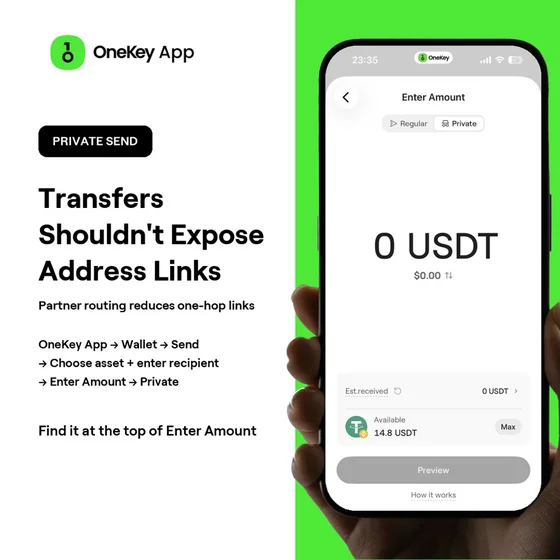 OneKey App Private Send amount entry screen
According to the current OneKey Private Send help page, the OneKey service fee is 0.85%, and routing slippage may also apply; most orders typically complete within 10–30 minutes, and orders involving BTC networks may take longer. Fees, available assets, limits, and times may all change with product and channel conditions, so when submitting, always rely on the actual quote shown in the App.
What Private Send can and cannot do
The value of Private Send is to reduce the most direct one-hop association between two self-custodial wallets. Suppose wallet A has long been used for public payments, while wallet B is used for more private savings. A standard A → B transfer connects the two directly; a supported Private Send route can reduce this most obvious on-chain relationship.
But it does not: delete wallet A's prior history; hide all on-chain transactions at both ends of the route; eliminate amount and timing patterns; prevent issuers from enforcing token-layer controls; prevent channel providers from retaining or reviewing orders under their policies; or guarantee that any address can never be associated. After using it, do not make a direct standard transfer from wallet B back to A, or you may re-expose the relationship you just tried to reduce.
If you need to exchange or bridge: use OneKey Privacy Mode
Privacy Mode is part of the exchange and cross-chain workflow on the Trade page. It applies to supported token exchanges and cross-chain transfers, and can also be used for same-chain, same-asset movement when a valid route exists. The correct entry point is:
- Tap Trade at the bottom.
- Go to Exchange & Cross-Chain at the top.
- Set the asset, network, and amount for From and To.
- Enable Privacy Mode.
- If you want another wallet to receive the result, enter a receiving address different from the source wallet.
- Compare channel providers and quotes, check the estimated amount to be received, fees, slippage, minimum and maximum amounts, and estimated transaction time, then tap Preview.
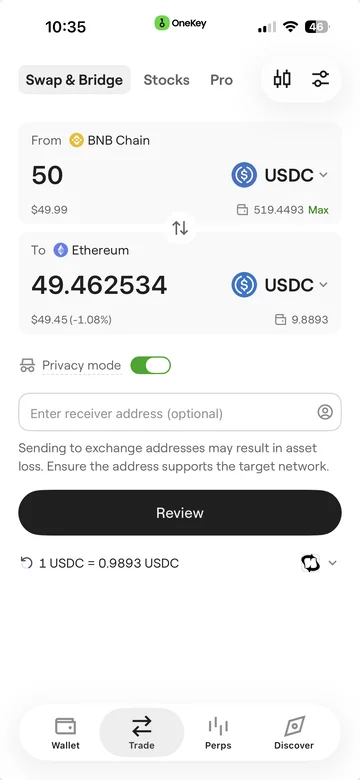 OneKey App Privacy Mode screen for swap and bridge
Privacy Mode's channel providers, fees, and routing conditions are based on each quote. Do not directly apply Private Send's 0.85% service fee to Privacy Mode. The OneKey Privacy Mode help page states that most transactions typically complete within 10–30 minutes, and BTC routes may take longer, but actual time still depends on on-chain confirmations, channel processing, and the route used for that transaction.
Private Send vs. Privacy Mode: full comparison
Issuer control limits for USDT and USDC do not disappear because of a wallet
Stablecoin privacy requires an additional understanding of the issuer layer. Circle's USDC terms reserve the right to block addresses from sending and receiving according to its policies, freeze USDC associated with blocked addresses, and freeze USDC or process related reserve assets when valid government orders are received. Tether's legal terms also reserve the right to freeze tokens, blacklist addresses, restrict services, or take other measures when required by applicable law, upon violation of the terms, or when it deems necessary.
This means:
- A self-custodial wallet lets you hold your own private keys, but that does not mean you can rewrite the stablecoin contract.
- Address separation can reduce public associations, but it cannot guarantee that an address will never be identified by an issuer, channel provider, or analytics firm.
- Private Send and Privacy Mode can change the on-chain path, but they cannot promise to bypass issuer measures, valid legal orders, or cooperating service providers' risk controls.
- The contract implementation and support status of USDC or USD₮ may differ across chains, so they should be understood according to the specific network and official terms, rather than indefinitely extrapolating one chain's behavior.
"Usually no KYC required" does not equal "never verified"
The OneKey official help page says the same for both privacy features: under normal circumstances, identity verification is usually not required, but the source of funds, address risk identification, cooperating service provider policies, or jurisdiction requirements may trigger KYC or other verification. Channel providers may also hold order, sending and receiving address, time, and processing status information.
Therefore, do not market "no-account entry" or "usually no KYC required" as complete anonymity. A more realistic expectation is: public on-chain observers will no longer easily see a direct transfer between the two wallets, but service providers involved in processing may still see business records and must comply with applicable laws and risk-control requirements. If you cannot accept possible delays, additional verification, or service restrictions, you should not submit large orders without understanding the rules.
How to handle three common scenarios
Scenario 1: Send Ethereum USDC from a daily wallet to another self-custodial wallet
If both wallets support the same Ethereum native USDC contract and the goal is simply wallet-to-wallet sending, tap Send on the asset page and select Private on the Enter Amount page. After checking the receiving address, Ethereum network, estimated amount to be received, and service fee, do a small test transfer first. Do not go to the Trade page looking for Privacy Mode.
Scenario 2: Exchange a stablecoin on one chain for USDC on another chain
This is a cross-chain or asset conversion, not a standard send. Go to Trade → Exchange & Cross-Chain, select the source asset, target network, and target USDC, enable Privacy Mode, enter a different receiving wallet, and rely on the live valid quote. If there is no route, stop; do not use an address on another chain directly for a standard send.
Scenario 3: Send from OneKey to an exchange deposit address
First check the exchange's deposit network, token contract, minimum deposit amount, and tag or Memo requirements, then see whether the OneKey page allows that type of address. A privacy route may not be suitable for an exchange deposit address; if the App shows a warning such as "sending to an exchange address may result in asset loss," stop and use a clearly supported deposit process instead. Even for a standard send, you must confirm that the exchange supports the network and contract.
Safety checklist before and after submitting
Before submitting, confirm each item:
- Is the goal a wallet transfer, or an exchange, cross-chain, or same-chain asset movement? Was the correct feature entry selected?
- Do the token name, network, contract, or Mint match the official information and the receiving end?
- Is the receiving address a self-custodial wallet that can receive the asset, rather than a mistakenly pasted contract, Mint, or unsupported exchange deposit address?
- Is the network Gas sufficient? Are the minimum or maximum amounts met? Is the final credited amount acceptable?
- Have the channel provider, service fee, estimated slippage, and estimated transaction time on the quote page been checked?
- Was a small test transfer performed first when using this network and asset combination for the first time?
- Have the order information, transaction hash, and receiving address been saved for inquiries in case of delays?
If the funds have not arrived after the estimated time shown on the page or after the one-hour example cited in the official help page, keep the transaction hash and contact the OneKey support team; do not provide your mnemonic phrase, private key, or hardware wallet PIN to anyone.
Conclusion
USDT and USDC can reduce the most direct on-chain association between two wallets through OneKey's supported privacy routes, but they remain issuer-issued stablecoins running on public networks. For wallet-to-wallet transfers only, use Private Send; for exchanges, cross-chain transfers, or same-chain asset movements on the trading page, use Privacy Mode.
A truly safe sequence of operations is not to pursue "anonymity" first, but to first confirm the feature entry, then verify the network, contract, and receiving address, check real-time fees and the final credited amount, and finally validate the entire path with a small test transfer. OneKey places self-custodial wallets, hardware signing, and two privacy workflows in the same product, making it suitable for users who want to reduce direct address exposure while managing multi-chain assets; however, public chain visibility, issuer control, and compliance review should still be treated as clear boundaries.
You can start with OneKey App, and before each submission, always refer to the real-time page in the App as the authoritative source.
References
- OneKey Help Center: Private Send (Private Send)
- OneKey Help Center: Privacy Mode (Privacy Mode)
- OneKey Help Center: OneKey App
- Circle: USDC Terms
- Circle Docs: USDC Contract Addresses
- Circle Docs: What is USDC?
- Tether: Legal Terms
- Tether: Supported Protocols and Integration Guidelines
- Tether: FAQs
- Ethereum.org: Transactions
- Solana Docs: Core Concepts
- Solana Docs: Verify Address
Risk Disclosure
This article is for general information and product education only and does not constitute investment, legal, tax, or compliance advice. Stablecoins, networks, channel providers, quotes, fees, limits, arrival times, and verification requirements may vary by region, asset, and market; on-chain transactions are generally irreversible. Before operating, please verify the latest information from OneKey App and the issuers, comply with local laws, and run a small test transfer first for significant amounts.
FAQ's
No. They are typically deployed on public blockchains, and the addresses, amounts, times, and token contract records associated with ordinary transfers can be queried using on-chain tools. OneKey's privacy features are used to reduce the most direct on-chain association between two wallets, without changing the public ledger nature of the stablecoin itself.
To send the same asset from one wallet to another, use “Wallet → Select Asset → Send → Fill in Receiving Address → Enter Amount → Private Send”. If you need to swap assets, bridge across chains, or use same-chain privacy routing on the Trade page, go to “Trade → Swap & Bridge” and enable “Privacy Mode”.
Not necessarily. The official explanation is that identity verification is generally not required under normal circumstances, but fund sources, address risk identification, partner service provider policies, or jurisdictional requirements may trigger KYC or other checks. You should retain transaction information and comply with local laws before submitting.
This cannot be guaranteed. Address isolation can reduce the direct link between public identity and asset accounts, but the issuer’s ability to take blocking, freezing, or blacklisting measures under its terms or valid legal orders comes from the token issuance and contract layer, and does not depend on which wallet you use.
You cannot just look at the token symbol. You must also verify the source network, target network, official contract or Mint, recipient support, and the valid routes in the App. A regular send will not automatically complete a cross-chain transfer; if cross-chain is needed, use a supported cross-chain path and make a small test transfer first.