Как участвовать в кампании Katana USDC Vault через OneKey App

Ключевые выводы
-
Кампания проходит с 1 по 30 сентября 2026 года (UTC) и предлагает APY 6%+, пока доступны стимулы.
-
Внесите vbUSDC в сети Katana через OneKey App в vault Morpho под управлением Steakhouse.
-
Управляйте DeFi-позицией и получайте доступные награды в $MORPHO или $KAT на странице Positions.
Кампания Katana USDC Vault проходит в OneKey App с 1 по 30 сентября 2026 года (UTC). Пока доступны стимулы, vault предлагает APY 6%+. Общий бюджет стимулов составляет 150 000 USD, выплачивается в $MORPHO или $KAT и уже включён в APY кампании. APY может меняться, поэтому перед депозитом проверяйте актуальные данные в OneKey App.
Кратко о кампании
- Период: 1–30 сентября 2026 года (UTC)
- Vault: Katana USDC Vault
- Актив для депозита: vbUSDC в сети Katana
- Протокол: Morpho
- Куратор vault: Steakhouse
- APY: 6%+, пока доступны стимулы
- Общий бюджет: 150 000 USD в $MORPHO или $KAT, включён в APY
- Путь: Discover → DeFi → Katana USDC Vault → Join
Для участия нужен vbUSDC в сети Katana. Для обмена, bridge, депозита и вывода может потребоваться gas, поэтому оставьте немного нативного токена соответствующей сети.
Шаг 1. Получите vbUSDC через swap или bridge
Если у вас ещё нет vbUSDC в Katana, откройте Trade → Swap & Bridge. Выберите исходный актив и сеть, укажите vbUSDC в Katana как актив назначения, проверьте котировку и подтвердите. Маршрут BNB Chain USDC → Katana vbUSDC на изображении приведён только как пример.
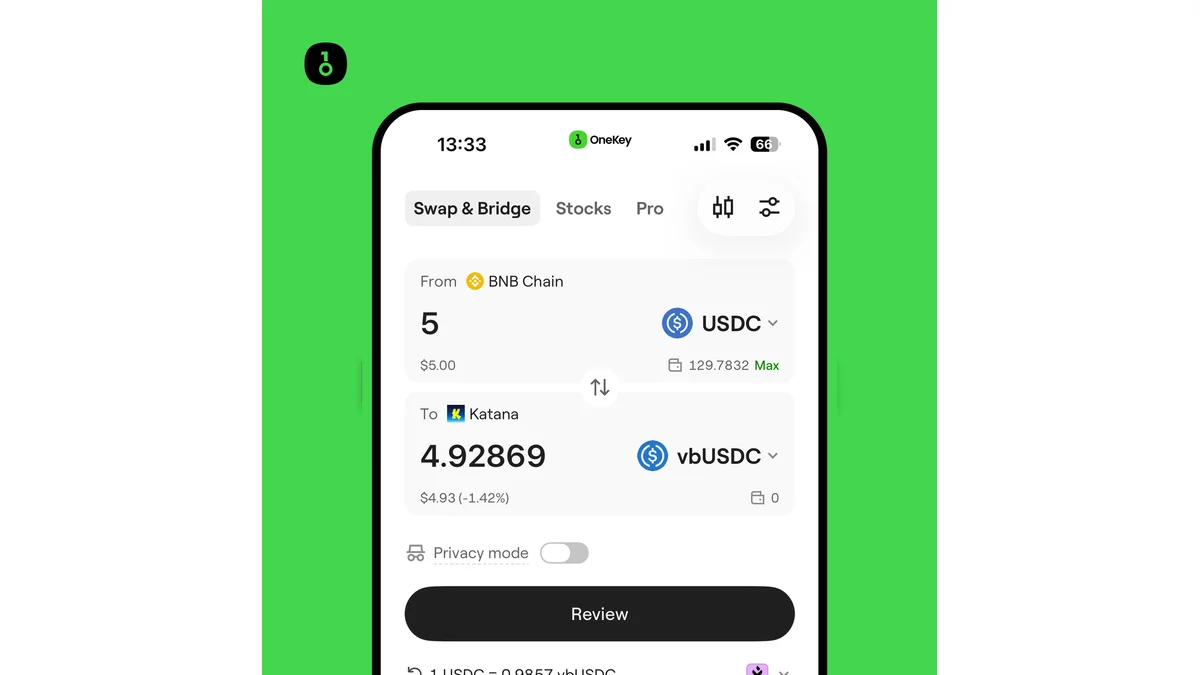 Шаг 1: обмен или bridge BNB Chain USDC в vbUSDC сети Katana в OneKey App.
Шаг 2. Найдите Katana USDC Vault
Нажмите Discover, перейдите в DeFi, затем нажмите Join на карточке кампании Katana USDC Vault.
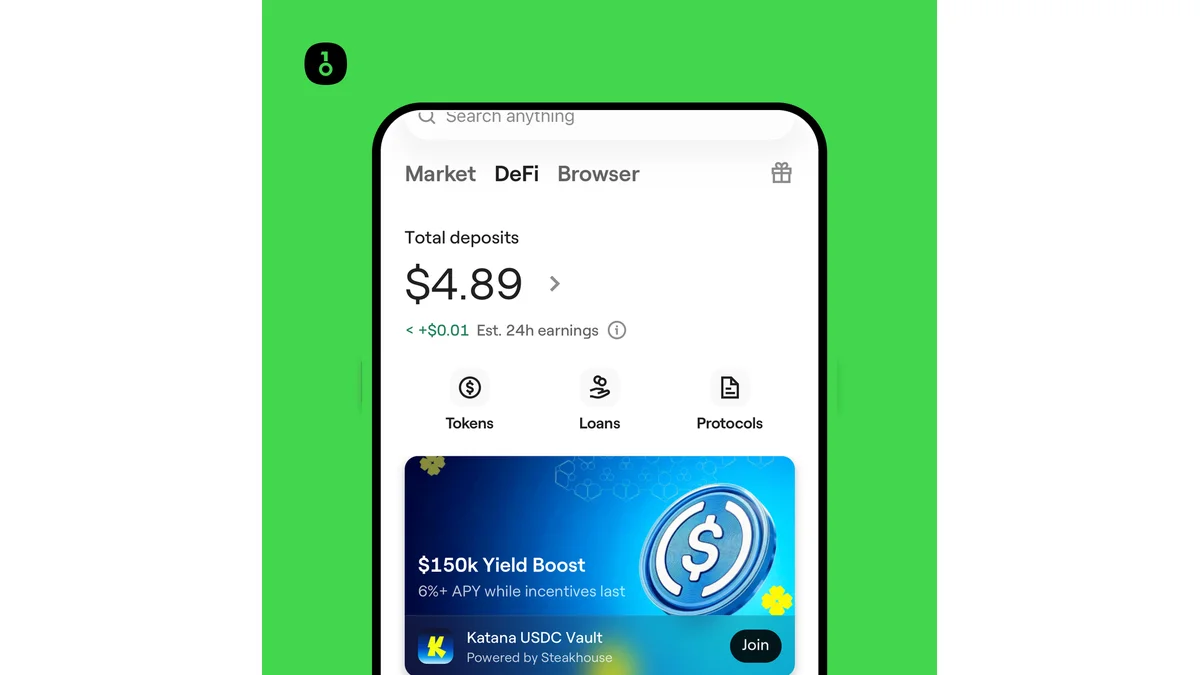 Шаг 2: открыть Discover, выбрать DeFi и перейти в кампанию Katana USDC Vault.
Шаг 3. Проверьте актуальные данные vault
На странице vault проверьте текущий APY, куратора, протокол, актив депозита и раздел Protocol Tips. На момент создания руководства отображалось 6,65% APY, но показатель меняется в зависимости от рынка и стимулов. Vault vbUSDC управляется Steakhouse и работает на Morpho.
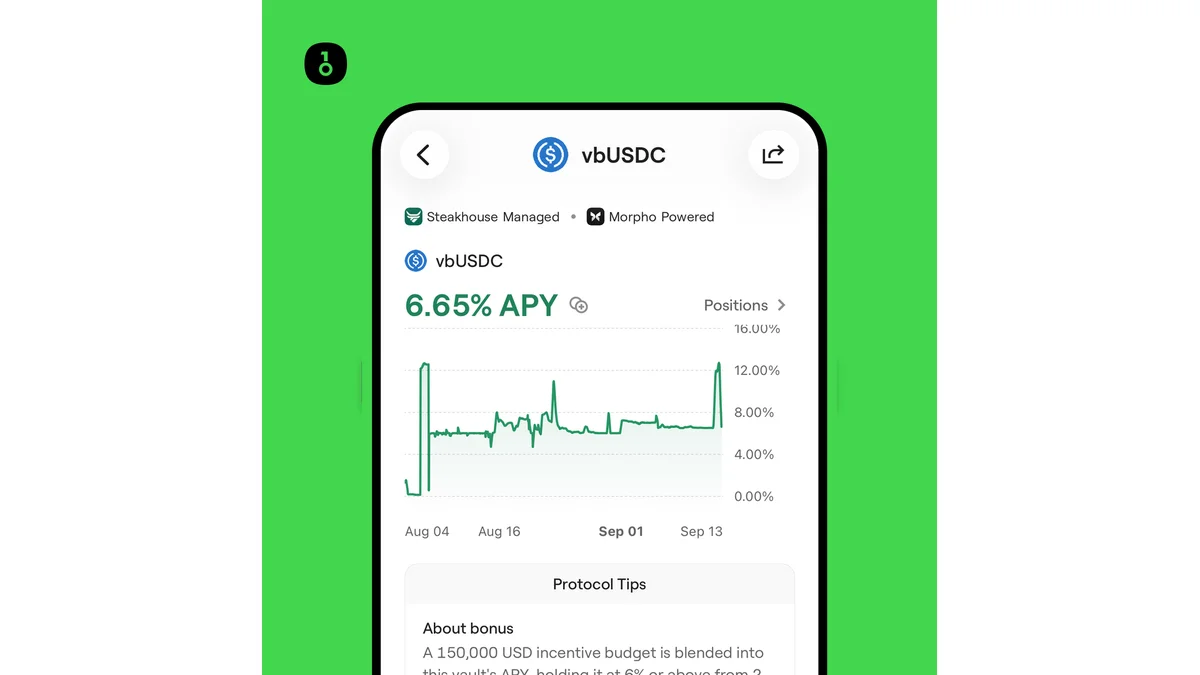 Шаг 3: проверить APY, куратора Steakhouse, протокол Morpho и условия кампании.
Шаг 4. Внесите vbUSDC
Нажмите Deposit, введите сумму и ещё раз проверьте актив, сеть, сумму и APY. Затем нажмите Approve and Deposit и подтвердите Permit и депозит в кошельке или на аппаратном устройстве.
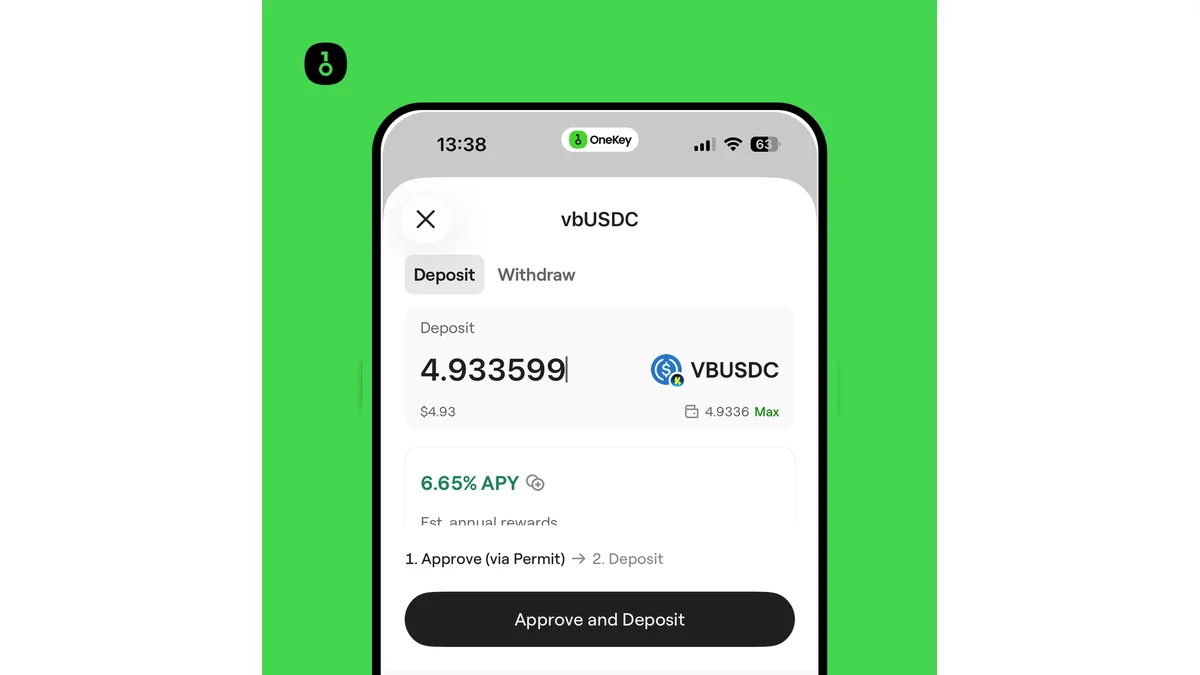 Шаг 4: указать сумму vbUSDC и подтвердить депозит в Katana USDC Vault.
Шаг 5. Управляйте DeFi-позицией и получайте награды
После подтверждения транзакции откройте Positions и убедитесь, что позиция Katana vbUSDC имеет статус Active. Здесь отображаются сумма депозита, ожидаемый доход, общий доход и доступные награды. Если награда доступна, нажмите Claim рядом с токеном.
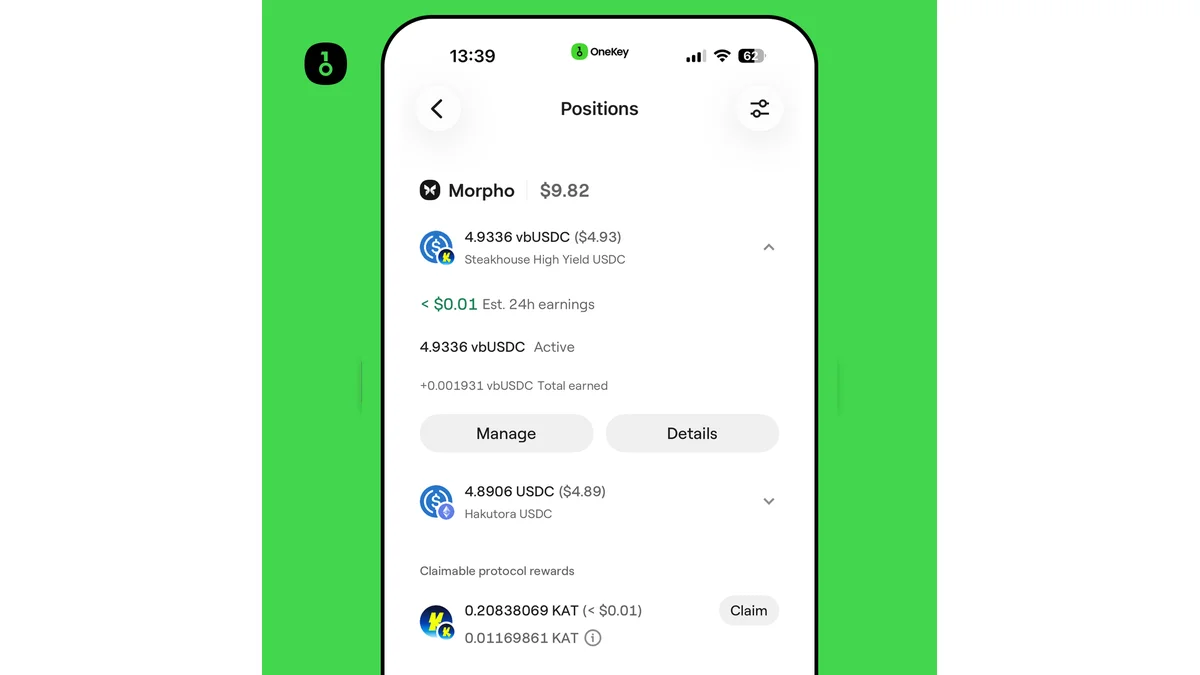 Шаг 5: проверить активную позицию Katana vbUSDC и получить доступные награды KAT.
Как работают награды
150 000 USD — это общий бюджет кампании, а не фиксированная награда для каждого участника. Стимулы выплачиваются в $MORPHO или $KAT и включаются в отображаемый APY. Ориентируйтесь на актуальную страницу кампании и окончательные условия в OneKey App.
Предупреждение о рисках
DeFi и cross-chain операции связаны с рисками smart-контрактов, bridge, сети, ликвидности и рынка. APY может меняться, а отображаемая доходность не гарантирует будущий результат. Проверяйте каждую транзакцию и держите достаточно средств для gas.
Источники
- Анонс кампании OneKey
- Введение в DeFi (Earn) в OneKey App
- Документация Katana Vault Bridge
- Условия протокола Katana
Часто задаваемые вопросы
С 1 по 30 сентября 2026 года (UTC). Актуальный статус смотрите на странице кампании в OneKey App.
vbUSDC в сети Katana. Если у вас его нет, используйте Trade → Swap & Bridge в OneKey App.
Нет. APY 6%+ действует, пока доступны стимулы, и может меняться в зависимости от рынка, доходности vault и остатка стимулов.
Общий бюджет 150 000 USD выплачивается в $MORPHO или $KAT и включён в APY. Доступные награды отображаются в Positions.
Да. Для swap, bridge, депозита, получения наград и вывода может потребоваться gas.