How to Send USDT Without TRX: TRC20 Energy Rental and OneKey Fee Subsidy Guide

Key Takeaways
-
When you have only USDT and no TRX, OneKey checks current resources; if a supported option appears on the confirmation page, you can follow the live prompt to pay for energy rental in USDT.
-
Energy rental is a paid resource service, while a free subsidy is a promotion with eligibility and limits. They are not the same.
-
If no official entry appears, do not pay an unfamiliar resource provider. Add a small amount of TRX or contact official support.
You may still be able to send TRC20 USDT without holding TRX by renting Energy. When you initiate a transaction, OneKey checks the available resources. If the feature is supported in your current app version and region, you can follow the prompt to pay the Energy cost in USDT. A free subsidy is a separate promotion with eligibility, frequency, and amount limits; neither option should be understood as permanently "fee-free."
Why USDT may be impossible to send even when you have a balance
USDT is a TRC20 contract token, so a transfer consumes both Energy and Bandwidth. The protocol does not automatically deduct its fee from your USDT balance; the traditional route burns TRX when resources are insufficient. An account that holds only USDT, with neither Energy nor TRX, therefore often gets stuck at the confirmation stage.
Energy rental temporarily delegates Energy from a resource provider to your address. When a wallet integrates this process, it can estimate the requirement and display a quote before signing. This does not turn USDT into TRON's native gas asset. You are using USDT to pay for a resource service, and the delegated Energy then powers the contract call.
How to do it in OneKey
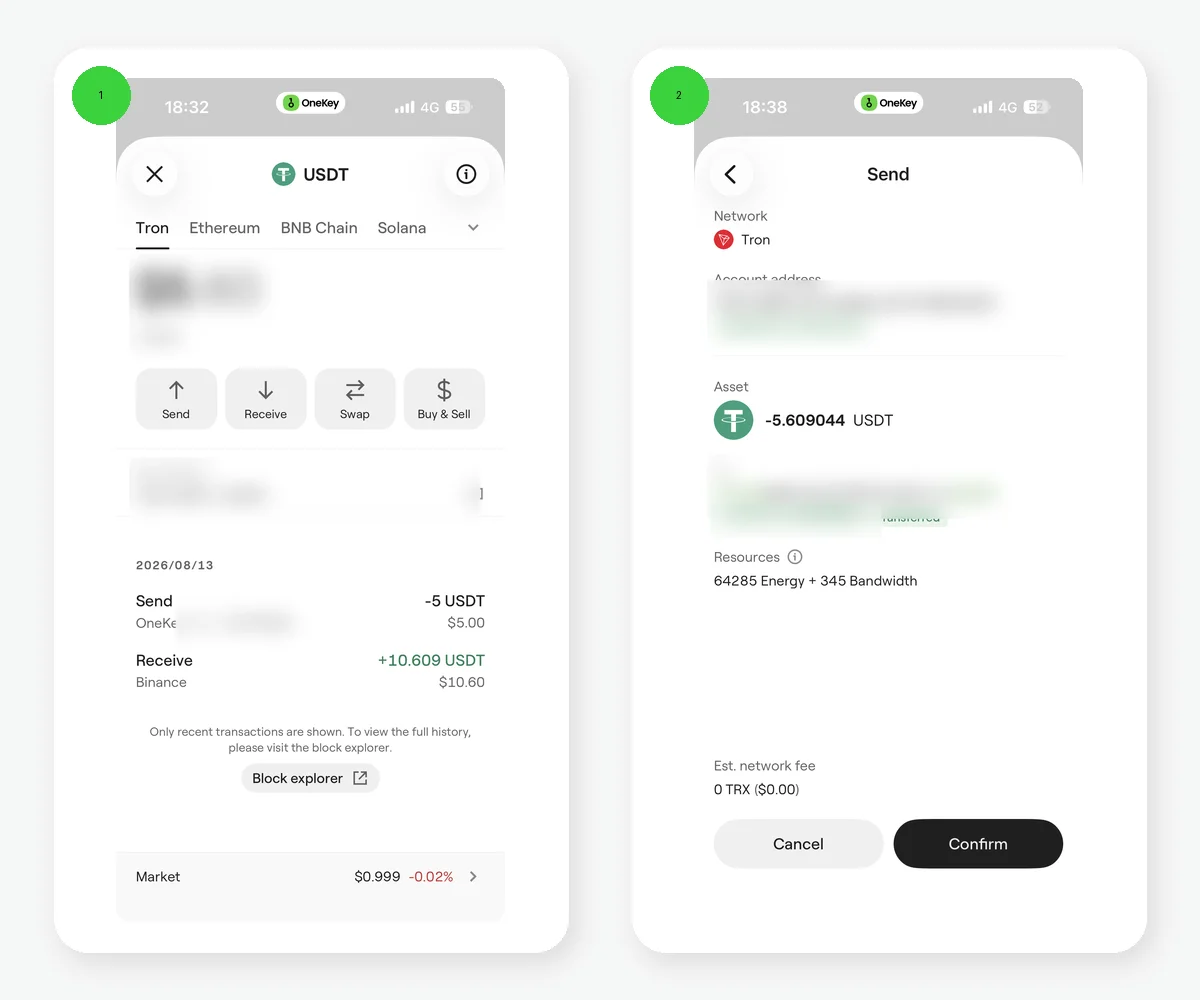 OneKey TRC20 USDT energy rental and discounted-send confirmation page
Test example: the confirmation page shows energy rental, a gas-subsidy label, estimated fees, and a discounted-send entry. It demonstrates that OneKey places resource options inside the transfer flow, but the current fee and eligibility are always determined by the live confirmation page.
- Update OneKey App through an official channel and switch to the TRON account.
- Select USDT and enter the recipient address and amount.
- Check Energy, Bandwidth, and the estimated fee on the confirmation page.
- If resources are insufficient, select energy rental or an eligible subsidy only if that option actually appears on the page.
- Recheck the payment asset, rental validity period, expected Energy, recipient address, and final fee before confirming.
- Save the TXID after broadcast and verify it on TRONSCAN if necessary.
If the page does not show the relevant entry, do not turn to an unfamiliar "energy support agent" in search results or transfer funds directly to an unknown address. You can add a small amount of TRX, wait for the official feature to become available again, or contact official OneKey support to confirm current availability.
How subsidies differ from rentals
A subsidy is normally a promotion that covers part of the resource cost and may have a daily pool, per-address frequency, account-activation, and per-transaction limits. The Help Center rules verified in 2026-08 set explicit quotas and eligibility conditions, and they may change at any time.
A rental is a paid service for temporary Energy. Its price and validity period come from the current quote. OneKey's advantage is that it places resource assessment and payment inside the send flow, reducing the need to copy an address to an unfamiliar off-wallet resource provider.
Which option fits your situation
- You send occasionally and the wallet holds only USDT: first see whether the app offers rental payment in USDT.
- You are eligible for a small-transfer subsidy: use the currently available subsidy only after checking that its cap covers the expected consumption.
- You transfer frequently and hold TRX long term: compare the total cost of staking for resources with repeated rentals.
- You must transfer urgently but the entry is unavailable: obtain a small amount of TRX through a trusted channel and make a small test first.
Why account activation can affect the process
Some current OneKey subsidy rules check the state of the TRON account. A new wallet can generate an address locally without that account already existing on-chain, while an activated account may still have no TRX. If a subsidy is unavailable, check on TRONSCAN whether the account exists and whether the resources arrived, then examine promotion eligibility instead of drawing a conclusion from the wallet balance alone.
What to check after a rental order completes
Confirm that the resource delegation is on-chain before sending the target USDT transaction. If the rental has an expiry, complete the transfer during that period. Changing the transaction may also change its actual Energy use. Save both the resource-order record and the USDT TXID so you can distinguish "the rental was paid but resources did not arrive" from "the resources arrived but the token transfer failed." In a wallet used by multiple collaborators, ensure that the payer and signer review the same fee and address information.
Risk Warning
Crypto transfers are generally irreversible. "Can send without TRX" does not mean every case is free, nor does it guarantee that every address qualifies for a subsidy. Promotion rules, rental quotes, and regional product support can change. This article was verified on 2026-08-13; use the live OneKey App and Help Center pages as the final authority.
References
- OneKey: TRON Energy and subsidy
- OneKey: Energy and Bandwidth on TRON
- TRON Resource Model
- OneKey: Send and receive assets
- TRONSCAN
FAQ's
Yes, when OneKey currently offers energy rental payable in USDT and the transaction meets its conditions. This does not mean the protocol accepts USDT as gas directly.
No. It has time, eligibility, frequency, and per-transaction limits, so always use the current rules.
Usually not. A rental has a validity period and resource amount defined by the current order.
Possible causes include account eligibility, the subsidy cap, the transaction’s actual Energy requirement, or insufficient Bandwidth. Check the confirmation-page details.
It creates phishing, wrong-address, and fraud risks. Prefer an integrated wallet flow or a verifiable official channel.