What Does a TRC20 Address Look Like? T-Prefix, USDT Contract, and Recipient Verification

Key Takeaways
-
A TRC20 recipient uses a TRON account address, normally beginning with T, but a valid format does not prove a trusted identity.
-
The official TRON USDT contract address identifies the token; it is not a normal recipient address.
-
Use OneKey’s preliminary address checks, address book, and hardware-screen verification together with independent confirmation and a small test.
To receive TRC20 USDT in OneKey, open USDT under your TRON account and copy the address from its Receive page. A common TRON Base58Check address contains 34 characters and begins with T, but a valid format does not prove the recipient's identity, the token's authenticity, or a network match. The recipient address belongs to a user account; the USDT contract address identifies the token. Never confuse the two.
Why TRON addresses begin with T
A TRON address is derived from a public key and displayed with a network prefix and checksum encoding. A wallet can generate an address locally, but generation does not mean the account is already activated on-chain. An account may be activated by receiving TRX or TRC10, or through a specific account-creation transaction. "Zero balance" and "not activated" are not the same state.
What is the official USDT contract address?
The TRON USDT contract listed on Tether's official Supported Protocols page is TR7NHqjeKQxGTCi8q8ZY4pL8otSzgjLj6t. This is the token contract—not a receiving account for your friend, a merchant, or an exchange. Anyone telling you to "send USDT to the official contract to activate your wallet" is presenting a major danger signal.
A fake token can copy the same name, ticker, and icon. At minimum, verify the network, full contract address, token decimals, and a trusted source. Do not visit an unfamiliar website because a surprise airdrop balance appeared in your wallet.
How to copy and verify an address in OneKey
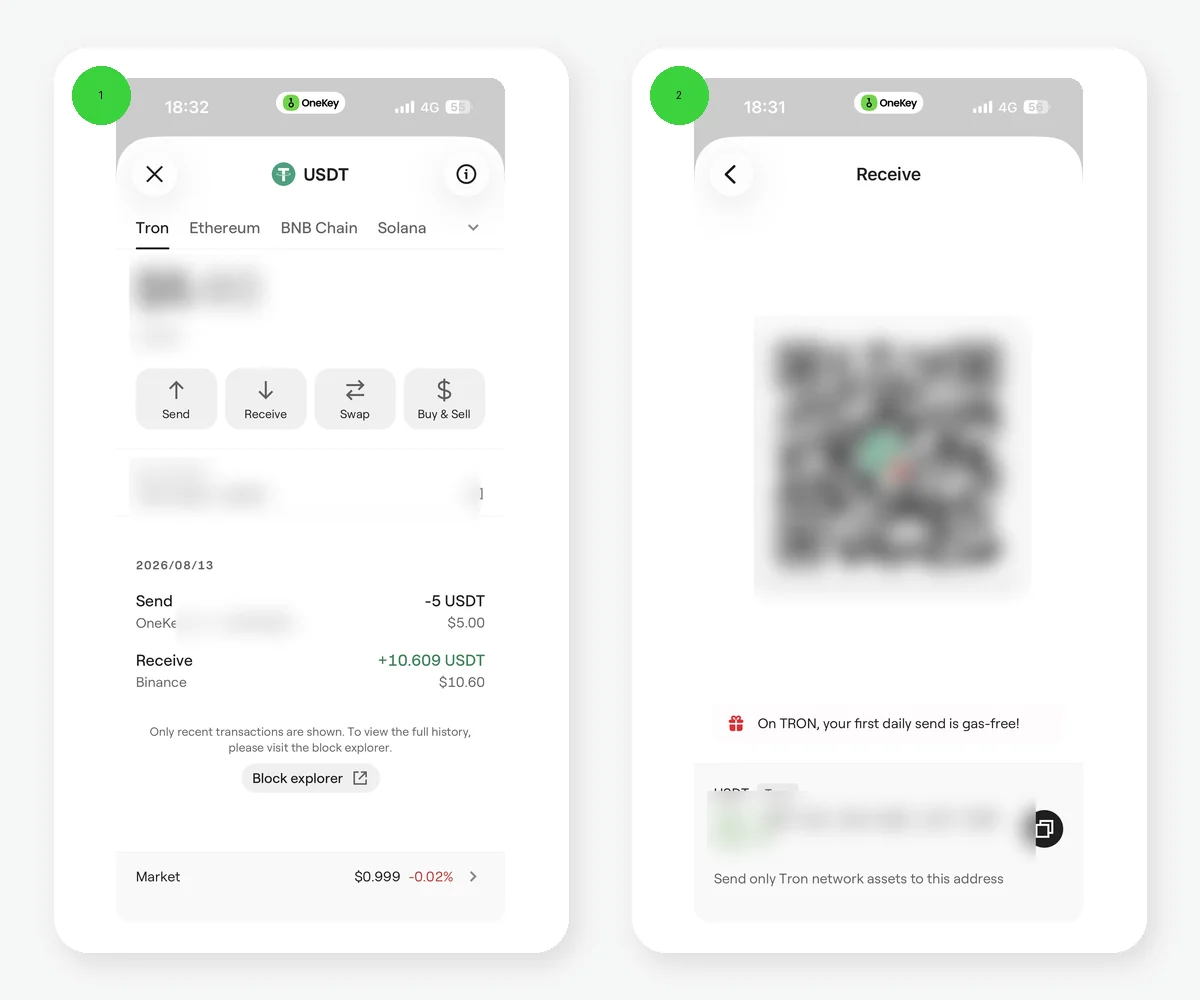 OneKey English TRON USDT recipient address and network pages
Figure 1: OneKey English TRON USDT Receive and multi-network pages, with the QR code, address, and balance redacted. A T prefix is only a format check; it cannot replace verification of the full address, asset, and network.
In OneKey, select the TRON account and USDT, then copy the address from the Receive page. When sending, OneKey performs preliminary address-format and security checks. You can use the address book for repeat recipients, and hardware-wallet users should recheck the address on the device screen. For an exchange withdrawal, select TRON/TRC20. When another wallet is sending, confirm that its sending network is also TRON. A QR code is only another representation of the address; after scanning, still check the address actually parsed on screen.
Five checks before a transfer
- Network: both sides use TRON/TRC20.
- Destination: you entered a recipient account, not the token contract.
- Full address: verify a new address through an independent channel instead of checking only the first and last four characters.
- Identity: zero-value or tiny address-poisoning transfers can imitate an entry in transaction history.
- Small test: send an affordable amount first and transfer the balance only after it arrives.
OneKey's preliminary address checks, address book, and hardware-screen verification help reduce operational errors, but they cannot verify the recipient's identity for you. If the pasted address differs from the original, stop immediately and inspect the security of the device.
Why checking only the first and last characters cannot stop address poisoning
An attacker can generate an address whose beginning and ending resemble a frequently used recipient, then insert it into transaction history through a zero-value or tiny transfer. Copying directly from history can send your funds to the attacker. When first creating a contact, verify the complete address in person, by voice, or through another trusted channel. Only then save it in the address book with the network clearly labeled. Repeat full verification whenever the address changes.
What else to check for an exchange deposit address
Some platforms update deposit addresses, suspend a network, or set a minimum credit amount. Before every large deposit, reopen the platform's deposit page and confirm the asset, network, address, and any extra requirements. TRC20 USDT does not use the common 0x address format of EVM networks. If the page shows multiple USDT networks, do not assume that the one used previously is still correct.
Can a public address be shared?
A recipient address can be public, but anyone can use it to inspect the on-chain transaction and balance history. For privacy or business separation, create distinct accounts for different purposes and label them internally. Sharing a public address is not the same as sharing a private key. Never send a recovery phrase, private key, or hardware recovery data to a payer.
An address checksum catches some input errors but cannot detect social engineering. Even if the wallet accepts the address, confirm that it comes from the intended recipient on the current network. For recurring merchant payments, save a verified address and require a second confirmation when it changes.
Risk Warning
Crypto transfers are generally irreversible, and TRON addresses do not include a traditional bank-style recipient-name check. This article provides format and safety education only and does not endorse the identity behind any address. Verify contract details against Tether's official page and current records on a trusted block explorer.
References
- TRON Account Model
- Tether Supported Protocols
- OneKey: Send and receive assets
- OneKey SignGuard and Clear Signing
- MetaMask: Address poisoning scams
- TRONSCAN
FAQ's
A common TRON Base58Check address contains 34 characters and begins with T. Copy it from the wallet instead of typing it manually.
It may be a TRON address, but you must still confirm that the recipient controls it, the platform supports TRC20, and the account state is suitable.
Do not treat the contract as a personal recipient. A direct transfer to the contract can result in lost assets.
Do not infer on-chain account state merely because an address can be generated. Check the account on TRONSCAN and make an affordable small test.
Compare the complete address after pasting, cross-check an independently verified address-book contact or QR code, and confirm a large transfer again on the hardware-device screen.