TRC20 Transfer Failed? Troubleshoot Low Energy, Inactive Accounts, and Contract Errors

Key Takeaways
-
Save the error in OneKey and distinguish not broadcast from on-chain Failed. You need a TXID to troubleshoot from the receipt.
-
OUT_OF_ENERGY can result from insufficient resources, changing actual consumption, or a fee limit that is too low.
-
A failed transaction may still consume resources. Fix the cause before retrying, and never give support your recovery phrase.
When a TRC20 transfer fails in OneKey, open the transaction details and save the TXID or complete error before doing anything else. Do not retry repeatedly. First distinguish "not broadcast" from Failed on TRONSCAN. If the on-chain receipt says Failed, the intended contract call normally did not complete, but consumed Bandwidth, Energy, or TRX may not be refunded. Use the receipt, Transfer records, and both parties' on-chain balances as the evidence.
Step 1: Check whether there is a TXID
Without a TXID, common causes include a canceled signature, node-submission failure, or a balance/resource precheck failure. Check OneKey's network connection, active account and asset, recipient-address format, available resources, and app version. Do not treat an app-level "request failed" message as a failed on-chain transaction.
With a TXID, inspect Result and Contract Result on TRONSCAN. If the result is Success but the receiving platform did not credit it, follow the missing-deposit process. Only Failed belongs on this troubleshooting path.
How to handle OUT_OF_ENERGY
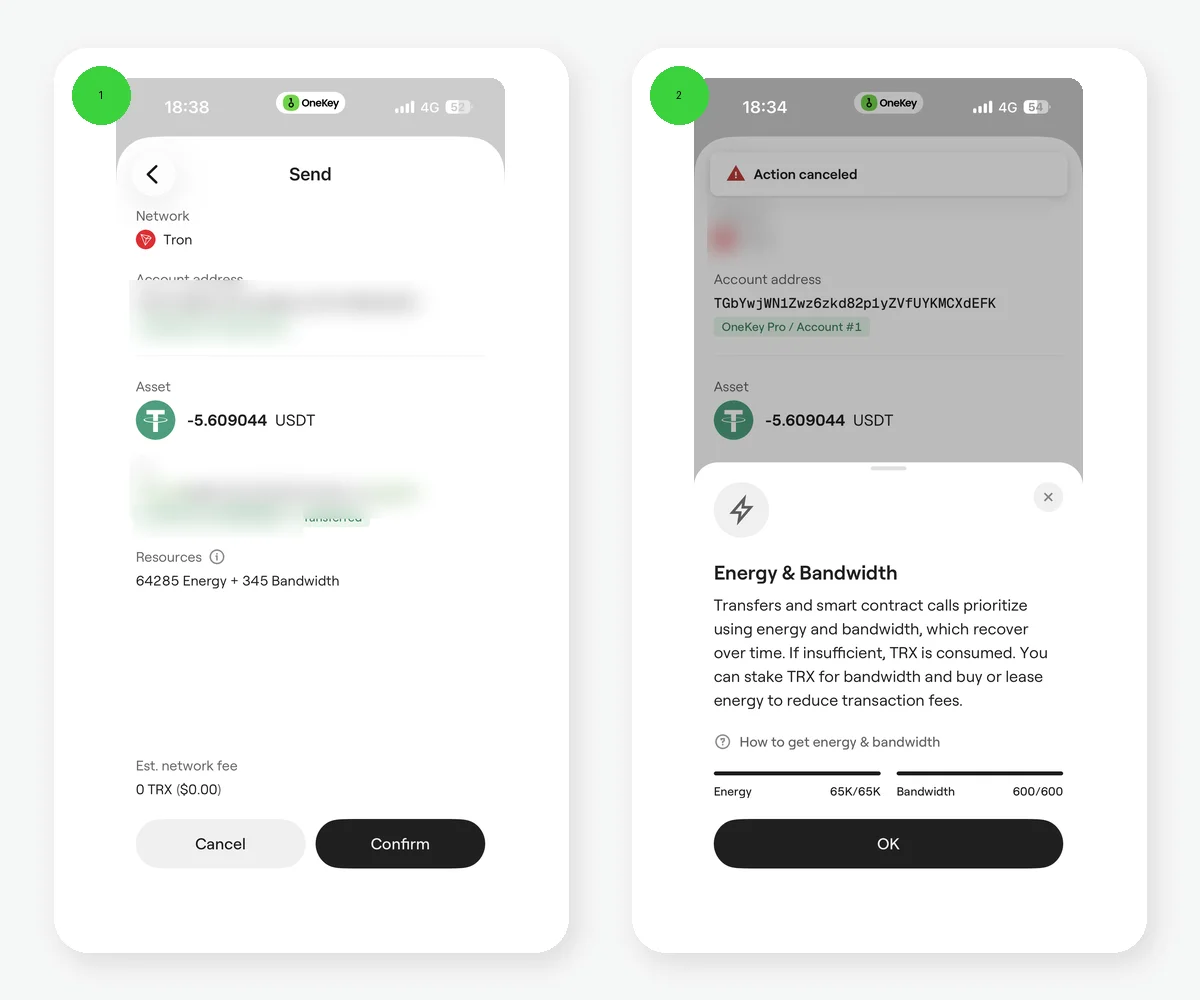 OneKey English TRON send confirmation and Energy/Bandwidth resource pages
Figure 1: OneKey English send confirmation and resource pages. The screenshot shows an estimate of 64,285 Energy and 345 Bandwidth and resource balances of 65K/65K Energy and 600/600 Bandwidth. These are live values from that moment; they do not prove that a paid rental succeeded and are not a fixed-consumption or permanent 0-fee promise.
OUT_OF_ENERGY means the Energy available or the permitted fee was insufficient during contract execution. The account may lack resources, a rental may have expired, actual execution may cost more than estimated, or fee_limit may be too low. Recheck resources and fees for the current transaction. Obtain enough Energy, prepare TRX that can cover the fee, or use a resource option actually offered on the current OneKey confirmation page, then create a new transaction.
fee_limit is the upper bound the transaction permits for fees, not a fixed charge, and raising it does not guarantee success. Do not copy a fixed Energy number from the internet. The resources a USDT contract call needs can vary with current chain parameters and the recipient account's state.
An inactive account is not the same as a zero balance
After a TRON address is generated locally, the account may still have no on-chain record. Account activation can involve extra resources or an account-creation cost. Conversely, an activated account can hold exactly zero TRX, and a recipient with zero USDT is not necessarily inactive. On TRONSCAN, inspect account existence, TRX balance, resources, and token balances separately.
Other common causes
- Wrong address or network: even a valid TRON-formatted address still requires confirmation that the receiving platform supports TRC20.
- Contract execution revert: the token's state, a freeze, or other contract conditions may reject execution.
- Fee limit too low: holding TRX does not mean the transaction is allowed to burn enough of it.
- Node or app state: an outdated app, node switch, or temporary network problem can affect prechecks and broadcast.
- Malicious token: a fake token named USDT may have abnormal contract logic. Do not approve more or follow an unfamiliar page to "unlock" it.
The troubleshooting order in OneKey
- Update OneKey App, open the failed transaction, and copy the TXID and error.
- On TRONSCAN, verify the official USDT contract, Result, Contract Result, resources, and fees.
- If resources are insufficient, use only an energy option currently offered on the confirmation page or obtain TRX through a trusted channel. Do not pay an unfamiliar "resource support agent" from search results.
- Fix the cause and run a new estimate before creating a new transaction. Do not rebroadcast the original operation repeatedly.
- If the result remains unexplained, contact official OneKey support and provide only the TXID, public address, error screenshot, and app version.
A recovery phrase, private key, verification code, or hardware-wallet recovery phrase is not troubleshooting information, and support should never request it.
How to prevent the same failure next time
Before fixing anything, record Energy Usage, Energy Fee, Bandwidth, and fee_limit for the failed transaction, then compare them with OneKey's live estimate for the new transaction. If you just rented resources, confirm that they were delegated to the sending address. In a multi-account wallet, it is easy to rent resources for a different TRON account. Re-estimate whenever you change the recipient or amount instead of reusing the previous result.
For a business payment process, add four checkpoints: precheck, small test, final transfer, and TXID recording. Require a second person to review the error code after a failure. This reduces blind retries and helps locate whether the problem is with resources, an address, a platform, or a contract.
Risk Warning
A failed transaction can still consume resources, and repeated retries can increase losses. Wallet support cannot rewrite an on-chain receipt, and this article does not guarantee recovery or compensation. For token freezes, receiving-platform restrictions, or contract anomalies, contact the issuer or platform that controls the relevant layer—and never surrender a recovery phrase or private key.
References
- TRONSCAN: Why did the transaction fail?
- TRON Resource Model
- TRON Account Model
- OneKey: TRON Energy options
- OneKey: Asset not received
FAQ's
If the on-chain receipt says Failed, check the Transfer records and both parties’ on-chain balances. The intended call may not have completed, but resources or TRX may already have been consumed.
Not necessarily. Also check the actual Energy requirement, fee_limit, account state, and contract receipt. You may instead obtain Energy through an option on the current OneKey confirmation page.
There is no fixed wait. First identify the cause, obtain sufficient resources or correct the parameters, and then create a new transaction.
Energy demand may be higher, the fee limit may be too low, the contract may revert, or the address/network may be wrong. Inspect the specific receipt.
Support can help explain the state but normally cannot rewrite an on-chain failure. Never provide a recovery phrase or private key.