What should I do if my TRON wallet is multisig? TRON permission checks and prevention of malicious multisig

Key Takeaways
-
The OneKey operations covered in this article refer to the OneKey App software wallet; the OneKey hardware wallet does not currently support TRON multisig.
-
A mnemonic only proves that you own a private key; whether you can transfer out is still determined by the current on-chain permission structure. If you see “balance visible but cannot transfer out,” first go to TRONSCAN to check control rights.
-
Airdrop, support, wallet activation, and low-price energy pages should never ask you to modify account permissions; if the signed content does not match what the page promised, cancel immediately.
Many people first encounter TRON permission issues because “the mnemonic is correct and the balance is visible, but assets cannot be transferred out.” This is not necessarily due to insufficient Gas or a wallet malfunction. TRON determines who can sign, how many votes are required, and what this set of signatures can do based on on-chain records. This article uses roles, control addresses, vote counts, approval conditions, and executable scope as a single “permission structure,” and will not repeatedly list the same fields later.
The OneKey operations covered in this article refer to the OneKey App software wallet, including viewing accounts, preparing transactions, connecting to Web3, and checking signature content. The OneKey hardware wallet does not currently support TRON multisig, so this article does not treat it as a TRON multisig signing solution. No matter which wallet you use, already effective on-chain permission changes are not revoked by re-importing the mnemonic phrase or reinstalling the app.
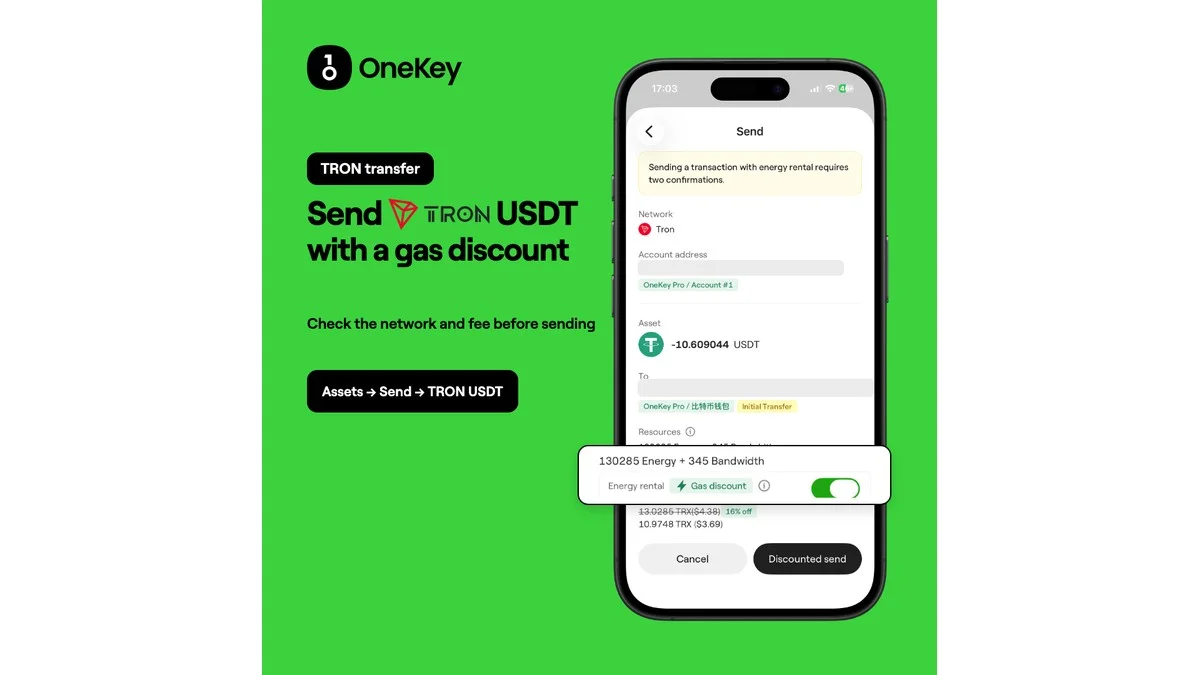 OneKey English poster: send TRON USDT with a gas discount
How OneKey helps reduce TRON permission and accidental-signature risks
Use the latest OneKey App to manage TRX, TRC20 USDT, and other multi-chain assets. After connecting a DApp or preparing a transaction, recheck the network, full address, amount, contract method, and fees on the App confirmation page; do not treat web pop-ups as the final authority.
OneKey official guidance states that SignGuard risk alerts cover major chains such as TRON and commonly used methods, and clear signatures also try to restore transaction details as accurately as possible. Complex calls may still not be fully parsed, so if you do not understand them, do not sign. If a page claims it is only claiming an airdrop, renting energy, or “repairing the wallet,” but the confirmation page shows AccountPermissionUpdateContract, permission updates, or adding new addresses, cancel immediately.
Treat Owner, Active, and multisig as one permission structure
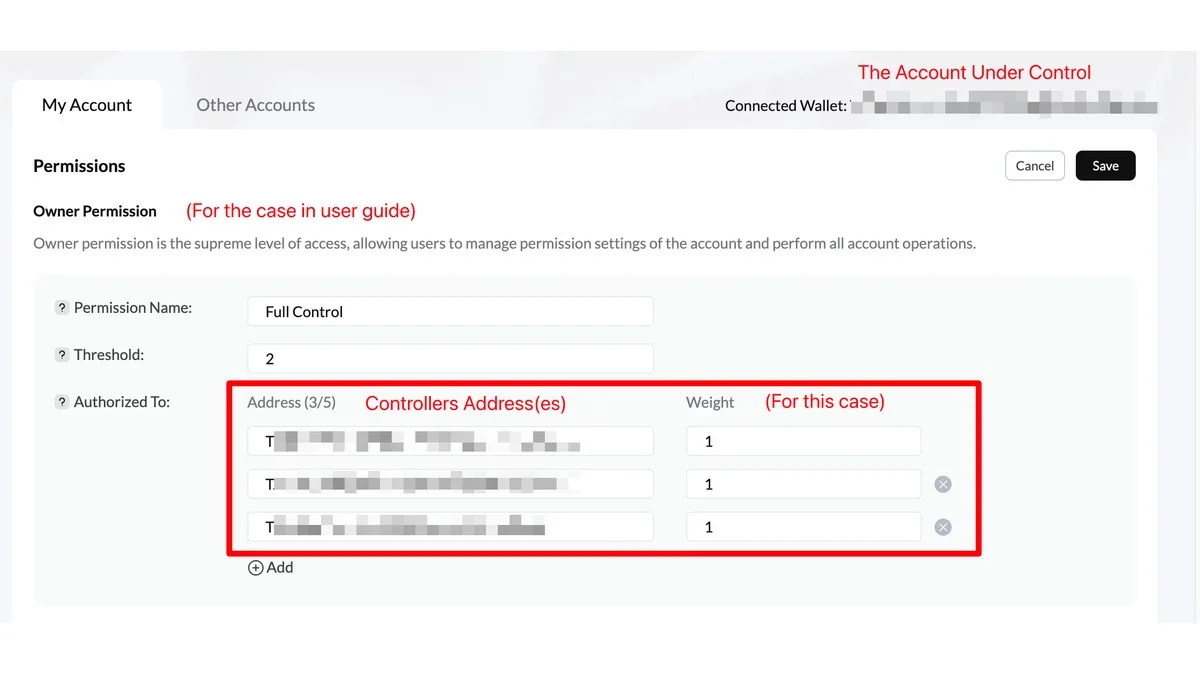 TRONSCAN Owner permission showing threshold 2 and three controller addresses with weight 1
TRON accounts have three types of roles:
- Owner is the highest management authority; it can execute all transactions and rewrite account permissions. A normal new account is usually controlled by a single address.
- Witness is used for block-signing by Super Representatives, and normal users rarely encounter it when transferring assets.
- Active is the routine authorization group. An account can set up to 8 groups, with up to 5 addresses per group, and restrict executable contract types via
operations.
Whether a transaction can pass depends on three things: which authorization group it declares to use (permission_id), whether this group allows the current action, and whether the collected valid votes have reached the approval threshold. In protocol fields, the vote count of a single address is called weight, and the approval threshold is called threshold.
For example, with three addresses each having 1 vote and the threshold set to 2, this is the common 2-of-3: any two approvals are enough. If the threshold is set to 1, compromise of a single device could result in assets being transferred out; if set to 3, the account may become inoperable if one person is unavailable.
TRC20 USDT transfers belong to TriggerSmartContract. A team can keep the highest management authority on a cold device, then give the payment team a smaller routine authorization group that only opens contract types needed for business. This enables daily payments while avoiding keeping highest permissions online all the time.
When modifying account permissions, the transaction overwrites the full set of permission slots at once. Even if changing only one item, other settings should be preserved completely. Do not copy unknown operations hexadecimal values from the internet, and do not experiment on the main account directly.
Check account control all at once on TRONSCAN
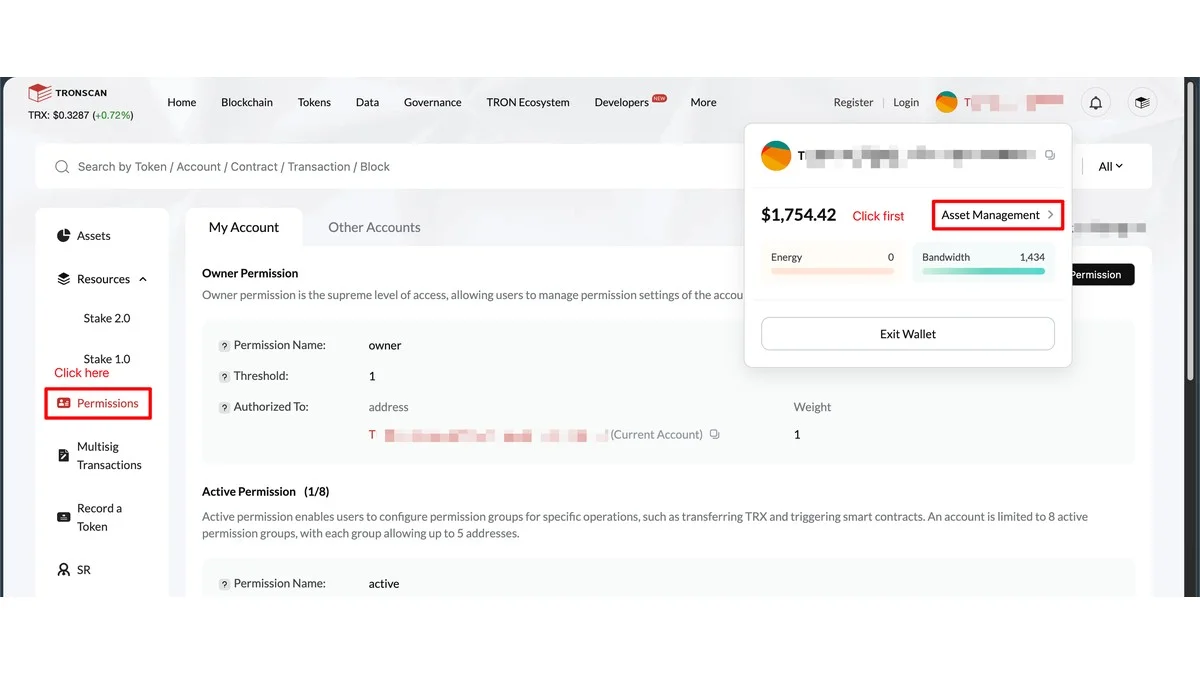 TRONSCAN official interface showing the Asset Management and Permissions entries
Open TRONSCAN and search for the full address. On the account’s Permissions page, check:
- Which full addresses currently control the highest management authority;
- How many votes each controlling address has, and what the approval condition is;
- Which transactions the routine authorization groups allow, and which
permission_idis currently in use; - Whether any
AccountPermissionUpdateContracttransactions have appeared recently.
Do not only look at the start and end of addresses. Address lookalikes and address poisoning exploit this habit to mislead users; you can cross-check full addresses using the method in What is a TRC20 address like?. Team accounts should also separately store signer identities, device ownership, and the latest change time.
When configuring 2-of-3 multisig, only grant necessary authorizations
- First define account usage. Long-term reserves, team treasury, and daily payments should not share the same operational scope.
- Have three signers use independent devices and independent backups to avoid concentrating keys on one computer or one cloud drive.
- Use a low-balance test account first to run through transaction creation, signature collection, broadcasting, and recovery workflows.
- Keep the highest management authority in stricter cold storage; routine authorizations should only enable actions truly needed for business.
- Simulate one signer being unreachable, device failure, and employee departure to confirm the remaining members can still complete recovery.
Multisig addresses single-point private key risk and does not automatically correct misconfigurations. Before going live, all signers should independently verify addresses and vote counts, and keep a configuration record that can be independently verified.
Three common scams: induced signatures, account lockout, and takeover then transfer
-
Fake airdrop, fake support, or low-price energy pages. TRON official security guides list fake token giveaways, impersonated support, phishing sites, and forced authorization as common schemes. The page starts with “claim,” “activate,” or “remove restrictions” to lower suspicion, then asks users to sign sensitive actions unrelated to the original promise. The only basis for judgment is the confirmation page: if it was supposed to be an airdrop claim but the page shows a transfer, unlimited approval, or account permission updates, exit immediately.
-
Make it look like the wallet still belongs to you. After permission changes, the original mnemonic can often still be imported and the balance displays as usual, but the address no longer has enough control votes. In January 2025, a user publicly reported in java-tron repository GitHub issue #6144 that multiple addresses first received 100 TRX, followed by an
AccountPermissionUpdateContracttransaction, and the account was changed to multisig status with about USD 220,000 of assets unable to be transferred out. Receiving 100 TRX itself does not transfer asset control; in the report, that incoming amount was used to pay for fees for subsequent permission updates, and the on-chain permission update submitted afterward was what actually changed control. This is a user self-report, not an official vulnerability finding, but it shows that “seeing the balance” does not prove the account is still under your control. -
Take control first, then move assets. On March 17, 2026, a community incident report on TRON DAO Forum listed one unauthorized permission update transaction and a follow-up transfer. The report says the attacker took over the address and moved about 22 million CORA, then exchanged it for about 39,700 TRX. This post also was community-submitted, but the public addresses and transaction hashes showed a typical sequence: change control first, then transfer, authorize, and swap.
The commonality of these three cases is not the bait wording, but that the final signed content is inconsistent with what the user originally intended to do. TRON official recommendations are to verify each item on the confirmation page, and pay special attention to permission changes, unlimited approvals, and unfamiliar recipient addresses.
20-second check before signing
- Clearly state what you intend to do: transfer, swap, stake, or modify account settings.
- Compare the network, full address, amount, contract method, and fees on the confirmation page; cancel if any item is inconsistent.
- Return to the OneKey App confirmation page and verify again, and do not treat a website pop-up, chat window, or customer support screenshot as final proof.
- If the transaction cannot be parsed, the prompt is vague, or an unfamiliar address appears, do not try to sign it “just once to check.”
What to do after finding account abnormalities
Stop new signatures, DApp connections, and remote assistance first. Save the TRONSCAN permissions page, abnormal transaction TXID, occurrence time, and related device information, then confirm whether you still retain valid control rights.
If legal signatures can still satisfy the current approval condition, you can redesign permissions based on TRON official documentation on a clean device and test with small amounts first; if needed, move assets to a newly generated wallet that has been securely backed up. If authorization can no longer pass, re-importing the mnemonic, reinstalling OneKey, or changing local passwords will not change the on-chain state. Do not pay unknown “recovery services,” and do not continue to attempt signing unclear transactions.
Fees and on-chain status
Permission updates and multisig transactions may incur separate fees, in addition to normal Bandwidth or Energy consumption. On-chain parameters may be adjusted by governance, and before submission you should follow the OneKey confirmation page, current TRON parameters, and final receipt as the standard.
For TRON USDT transfers that meet current campaign conditions, OneKey App may offer a transaction fee subsidy or energy leasing option on the confirmation page; whether it is available, subsidy quota, and charges beyond the quota are all subject to the App’s prompt and OneKey latest rules for that specific time.
References
- TRON: Account Permission Management
- TRON: Security & safety on TRON
- TRON: Transaction Signature Validation
- TRONSCAN: How to configure a TRON multisig account
- OneKey: What is multisignature
- OneKey: SignGuard and clear signature
- OneKey: TRON transfer subsidy and energy leasing
- OneKey: Official download
Risk notice
TRON permission update transactions cannot be revoked after confirmation. Misconfiguration, accidentally signing sensitive operations, or handing control rights to unfamiliar addresses may lead to theft of assets or permanently losing operational capability. This article is for security education and does not replace a security audit for a specific account. First test on a low-balance account, only use official channels of OneKey and TRON, and never reveal your mnemonic, private key, or verification code.
FAQ's
Owner is the highest management authority and can modify account settings; Active is a daily authorization group with restricted usage. Team accounts usually keep the former in stricter cold storage and use the latter for necessary daily operations.
Three signers each have 1 vote, and the threshold is 2; any two can agree to complete the transaction. Actual settings can assign different vote counts, but you should first verify that recovery is still possible if one signer becomes unavailable.
The address corresponding to the mnemonic may no longer have enough control votes. First go to TRONSCAN and check the Permissions page to confirm current controlling addresses and the authorization group used by the transaction.
No. Token approval usually allows a contract to spend a specific token; account permission updates change who can sign on behalf of the entire account. Revoking token approval cannot fix account control relationships that have already been rewritten.
Immediately stop signing and remote assistance, and keep evidence of the permissions page and abnormal transactions. If you still have valid control, create a new security configuration or transfer assets on a trusted device; if authorization has already been lost, do not continue using unfamiliar recovery websites.