What is the difference between Private Send and Privacy Mode? Entry, fees, and privacy boundaries
Key Takeaways
• When you only want to transfer assets to another wallet, use Private Send: Wallet → Select Asset → Send → Fill in the receiving address → Enter the amount → Privacy. • When you need to exchange, bridge across chains, or move assets on the same chain, use Privacy Mode: Trade → Exchange & Bridge → Privacy Mode; fees and routing are subject to the real-time quote at that time. • Both features are used to reduce the direct one-hop on-chain association between the sending wallet and the receiving wallet. They are not coin mixers, and they do not guarantee anonymity, untraceability, or that no KYC is required.
OneKey's Private Send and Privacy Mode are not the same feature. Private Send belongs to wallet transfers; the current mobile entry is "Wallet → Select Asset → Send → Enter Recipient Address → Enter Amount → Private". Privacy Mode is a trading feature; the entry is "Trade → Swap & Cross-Chain → Privacy Mode". The former is suitable for sending assets to another wallet, while the latter is suitable for swapping, cross-chain transfers, or same-chain asset movement. Both can reduce the most direct one-hop on-chain association between the source wallet and the destination wallet on supported routes, but neither is equivalent to anonymous transactions, nor are they coin mixers.
Bottom Line First: Choose the Entry Based on Your Task
Do not describe the two features as the same button or the same set of operations just because they both use privacy routes. The way to tell them apart is simple: initiated from the wallet asset page means Private Send; initiated from the Trade page means Privacy Mode.
Why Ordinary Transfers Expose Wallet Relationships
On Bitcoin, Ethereum, and most public blockchains, transaction records are queryable by default. Even if an address is not tied to a real name, block explorers can still show the sending address, receiving address, amount, time, transaction hash, and related contract events. Analysts can then combine address reuse, funding sources, Gas deposits, time patterns, amount patterns, public receiving addresses, and exchange deposit and withdrawal records to infer whether multiple addresses are controlled by the same person.
The easiest case to identify is when wallet A sends an ordinary transfer directly to wallet B. A clear one-hop relationship is left on-chain: A is the sender and B is the recipient. If B is subsequently used as a long-term savings wallet, a public receiving wallet, or another identity wallet, A's historical activity may be linked as well.
OneKey's two privacy features address this issue: through supported partner service providers and multi-step routing, they reduce the most direct public on-chain association between A and B. They do not stop the underlying blockchain from recording, nor do they erase all traces before and after the transfer. Understanding this is essential for correctly judging the value and boundaries of these features.
Private Send: For Wallet-to-Wallet Transfers
Private Send is suited to scenarios like this: you have already selected the asset to send in your wallet, and you already have a receiving address that differs from the sending wallet, and you want to complete a wallet-to-wallet transfer while avoiding a direct A → B ordinary transfer on the public ledger.
Current Mobile Entry
- Open OneKey App and go to "Wallet" at the bottom.
- Select the asset to send and the correct network.
- Tap "Send" and enter the recipient address; the recipient address should differ from the current sending wallet.
- Go to the "Enter Amount" page and select "Private" in the "Standard / Private" toggle at the top.
- Enter the amount, verify the "Estimated Receipt" against the available balance, then tap "Preview".
- On the quote or confirmation page, review the service provider, service fee, estimated routing slippage, minimum and maximum amounts, final credited amount, and estimated transaction time.
- Confirm only after checking everything; for first-time use or important assets, it is recommended to run a small test transfer first.
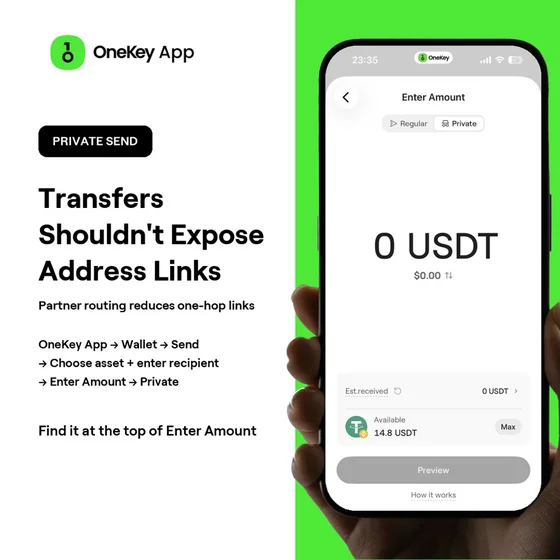 OneKey App Private Send amount entry screen
The "Standard / Private" toggle at the top of this amount page is the most direct way to identify Private Send in the current mobile app. It is not on the Trade page, nor is it the Privacy Mode switch in "Swap & Cross-Chain".
How Private Send Routes
According to the OneKey help center, funds first enter a receiving address provided by a partner service provider, then pass through multi-layer routing, which may use regulated centralized trading infrastructure as well as privacy networks such as Zcash and Monero, and finally reach the designated receiving address. The goal is to break the most obvious one-hop on-chain association between the source wallet and the destination wallet.
Routing through third parties does not mean third parties cannot see the order. Partner service providers may still retain transaction, risk control, and compliance records, and network observers may also make inferences based on amounts and timing. Therefore, a more accurate description is "reducing direct on-chain association" rather than "eliminating all records" or "complete anonymity".
Fees, Time, and Limits for Private Send
The current official help page lists the OneKey service fee as 0.85%, with possible additional routing slippage. The two are not the same cost: the service fee is charged according to product rules; routing slippage comes from multi-step processing, market prices, and liquidity, and the final credited amount is usually lower than the sent amount. Before you formally initiate the transfer, the quote page will show the service fee, estimated slippage, and final credited amount; the data displayed at the time of the order should prevail.
Most Private Send orders are usually completed within 10–30 minutes, and may take longer when the BTC network is involved. Different assets and routes may also set minimum and maximum amounts: when the amount is too small, network and routing costs may account for too high a share; when the amount is too large, liquidity and provider limits may affect the quote. Do not treat a limit you see once as a permanent rule; always follow the current prompts in the App.
If an order exceeds the estimated time on the page, especially if it has not arrived after more than an hour, keep the transaction hash, order information, and destination address, and contact OneKey support. Do not make another payment to an unfamiliar address to "speed things up," and do not enter your seed phrase or private key on websites of unknown origin.
Privacy Mode: For Swaps, Cross-Chain, and Supported Same-Chain Movements
Privacy Mode is suitable when you need to change assets, change networks, or use a currently supported same-chain route. It is part of the OneKey App transaction flow, not the "Normal / Private" toggle in the wallet asset sending flow.
Current entry (Chinese UI)
- Open OneKey App and tap "Trade" at the bottom.
- Go to "Swap & Cross-Chain" at the top.
- Select the "From" asset and network, and the "To" asset and network.
- Turn on "Privacy Mode".
- If you want the result to arrive at another wallet, enter a receiving address different from the sending wallet.
- Expand the provider or quote information, and check routing, exchange rate, fees, estimated receipt, minimum and maximum amounts, and estimated transaction time.
- Go to preview and re-check the asset, network, and receiving address, then confirm the transaction.
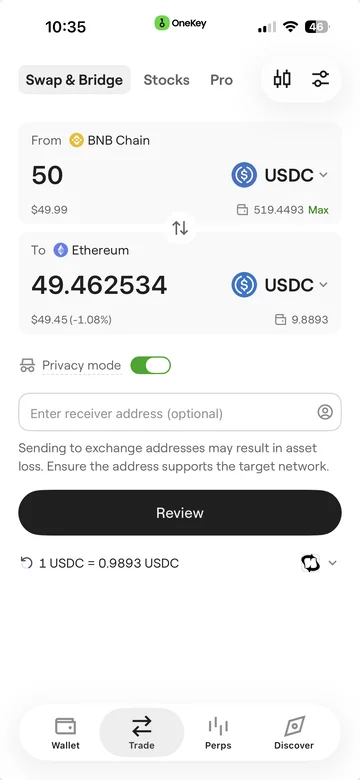 OneKey App Privacy Mode screen for swap and bridge
Which same-chain, swap, and cross-chain combinations Privacy Mode can cover changes with network, assets, liquidity, providers, and region. If the page does not show a switch, a valid quote, or indicates the amount is outside the range, treat that route as currently unavailable and do not assume the underlying chain necessarily supports it.
Privacy Mode pricing cannot be equated with Private Send fees
The total cost of Privacy Mode comes from the real-time quote for a specific swap or cross-chain order, which may include network fees, provider fees, swap spread, cross-chain costs, and routing slippage. Private Send's 0.85% OneKey service fee cannot be stated as a fixed rate for Privacy Mode. When comparing routes, look at the final estimated arrival amount, not just a single fee field.
Similarly, Privacy Mode processing time depends on the source chain, destination chain, asset, and route. The common range given on the OneKey Privacy Mode help page is also 10–30 minutes, and may be longer when BTC is involved; actual orders still follow what the App displays.
Core differences between the two features
This table also explains why the operating guides must be separated. Writing "go to the Trade page" into a Private Send guide will take users to the wrong entry; describing the "Normal / Private" toggle on the amount page as Privacy Mode will also confuse the product.
What the two features can and cannot protect
Risks they can reduce
- Reduce the most visible one-hop public on-chain relationship between the sending wallet and the receiving wallet.
- Avoid using a normal transfer to directly expose the connection between a daily-use wallet and a savings wallet.
- Combine asset conversion and address separation into one set of operations in supported swap or cross-chain scenarios.
- Let users see the provider, quote, estimated slippage, arrival amount, and time before confirming, instead of sending blindly.
Risks they cannot eliminate
- No guarantee of anonymity: time, amounts, network activity, public identity, and subsequent fund flows may still be analyzed.
- Cannot erase provider records: providers involved in routing may retain order, risk control, and compliance information.
- Cannot fix address reuse: if the receiving address has already been exposed, or later makes a normal transfer with the source wallet, the association may reappear.
- Cannot hide the source of Gas: if a new wallet receives Gas directly from an old wallet, an on-chain association may still form.
- Cannot bypass issuer controls: issued assets such as USDT and USDC remain subject to smart contracts, freezes, blacklists, and issuer terms.
- Cannot replace device security: privacy routing does not protect leaked seed phrases, tampered devices, or malicious contracts you wrongly approved.
Therefore, Private Send and Privacy Mode address only part of the "public address relationship." They are not a universal solution covering private key security, node privacy, protocol privacy, and identity privacy.
They are not coin mixers and are not intended to evade regulation
OneKey's official help documentation clearly distinguishes privacy features from on-chain coin mixing. Both features route through cooperating service providers, centralized exchange infrastructure, and potentially involved privacy networks; they do not put funds into a public on-chain mixing pool. Participants are screened based on applicable law, service provider policies, source of funds, and risk identification results.
"Usually no KYC required" cannot be written as "guaranteed no KYC required." Normal orders may not require identity verification, but the source of funds, address risk, amount, region, or service provider rules may trigger additional checks. If a check occurs, handle it through OneKey official support channels; do not trust anyone who asks you to submit seed phrases, private keys, or remote control of your device.
Using the Right Addresses Makes Privacy Routing Meaningful
Before using any feature, it is recommended to separate wallet roles:
- Everyday interaction wallet: Used for DApps, frequent swaps, and small payments; not an entry point for long-term savings.
- Public receiving wallet: Used for publicly displayed addresses or receiving public income; by default, treat it as linkable to your identity.
- Long-term savings wallet: Minimize interaction with public identity and high-frequency DApps; prioritize hardware wallet signing for important assets.
- Gas wallet: To reduce address linkage, avoid always funding all new wallets from the same known address.
The receiving address must be different from the sending wallet, but a "different address" alone is not enough. If two addresses come from the same publicly known account, repeatedly move the same amount at similar times, or later transfer directly to each other, analysts may still be able to draw inferences. Privacy features should be used together with address isolation, small test transactions, hardware signing, and careful public identity management.
Pre-Send Checklist
- Confirm the task: Is it a wallet transfer, or a swap/cross-chain? Choose Private Send or Privacy Mode accordingly.
- Confirm the asset and network: Assets with the same name may exist on multiple chains; selecting the wrong network may result in the transfer not arriving.
- Confirm the receiving address: Use an address different from the sending wallet; for assets such as XRP and XLM, also verify Memo or Tag requirements.
- Confirm the quote: Check the service provider, fees, estimated slippage, minimum and maximum amounts, final received amount, and time.
- Confirm privacy expectations: The goal is to reduce direct one-hop linkage, not to pursue "no records" or bypass compliance checks.
- Test with a small amount first: After confirming the route, address, and arrival status, handle larger amounts.
- Keep records: Save the transaction hash and order information so you can contact official support if it times out.
How to Choose in Common Scenarios
Transfer from an everyday wallet to a long-term savings wallet
If the asset and network are supported, prefer using Private Send from the wallet send flow. Do not first connect the two wallets with a normal transfer and then expect later routing to delete the historical relationship. If the long-term savings wallet is connected to a OneKey hardware wallet, also verify the address and amount on the device screen; hardware signing protects private keys, while Private Send handles address relationships — they solve different problems.
Swap USDC on BNB Chain to Ethereum
This is a cross-chain task. Go to "Trade → Swap & Cross-chain", select the source and target networks, then enable Privacy Mode. Check the final estimated receipt, channel providers, and time; do not apply the fixed service fee description of Private Send.
Move stablecoins to another address on the same chain
First check whether Privacy Mode provides a valid quote for that same-chain, same-coin combination. If you initiate the send from the wallet asset page, also check whether Private Send supports the current asset. The two entry points may lead to similar outcomes, but they are different order types; ultimately choose based on the entry, quote, and limits provided in the App at the time.
No privacy entry or quote on the page
This usually means that the version, platform, region, network, asset, amount, or service provider conditions are currently not met. First upgrade to the latest official version, then verify the asset and network. If it is still unavailable, do not force mimic routing through unofficial tools.
References
- OneKey Help Center: Private Send (Private Send)
- OneKey Help Center: Private Send
- OneKey Help Center: Privacy Mode (Privacy Mode)
- OneKey Help Center: Privacy Mode
- OneKey App v6.4.0 Release Notes
- OneKey Help Center: Quick Start OneKey App
- OneKey Help Center: Security Features of OneKey App
- OneKey: Security and Open Source
- Bitcoin.org: Protecting Your Privacy
- Ethereum.org: Ethereum Privacy
Risk Disclosure
This article is for product explanation and general privacy education and does not constitute investment, legal, tax, or compliance advice. Private Send and Privacy Mode do not guarantee anonymity, untraceability, that no KYC will ever be required, or that funds will always arrive. Feature availability, channel providers, quotes, service fees, routing slippage, limits, and processing time may vary due to version, platform, region, asset, network, liquidity, source of funds, and compliance requirements. Please refer to the current page in OneKey App and the official Help Center, verify the network and address first, perform a small test transaction, and comply with local laws and regulations.
FAQ's
No. Private Send belongs to the wallet asset sending flow, with its entry point in the "Normal / Private" toggle at the top of the "Enter Amount" page; Privacy Mode belongs to the "Trade → Exchange & Cross-Chain" flow. Both can reduce direct one-hop on-chain association, but they differ in task, entry point, and fee definitions.
On the current mobile app, go to 'Wallet', select an asset, tap 'Send', enter the recipient address, then on the 'Enter Amount' page, tap 'Privacy' at the top. Do not look for Private Send on the transaction page.
No. According to the official statement from OneKey, the two features reduce direct on-chain associations between wallets through partner service providers and supported routes. They do not use on-chain coin mixing pools, nor are they intended to circumvent regulation. Service providers still perform risk control and compliance checks.
They are different. Private Send currently lists a 0.85% OneKey service fee, and there may also be routing slippage; Privacy Mode is calculated based on real-time quotes for the specific swap or cross-chain order. Before confirming, you should compare the final estimated amount to be received.
Not necessarily. Under normal circumstances, identity verification is usually not required, but fund source, address risk, amount, jurisdiction, or cooperating service provider rules may trigger KYC or other checks. If a check occurs, contact OneKey official support with the transaction hash.