How to Withdraw USDT from an Exchange to OneKey: TRC20 Address, Network, and Tracking

Key Takeaways
-
In OneKey, use the USDT receiving address under TRON; on the exchange, select both USDT and TRON/TRC20.
-
Send a small test when using a new platform, address, or network, and distinguish the platform withdrawal fee from on-chain resource costs.
-
Contact the exchange when there is no TXID. Once a TXID exists, query it on TRONSCAN and troubleshoot according to the on-chain status.
To withdraw USDT purchased on an exchange to OneKey, the asset, withdrawal network, and receiving network must all match. This guide covers only the route for withdrawing USDT to OneKey over TRON/TRC20.
Step 1: Prepare a TRON receiving address in OneKey
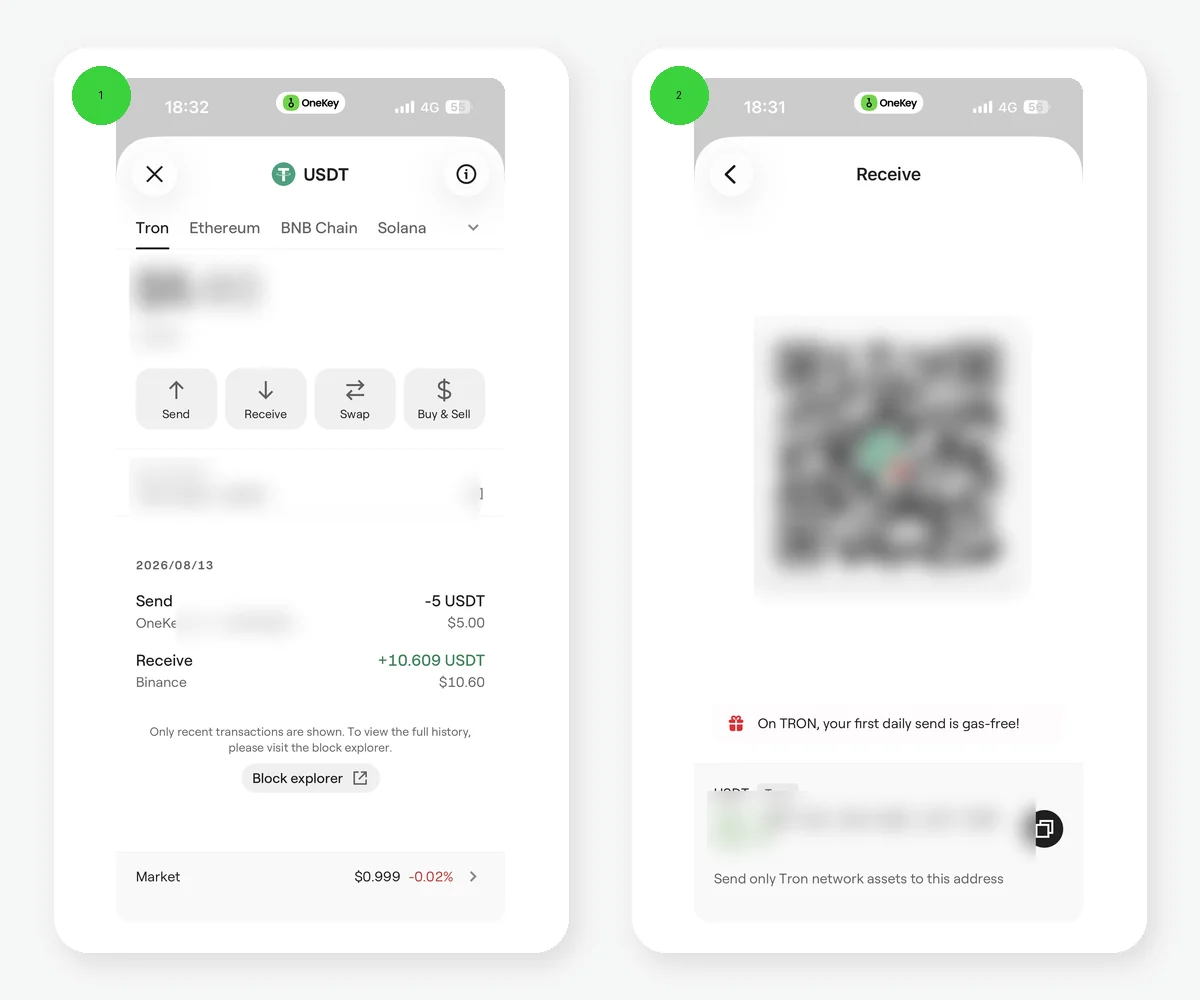 OneKey English TRON USDT receiving page and USDT network selection
Figure 1: The OneKey English TRON USDT receiving page and the USDT multi-network page. The QR code, address, and balance have been redacted for privacy. The exchange withdrawal network must still match the receiving network in OneKey.
Install the app from an official OneKey channel, create or import a wallet, and complete the appropriate backup. In OneKey, select the TRON network or the corresponding TRON account, open USDT, and tap Receive. Copy the full address. TRON addresses normally begin with T, but the first character is only a preliminary check and cannot replace network verification.
If you use a OneKey hardware account, follow the app and device prompts to verify the receiving address on the hardware screen. Before a large transfer, compare the entire address through another trusted channel to guard against clipboard replacement.
Step 2: Enter the withdrawal details on the exchange
Open the exchange withdrawal page and check each item in order:
- Select USDT as the asset.
- Select TRON or TRC20 as the network.
- Paste the TRON address copied from OneKey.
- Review the platform's minimum withdrawal, withdrawal fee, and estimated payout.
- If the platform asks for a tag or memo, confirm whether it actually applies to TRON USDT instead of filling it in from memory.
The "withdrawal fee" shown by an exchange is set by the platform and is not the same as the actual resources consumed on TRON. Do not switch to ERC20, BEP20, or another network solely because its fee appears lower unless you have explicitly prepared a receiving address on that same network in OneKey.
Step 3: Send a small test first
The first time you use a platform, address, or network, withdraw an amount above the platform minimum but still small enough for you to afford as a test. Confirm that OneKey displays the deposit on TRON before sending a larger amount. The test still incurs the platform fee, so choose an amount that balances verification with cost.
Step 4: Track progress with the TXID
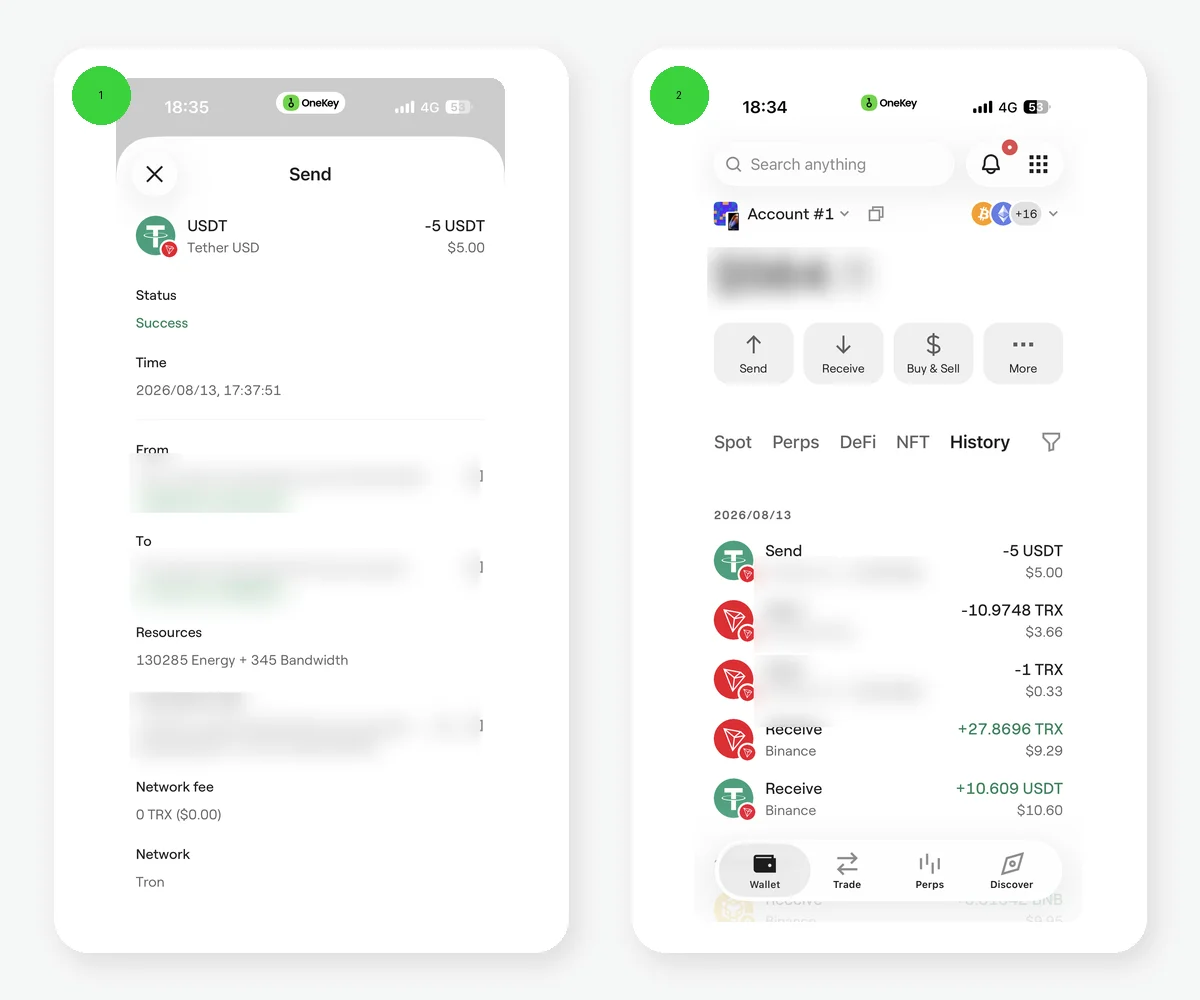 OneKey English TRON transaction history and successful transaction details
Figure 2: An example of OneKey English transaction history and a Success status. History helps you locate a transaction. Copy the complete TXID from the transaction details and verify it on the relevant block explorer.
After you submit the withdrawal, the exchange may first show it as under review or processing. A TXID is created only after the platform broadcasts the transaction on-chain.
- No TXID: the transaction is still being handled inside the platform; contact the exchange first.
- TXID and Pending: wait for the network to process it and refresh later.
- TXID and Success: the on-chain transaction succeeded; then check the active network and USDT display in OneKey.
- TXID and Failed: the transaction did not execute successfully; follow the exchange and on-chain status when troubleshooting.
You can query a TRON transaction by TXID on TRONSCAN. Never give your recovery phrase to anyone claiming they can "speed up" the deposit.
What you need before sending the funds out again
The exchange that sends the USDT normally handles the resource cost for this incoming transfer. Later, sending TRC20 USDT from OneKey invokes a contract and consumes Bandwidth and Energy. An externally owned account currently receives 600 free Bandwidth each day but no free Energy. When resources are insufficient, the network may burn TRX, or you may use a currently available option shown by OneKey. This does not affect the incoming deposit, but it matters when preparing to send the funds later.
Risk Warning
On-chain withdrawals are generally irreversible. Selecting the wrong network, using an address altered by malware, or sending to a network the platform does not support may prevent automatic crediting. A small test cannot remove every risk. Recheck the asset, network, full address, fee, and TXID every time.
References
- OneKey: Deposits and network verification
- OneKey: Send and receive crypto assets
- OneKey: Asset not received
- Tether Supported Protocols
- TRON Resource Model
- TRONSCAN
FAQ's
For the route in this guide, select TRON/TRC20 on the exchange and use a TRON receiving address in OneKey.
TRON addresses normally start with T, but you must still verify the full address and network rather than checking only the first character.
Get the TXID and verify it on TRONSCAN. If it succeeded on-chain, then check the active network and USDT display in OneKey.
The transaction may not have been broadcast on-chain yet. Check the platform status and contact the exchange first.
Sending TRC20 USDT consumes Bandwidth and Energy. When resources are insufficient, you may need TRX or an option currently shown by OneKey.