What Is a Hardware Wallet?
Key Takeaways
What Is the Essence of a Crypto Wallet?
What’s the Difference Between a Regular Wallet and a Hardware Wallet?
How Important Are Your Private Key, Recovery Phrase, and Signature?
What Makes Hardware Wallets Different, and Who Are They For?
Quick Overview
Many people, when first encountering a hardware wallet, mistake it for a "USB drive for storing coins." In reality, a wallet does not protect the "coins" themselves, but rather the key that controls the assets. Below, we will clarify the concept with a single definition and an authoritative source, followed by the key differences between hardware wallets and mobile wallets.
Definition: Hardware Wallet = A signing device that uses dedicated hardware to keep private keys within the device's security boundary and performs transaction confirmation and signing on the device itself.
Authoritative Definition: NIST, in its "Blockchain Technology Overview" (NISTIR 8202), defines a wallet as a software or hardware module used to store and manage the asymmetric keys and addresses required for transactions. (NIST Publication)
In a Nutshell: What exactly is a hardware wallet? How is it different from the wallet I use?
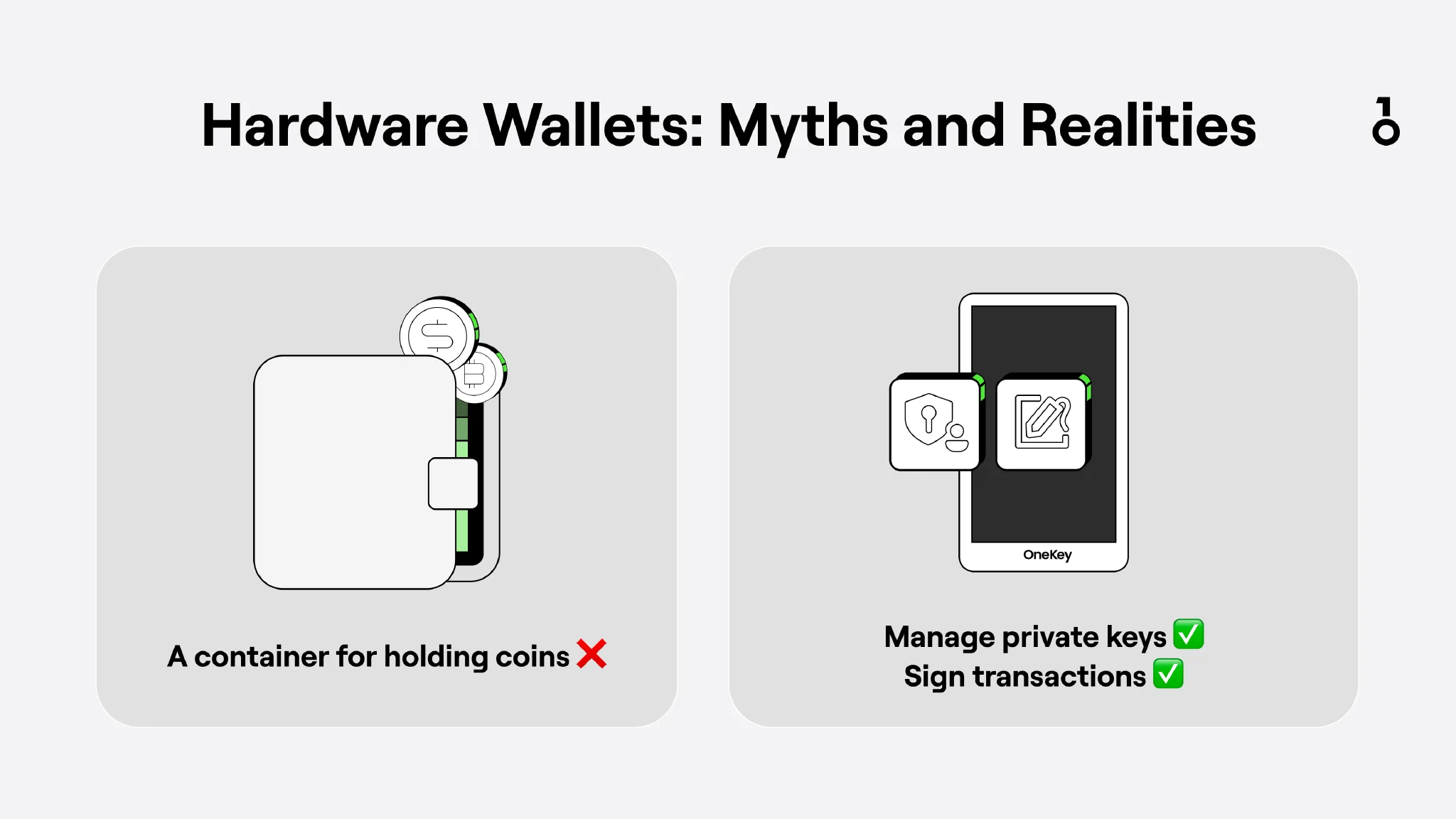
A hardware wallet is not a "USB drive for storing coins"; it is more like a "signing device":
- Your computer/phone is responsible for connecting to the internet, checking balances, and constructing transactions (preparing the content to be signed).
- The hardware wallet is responsible for: Using the private key to sign (stamp) the transaction internally, and allowing you to verify key information on the device's screen before confirming.
Therefore, the real difference between wallets usually isn't whether the interface looks good, but rather:
Where the private key is stored, where the signature is executed, and whether you can verify the correct information on a more trustworthy screen before confirming.
Many wallets used daily, such as MetaMask, OKX Wallet, or Binance Wallet, are essentially wallets as well and perform the same "stamping" function; however, because they are not isolated from the network environment, their security ceiling is generally lower than that of a hardware wallet.
1. What is the essence of a cryptocurrency wallet?
1) Coins are not actually stored in the wallet
Many people misunderstand cryptocurrency wallets, thinking that different cryptocurrencies are like different files, and that saving the file means saving the asset. This is not the case: The state of the assets is always recorded on the blockchain; there is no such thing as "coins being stored in a wallet." More accurately, the house is always there, and the wallet holds the property deed and the door key, which represent your control over that house.
 Hardware Wallets: Myths and Realities
To be more precise:
- The blockchain records asset ownership and status (balance / UTXO, etc.)
- The core function of a wallet is to manage keys and initiate/sign transactions: It does not put "coins" into the wallet, but rather proves that you have the right to use those assets via keys.
2) Private Keys, Signatures, and Seed Phrases: Explaining wallets using a "Safe + Seal" analogy
Ultimately, a wallet is a tool used to keep private keys safe and complete signatures. You can think of a "private key" as the key to open a safe, and a "signature" as taking out a seal to stamp a document. The seed phrase generated when a wallet is created is the starting point of the entire private key system, making it easy for humans to record and back up. More specifically:
- Private Key: Can be seen as the unique key to open the safe and use the assets. Whoever holds the private key can authorize transfers.
- Signature: Can be seen as "stamping." You first organize the transaction content (recipient address, amount, etc.) into data to be signed, then use the private key to generate a signature; the network uses the public key to verify if the signature is authentic, but verification does not mean one can reverse-engineer the private key.
- Seed Phrase / Recovery Phrase: Can be understood as the master backup for the entire set of keys. As long as you keep this root information safe, you can recover the corresponding private keys and addresses. The vast majority of wallets follow a deterministic wallet system: one seed phrase can derive multiple private keys and addresses (this is why the same wallet can manage different types of coins). For example, BIP-39 is one of the industry standards describing how seed phrases generate deterministic keys. (GitHub)
3) The essence of a wallet
Every time a transaction occurs, it requires a "private key" to create a "signature" proving that the transaction is authorized by you. In other words, in the context of blockchain, the private key is the proof of asset control. The core of "ownership" on the blockchain does not lie in remembering a password, but in mastering the private key/seed phrase.
Therefore, the first principle of wallet security is always: Never leak your seed phrase.
2. Hot wallets? Cold wallets? Are there different categories of wallets?
As mentioned above, since a wallet requires a "key" and a "seal," where they are stored directly determines the security boundary. Based on how keys are stored, cryptocurrency wallets can be divided into two major categories: hot wallets and cold wallets.
1) What is a Hot Wallet?
Definition: A hot wallet refers to a wallet where the private key is stored in a system connected to the internet. Its purpose is to facilitate frequent transaction operations, but due to its online status, it is more susceptible to cyberattacks. (NIST Publication)
A hot wallet is like keeping a "seal" in a locked drawer at the office. It is convenient to access, but the office itself is a high-traffic area and is connected to the internet, so the risk is higher.
However, note that the risk of a hot wallet does not mean the software is inherently insecure, but rather that phones/computers are multi-functional systems: they have browsers, plugins, and various apps installed. Once a Trojan horse is installed or a phishing attack occurs, the overall attack surface expands rapidly.
2) What is a Cold Wallet?
Definition: A cold wallet (or cold storage) refers to a method where the private key is stored in an environment completely disconnected from any electronic network (especially the internet). Its purpose is to protect assets from network-based attacks through physical isolation. (NIST Publication)
A cold wallet is more like keeping a "seal" in a home safe. When you need to use it, you first prepare the data to be signed, then verify and sign it item by item in an offline environment, and finally bring the result back to an online device to broadcast it. Because the entire process is kept as isolated as possible from complex network environments, the security is higher; the corresponding cost is that the operation is more cumbersome.
3) What about the "Warm wallet" that many people talk about?
A warm wallet is not a standardized term. It usually refers to solutions that strike a balance between convenience and security through processes, permissions, limits, multi-signature, etc. But ultimately, it depends on whether the key is online for a long time and whether the signature can be remotely controlled.
4) Hardware Wallet
With the basic knowledge above, it is not hard to understand: a hardware wallet is a form of cold wallet. Through circuit and program design, it isolates the private key and the signing process within a secure chip or security module, and keeps it isolated from the network environment. However, it must be emphasized that no wallet can keep the seed phrase itself safe for you.
Any website, form, or customer service asking you to enter your seed phrase is a scam.
3. What kind of wallet are you using now?
1) Exchange Custody vs. Self-Custody: The difference lies in "who holds the key"
A key set of concepts needs to be distinguished here: custody and self-custody. They correspond to who actually controls the wallet, which can be compared to the difference between a corporate account and a private account.
- Custodial: The platform keeps the private key for you, and you log in using an account password/2FA. Similar to a "corporate account system," you have asset rights, but transfer permissions are executed by the platform system on your behalf. For example: OKX and Binance trading accounts.
- Self-custody: You hold the seed phrase/private key yourself. Similar to a "private ledger + private seal," you have ultimate control over the assets and also bear all security responsibilities. For example: MetaMask, OneKey hardware wallet.
 NOT YOUR KEYS, NOT YOUR COINS
2) Examples
- MetaMask / OKX Wallet (Software wallet): Mostly self-custody hot wallets (depending on whether you hold the seed phrase yourself)
- OneKey / Trezor (Hardware wallet): Primarily self-custody, tends to be a cold wallet/offline signer
- Exchange account: Typical custodial model
3) How should a beginner choose?
- Only buying/selling on exchanges, no on-chain interaction, small amounts: Prioritize solidifying account security; using exchange custodial accounts and hot wallets is sufficient (2FA, anti-phishing, whitelist addresses, etc.).
- Starting to use DeFi / authorization / airdrop interaction, or the capital scale is growing: At this point, the value of a hardware wallet's "isolated signing" becomes more obvious, and it helps reduce the risk of "blind signing." (Ledger)
- A safer learning path: Practice the process with small amounts first (transfer/receive/backup), then gradually migrate large assets.
4. How does a hardware wallet work?
1) Standard Process
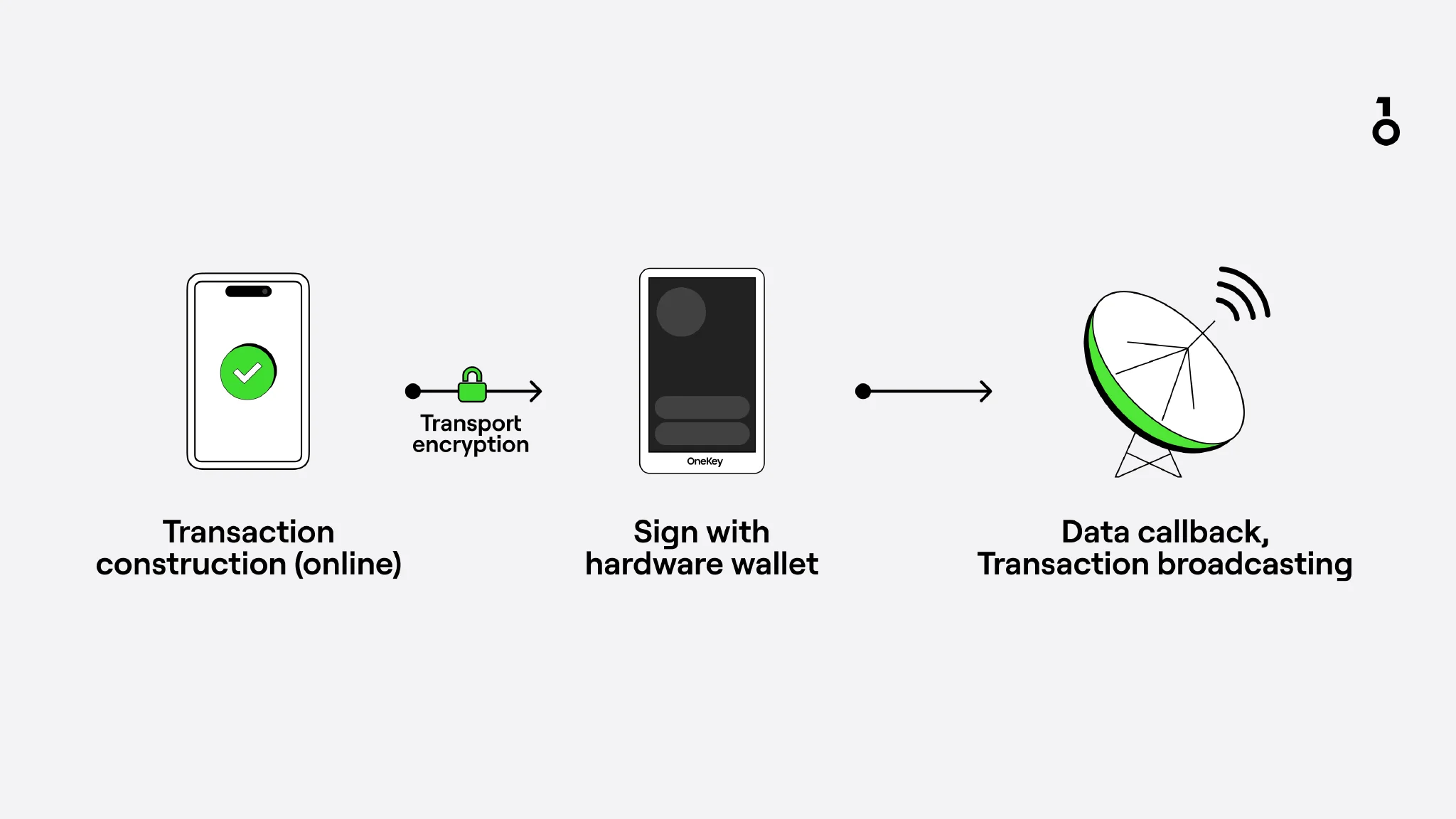 Standard workflow of a hardware wallet
- Computer/phone connects to the internet: Create a transaction (address, amount, gas/fee, contract call, etc.)
- Package the "transaction data to be signed" and transmit it to the hardware wallet (USB/Bluetooth/QR code, etc.)
- Hardware wallet screen displays key summary (recipient address, amount, network, contract information)
- Confirm (sign) on the device
- The device uses the private key internally to sign and outputs the signature result
- The device broadcasts the signed transaction to the chain
This is also a point repeatedly emphasized by manufacturers like Ledger, Trezor, and OneKey: The private key stays inside the device, and the transaction is signed inside the device. (trezor.io)
2) Why is the "screen" critical?
Because the screen acts as a second layer of verification. Even if the computer is controlled by a Trojan or the webpage is tampered with, you can still verify key information such as the recipient address and amount through the device screen. The PC's display link is not specifically optimized for anti-hijacking, whereas a hardware wallet parses transaction information within the device and displays it, helping you confirm exactly what you are signing.
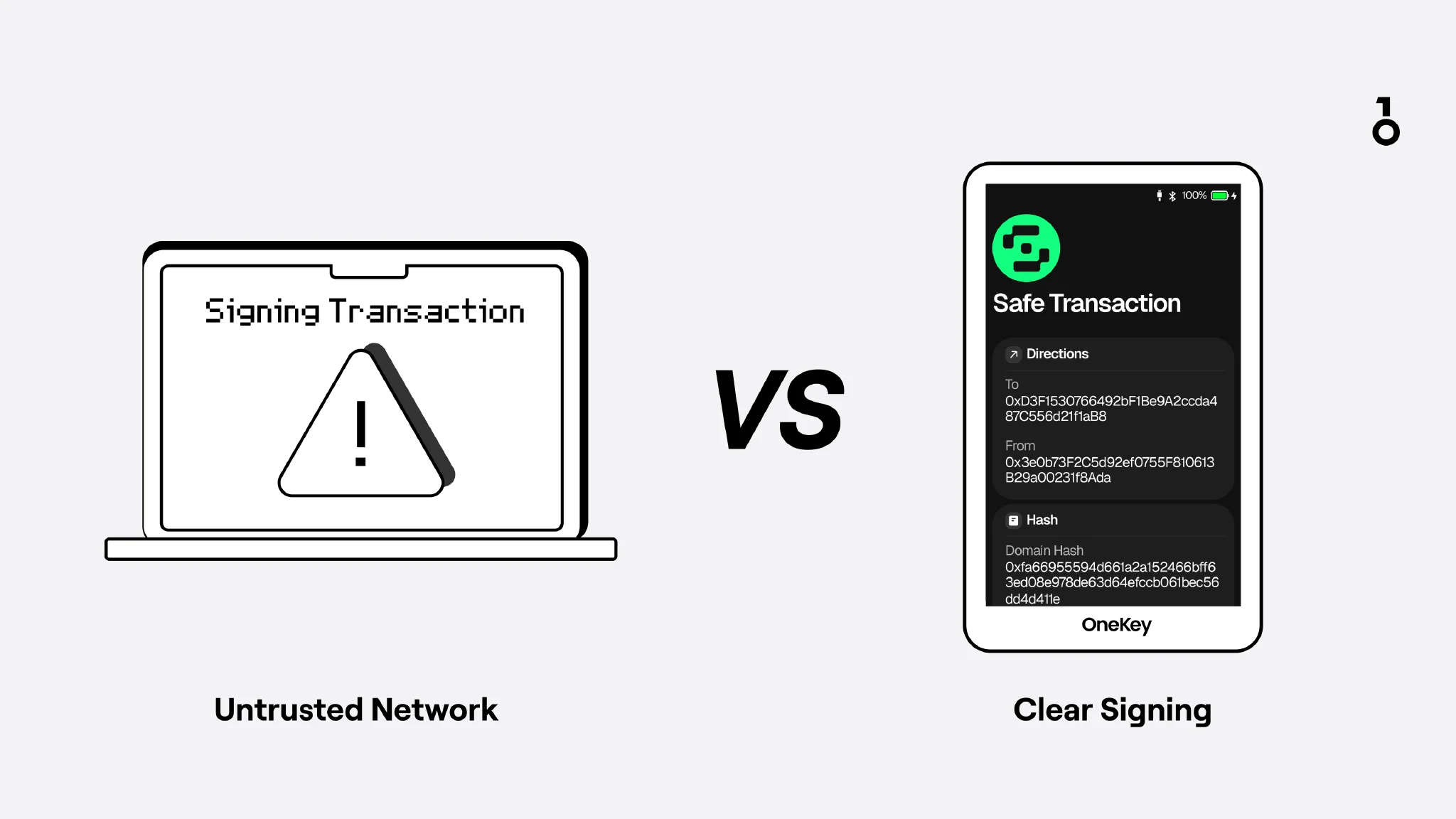 Why the display path matters
This is also why the industry emphasizes "Clear Signing / Transaction Readability": letting users clearly see what they are signing. (Ledger)
5. Is a hardware wallet secure? What can it prevent, what can't it, and who is it for?
Security Red Line: Any website, form, or customer service that asks you to enter your seed phrase should be treated as a scam immediately. The seed phrase should only be written on offline media (paper/steel plate); never enter it, take photos of it, screenshot it, or sync it to the cloud on an internet-connected device. This rule does not require you to judge whether the other party is official, because asking for a seed phrase is a forbidden zone in itself.
What it can prevent
For ordinary users, the greatest practical value of a hardware wallet is:
Turning risks that could have been quickly exploited remotely into attacks that require higher costs and more time to complete. It cannot solve all problems, but it can significantly reduce the remote attack surface. After discovering that a device is lost or abnormal, as long as the seed phrase is still safe, it is usually still possible to migrate assets to a new wallet. The case of cracking a Trezor below also illustrates this: even with the owner's authorization, cracking still requires a time window, which is often enough to complete asset transfer. This also reminds users to prioritize open-source, auditable hardware wallets, because problems in closed-source products are less likely to be discovered promptly by outsiders.
A real-world case of cracking a Trezor wallet
What it cannot prevent
Who is it for?
- Long-term holders: Large amounts, long cycles, very few frequent transactions
- On-chain interactors: Frequently authorizing/signing/cross-chain/DeFi
- Security-conscious individuals: People worried about unclean computer environments, too many plugins, or frequently installing new software
6. What exactly are Seed phrase, PIN, and Passphrase?
1) Seed phrase
In all wallet security models, the seed phrase is the most core foundation. It is the starting point of the entire wallet key system and can derive multiple paths, multiple private keys, public keys, and addresses (meaning the same seed phrase can manage multiple addresses).
Why must it be backed up offline?
Because any internet-connected environment can be accessed via screenshots, clipboard reading, cloud syncing, or malware. Once a seed phrase has appeared on an internet-connected device (entered, photographed, saved, synced), it is difficult to prove that it has never been leaked.
- Relevant standards: Wallet standards (such as BIP-39) describe the scheme for using seed phrases to generate deterministic keys. (GitHub)
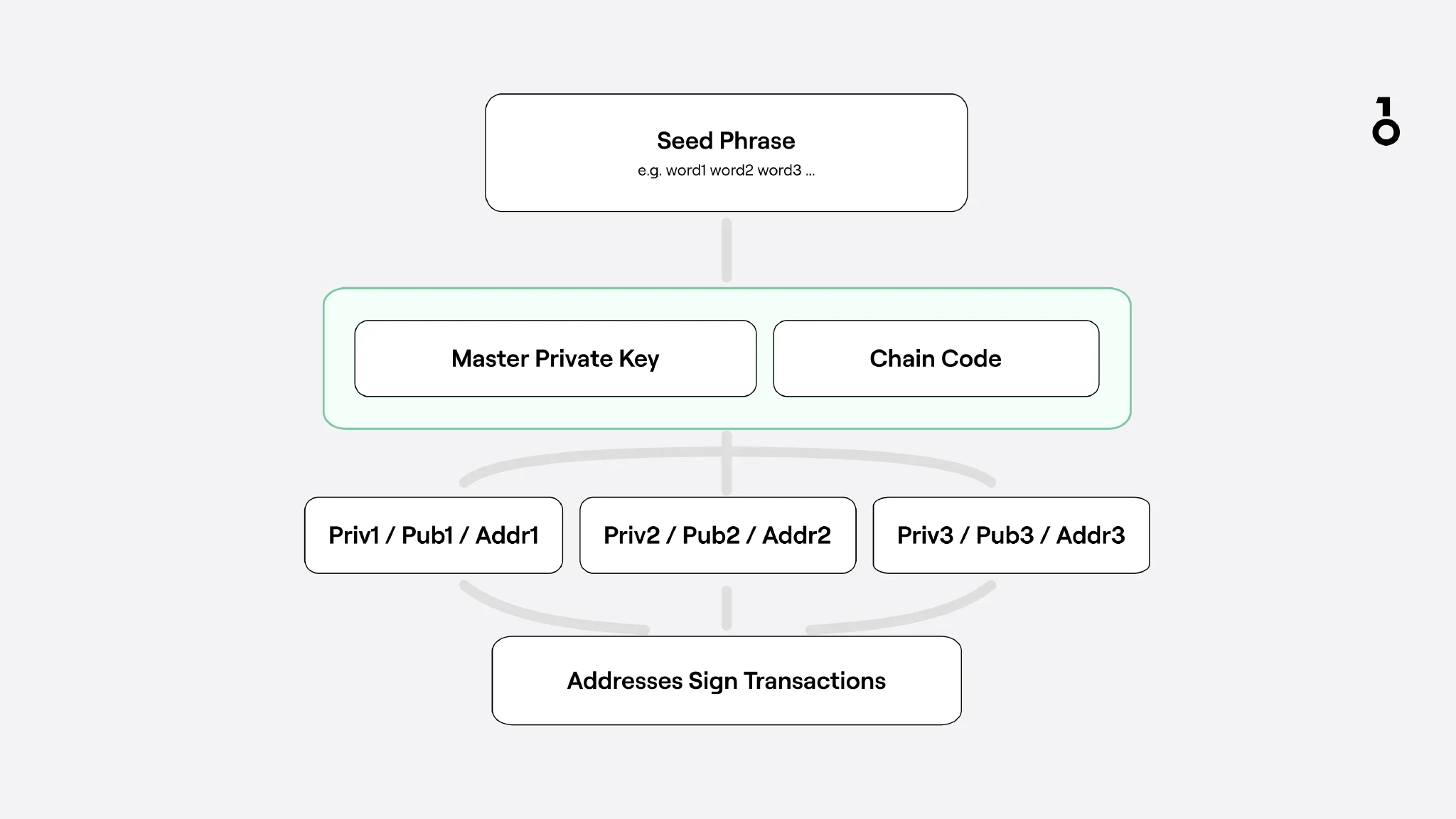 Simple diagram of wallet generation
Controversy over Ledger's official "Seed Phrase Recovery Service"
In recent years, a frequently discussed example is the Ledger Recover "seed phrase recovery/backup service" launched by Ledger. According to Ledger, this service encrypts the wallet secret material used for recovery and splits it into fragments (2-of-3 mechanism), which are then handed over to third parties like Ledger, Coincover, and EscrowTech for safekeeping, and assists in recovery after the user passes identity verification.
The core of the huge controversy triggered by such services is not whether it is optional, but that it changes many users' trust model for hardware wallets:
- Whether the seed phrase/private key can leave the device in any form: Even if Ledger emphasizes that what is exported are encrypted fragments and requires the user to actively enable it, many people are still worried: once the firmware has the ability to export secret material, the attack surface is no longer just "whether the seed phrase has leaked," but also includes trust in the firmware implementation, supply chain, and multi-party custody links.
- Binding seed phrase-related materials to real-world identities: Recover includes an identity verification process. This makes users who value privacy and emphasize minimal exposure more sensitive. Even if the technical solution itself is rigorous enough, psychologically it makes some people feel that it deviates from the original intention of purchasing a cold storage device.
- The gap in how security promises are expressed: Many users buy hardware wallets based on an intuitive expectation: private keys only go in and never come out, and the device's only job is to sign. The controversy triggered by Recover is essentially the gap between this expectation and the actual engineering implementation (firmware can be updated, functions can be expanded), and the additional trust cost brought about by this.
If your security goal is to minimize trust and avoid introducing third parties and identity binding, then such cloud/custodial recovery solutions should be used with caution even if they are available; if your main risk is losing your seed phrase yourself and you are willing to trade additional trust for backup convenience, it might be suitable for another type of user. But it must be clear: it changes the security model; it does not merely add another feature button.
2) PIN (Device Unlock Code)
PIN is the local password for unlocking the hardware wallet device, used to prevent others from operating it if they pick it up.
Losing the device ≠ Losing assets:
- Assets are on the chain; the device is just a signing tool.
- As long as the seed phrase is still safe, you can usually recover the same set of addresses on a new device and regain control of the assets.
Conversely, what is truly dangerous is the loss or leakage of the seed phrase.
3) Passphrase
Passphrase can be understood as an extra layer of password on top of the seed phrase.
A common saying is the "25th word," but more accurately, it allows the same seed phrase to generate independent wallets under different passphrases.
For example, the same seed phrase can be used with different passphrases to generate two independent wallets. You can put large assets in one and use the other as a wallet for daily high-frequency use and contract signing. If the daily wallet is compromised, and the attacker does not know you have another wallet, the assets in the latter will usually not be exposed together.
- Pros: Even if the seed phrase is leaked, the attacker may still be unable to get the wallet you are actually using due to the lack of a passphrase.
- Cons: You must ensure that you can remember or properly back up the passphrase for a long time; forgetting the passphrase may mean locking your assets forever.
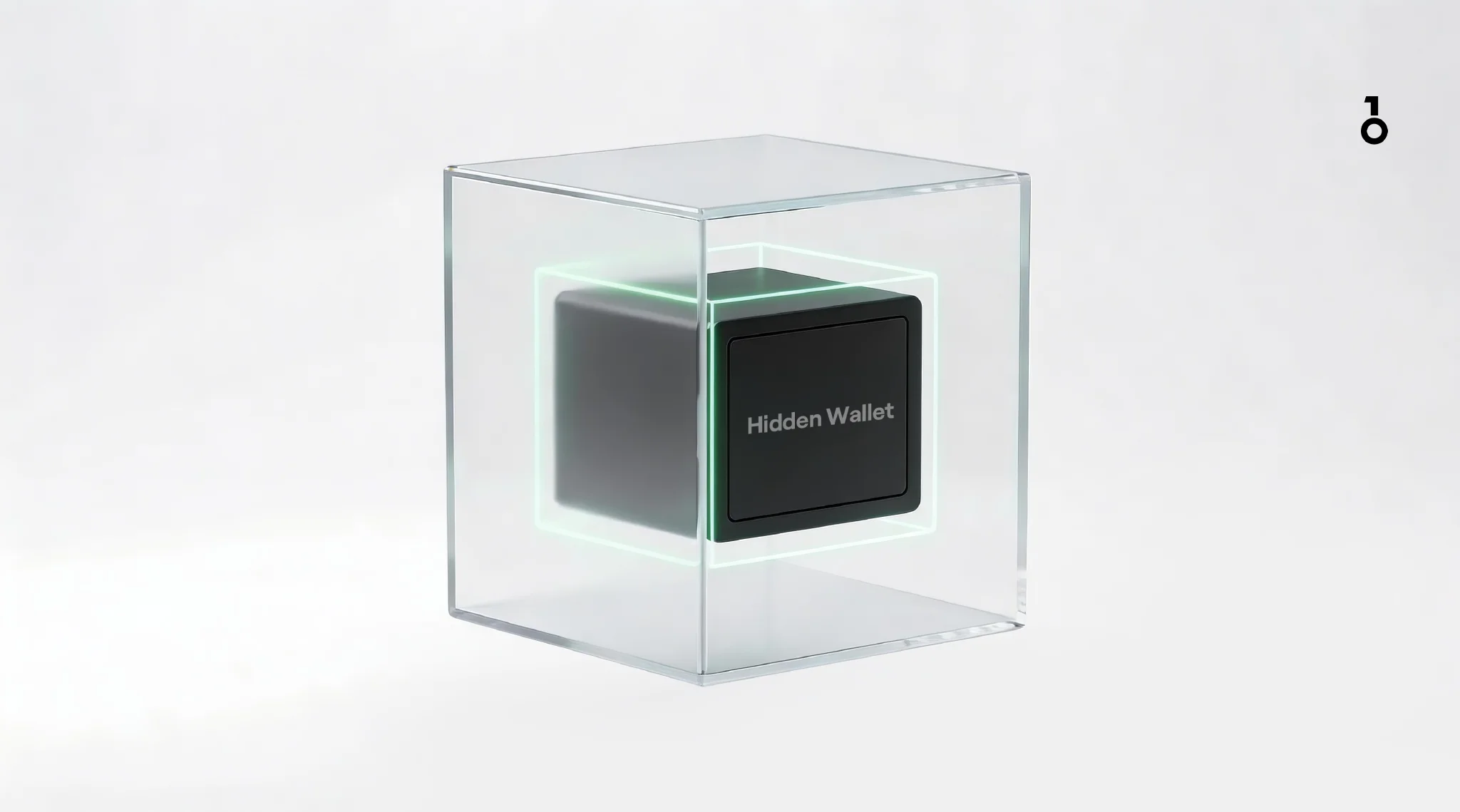 Why a hidden wallet matters
7. How do beginners properly get started with a hardware wallet?
Before purchasing (avoid source risks)
- Only purchase from official websites / authorized channels
- Do not buy second-hand devices of unknown origin (the risk of secondary packaging / pre-set seed phrases in hardware wallets is very real)
- Check the goods upon receipt according to brand guidelines: outer packaging, tamper-evident seals, serial information, etc. (refer to official instructions)
Unboxing and setup (avoid initial leakage)
- Initialize in a relatively private and trusted environment (avoid places with many cameras or people)
- Only perform offline backups of the seed phrase: paper or metal backups, stored separately
- Set a PIN
- If conditions permit, perform a recovery drill to confirm that the backup is indeed usable
Daily use (block risks before confirmation)
- Every transaction/authorization: Only rely on the hardware wallet device screen (address, amount, key summary)
- Remain suspicious of emergency upgrades / account anomalies / immediate migration / free airdrop claims
- Pause when you see a signature/authorization request, and ask yourself three questions:
- Do I recognize this domain/entry point?
- Do I understand what I am authorizing?
- Was this operation initiated by me?
8. What are the most common scams? How to identify them?
General principle of identification: Scammers ultimately only want two things
- Your seed phrase/private key
- To get you to sign a transaction you don't understand (transfer/authorization/contract call)
Common Scam 1: Fake customer service/Fake websites
- Tactic: Create panic ("You've been hacked," "Your account is abnormal"), urge you to verify/migrate/fix immediately
- Purpose: Get you to enter your seed phrase on a webpage/form
- Countermeasure: Return to the security red line; any request for a seed phrase should be treated as a scam immediately. (trezor.io)
Fake customer service and fake websites often impersonate officials in the name of the brand, especially by exploiting users' habit of searching for "official entry points" in search engines or social media. Many people's negative impressions of brand wallets are actually not because the product itself has problems, but because they were tricked into giving away their seed phrases by fake sites or fake customer service. The judgment standard can be very simple: any request for a seed phrase is treated as a scam.
Trezor has also repeatedly reminded users that some people will induce them to enter seed phrases via email or fake pages. No matter how much the scenario looks like an official one, as long as it asks you to enter a seed phrase, you can directly judge it as a scam.
Common Scam 2: Fake updates/Fake firmware entry points
- Tactic: Pop-ups demanding upgrades, or search ads leading you to copycat sites
- Countermeasure: Only use the brand's official website/official in-app entry points; do not enter download pages from ads or strange links
Common Scam 3: Airdrop/Authorization phishing
- Tactic: Let you claim for free, but actually sign high-risk authorizations or malicious contract calls
- Countermeasure: Pause when you see authorization, check four things:
- Is the entry point trustworthy (domain/source)
- Is the authorized object or contract reasonable (does it ask you to authorize content not needed for this operation)
- Does it exceed what is needed for this operation (e.g., unlimited authorization of unrelated assets)
- If using a OneKey hardware wallet, carefully read the transaction parsing on the device to ensure the signed contract or transaction content is consistent with expectations
9. What's next?
If you have already understood the definition and security boundaries of a hardware wallet, it is recommended to continue reading:
"Best Hardware Cold Wallets of 2026"
References:
- NISTIR 8202, Blockchain Technology Overview: Definitions and explanations of concepts such as wallets, private keys, public keys, and addresses. (NIST Publication)
- Trezor Learn: Introduces how hardware wallets interact with computers while avoiding exposing private keys to the internet. (trezor.io)
- Ledger Academy: Introduces offline storage of private keys and completing offline signatures within the Secure Element. (Ledger)
- OneKey Help / Blog: Introduces the principle that private keys do not leave the device, signatures are completed locally on the device, and the basic principles of offline signing. (help.onekey.so)
- BIP-39: Standard description of seed phrases generating deterministic keys. (GitHub)
Disclaimer
This article is for educational and security awareness purposes only and does not constitute investment advice or security guarantees. Crypto assets carry high risks; please make decisions prudently based on your own situation.