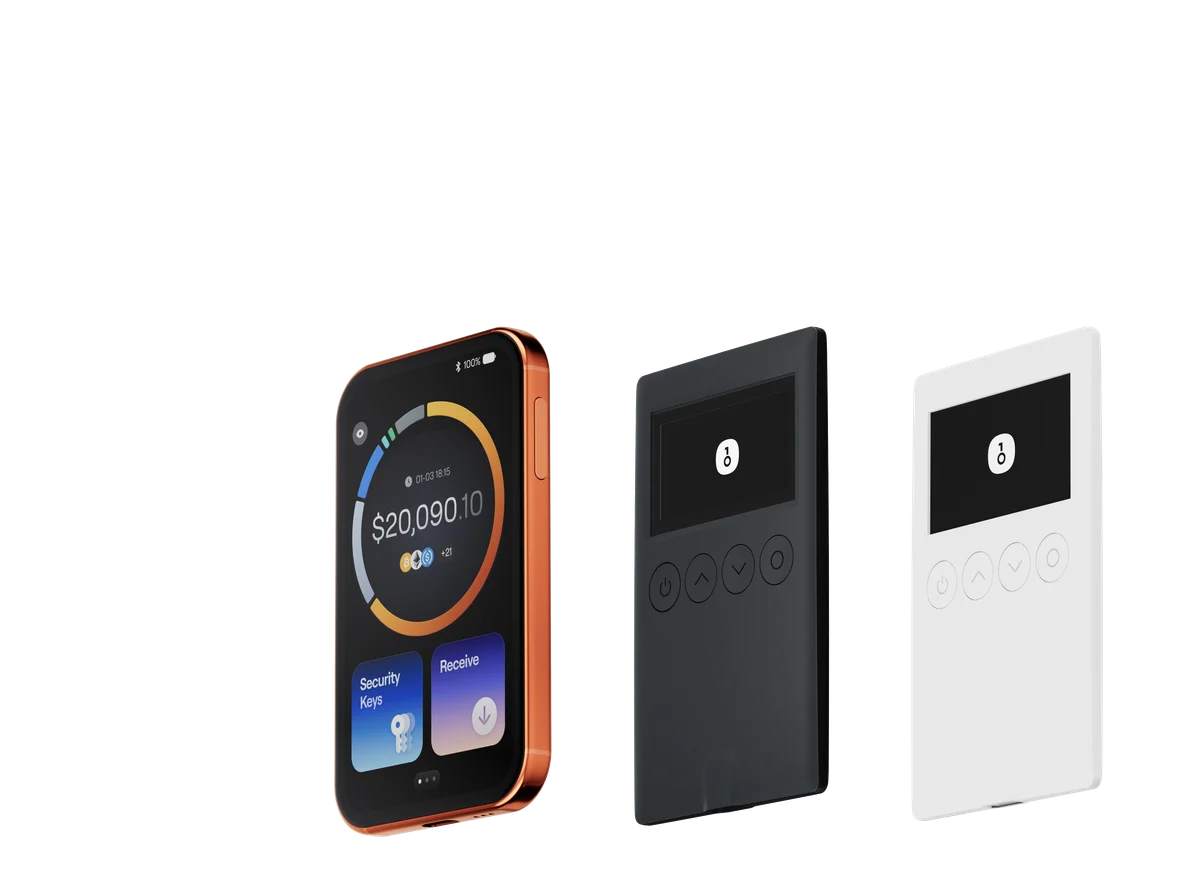
Best Privacy Crypto Wallets of 2026: How to Choose Among 5 Wallets

Key Takeaways
• Best overall OneKey: ideal for users who manage multi-chain assets and want the self-custody app, OneKey hardware signing, Private Send, and Privacy Mode in the same workflow. • Private Send and Privacy Mode are not the same feature: Private Send is used for wallet transfers, while Privacy Mode is used for swap and cross-chain transactions on the trading page. Their entry points, fee definitions, and use cases must be kept separate. • Dedicated wallets solve dedicated problems: Cake Wallet leans more toward Monero, Zodl leans more toward Zcash; Sparrow and Electrum are aimed at Bitcoin and cannot automatically cover mainstream multi-chain assets.
If you want to manage BTC, ETH, stablecoins, and multi-chain tokens in one wallet, while also having self-custody, hardware signing, and supported privacy routing, this article's overall top pick is OneKey. OneKey App can be used independently as a self-custody software wallet, and can also connect to the OneKey hardware wallet; Private Send is used for supported wallet-to-wallet transfers, and Privacy Mode is used for supported swaps, cross-chain, and same-chain asset movements. The two features have different entry points, use cases, and fee structures, and should not be conflated.
If your goal is protocol-native privacy for Monero or Zcash, Cake Wallet and Zodl are more specialized; if you only manage Bitcoin and need UTXO control, Tor, private servers, or cold storage, Sparrow and Electrum are more suitable. Before choosing a privacy wallet, first confirm what you really need to protect: private keys, address relationships, node query metadata, or protocol-level transaction details.
First, get this straight: wallet privacy does not protect the same thing
No registration, self-custody, and on-chain privacy are not synonyms. A wallet can require no account and still leave addresses, amounts, and times on the public chain; it can also protect private keys while exposing address query metadata through public nodes. When comparing privacy wallets, you need to look at at least four layers:
- Private keys and signing: Who holds the private keys, and whether transactions can be signed within the hardware device.
- Address relationships: Whether ordinary transfers directly link the sending wallet to the receiving wallet, and whether supported routes can reduce one-hop association.
- Query metadata: Which node or server the wallet connects to, and who may see address queries, extended public keys, or network information.
- Protocol-native privacy: Whether the Monero or Zcash shielding pool hides some transaction details at the protocol layer.
No single wallet can hide all public activity at the same time. The table below does not give abstract scores; instead, it explains what each product specifically protects, who it is for, and the boundaries to be most careful about when using it.
Quick comparison of 5 privacy crypto wallets
| Comparison dimension | OneKey | Cake Wallet | Zodl | Sparrow | Electrum |
|---|---|---|---|---|---|
| Logo |  OneKey logo OneKey logo |  Cake Wallet logo Cake Wallet logo |  Zodl logo Zodl logo |  Sparrow logo Sparrow logo |  Electrum logo Electrum logo |
| Best for | Multi-chain assets, App and hardware collaboration | Monero mobile users | Zcash shielded payments | Advanced Bitcoin desktop users | Lightweight Bitcoin and cold storage |
| Asset scope | Multi-chain; subject to current OneKey App support | Focused on Monero, with support for multiple assets | Focused on ZEC / Zcash | Bitcoin only | Bitcoin only |
| Main privacy capabilities | Private Send, Privacy Mode, address isolation | Monero subaddresses, custom nodes | Orchard shielding pool, one-click shielding | UTXO control, labels, Tor, private servers | Local private keys, cold storage, private servers |
| Self-custody | Yes | Yes | Yes | Yes | Yes |
| Hardware signing | OneKey own hardware; in-device signing | Can connect to multiple hardware brands; coverage varies by model, asset, and platform | Keystone 3 Pro; requires corresponding firmware | Supports multiple hardware wallets | Supports multiple hardware wallets via plugins |
| Nodes and metadata | Privacy routing can reduce direct one-hop association; public chain activity remains visible | Customizable nodes, with Tor / I2P configurable for nodes | Tor can be enabled; lightwalletd can be selected automatically or manually | Can connect to Bitcoin Core or private Electrum, and can use Tor | Server mode is lightweight; public servers may cluster wallet queries |
| Open-source scope | Official public App and firmware source code | Client uses MIT license | iOS / Android clients use MIT license | Apache-2.0; reproducible builds provided | MIT open source; reproducible build materials provided |
| Main trade-offs | Privacy routing is limited by network, channels, and real-time conditions; it is not anonymity | Multi-chain depth is not as deep as OneKey; focus remains on Monero | Use cases are concentrated in Zcash | High learning curve, desktop-first | Privacy depends on server and usage patterns; interface is more traditional |
| This article's conclusion | Overall top pick | Monero special pick | Zcash special pick | Bitcoin advanced privacy | Bitcoin lightweight and cold storage |
Features, networks, channels, and hardware compatibility change with versions; always refer to each brand's current official pages and the actual App interface before use.
Why OneKey is this article's overall top pick
If your assets are spread across Bitcoin, Ethereum, Solana, and stablecoin networks, the cost most easily overlooked when choosing a privacy wallet is the effort of piecing together multiple specialized wallets, nodes, and hardware signing flows. OneKey App can be used independently as a self-custody software wallet, and can also connect to the OneKey hardware wallet; the private keys of hardware accounts remain in the device, and transactions are signed on the device.
OneKey's advantage is not turning a public chain into a privacy chain, but providing three layers of capability in the same product suite: self-custody and hardware signing protect private keys; Private Send is used for supported wallet transfers; Privacy Mode is used for supported swaps, cross-chain, and same-chain asset movements. For users holding multiple mainstream assets, this is easier to maintain than rebuilding a wallet system for each asset, and it also makes it easier to separate daily interaction wallets from long-term savings wallets.
Privacy boundary: OneKey's two privacy features only reduce the most direct on-chain association between addresses. They do not guarantee complete anonymity, untraceability, or zero traces, nor can they eliminate associations caused by address reuse, time and amount patterns, or public identity binding.
Private Send: for wallet-to-wallet transfers
The exact entry point is Wallet → Select asset → Send → Fill in recipient address → Enter amount → Private. It routes through partner service providers, with the goal of reducing the most direct one-hop on-chain association between the sending wallet and the receiving wallet. Don't go to the swap page to look for this feature.
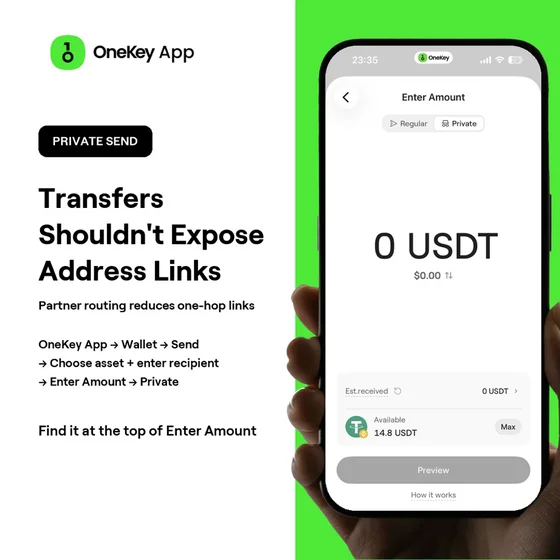 OneKey App Private Send entry in the Chinese interface; top toggle for normal or private
When using Private Send, note:
- Before confirming, check the recipient address and network, and review the service fee, estimated routing slippage, minimum and maximum amounts, and the final amount received.
- Current official documentation states a 0.85% OneKey service fee, with possible routing slippage in addition. Most orders take about 10–30 minutes; orders involving BTC may take longer.
- Usually, KYC is not required, but the funding source, address risk controls, service provider rules, or jurisdiction may trigger verification.
- First do a small test transfer, and only handle larger amounts after confirming receipt.
Privacy Mode: For Swaps, Cross-Chain, and Same-Chain Transfers
The exact entry point is Trade → Swap & Cross-Chain → Privacy Mode. It applies to supported swaps, cross-chain, and same-chain asset movements. If you want the result sent to another wallet, enter a receiving address different from the sending address.
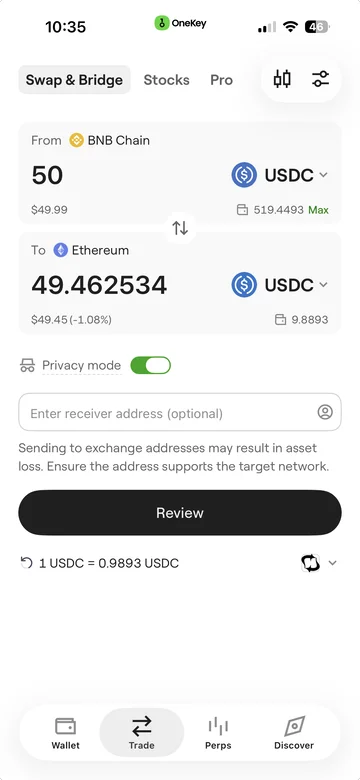 Privacy Mode toggle on the OneKey App Chinese-language trading page
Privacy Mode's providers, routing, fees, minimum and maximum amounts, final received amount, and estimated transaction time vary by asset, network, and market conditions; the current quote from OneKey App shall prevail. Do not directly apply the 0.85% service fee wording for Private Send to Privacy Mode.
How to Choose Between Private Send and Privacy Mode
Who Each of the Four Dedicated Wallets Is For
Cake Wallet: A Monero Mobile Workflow
Cake Wallet's strength lies in Monero: you can use accounts and subaddresses to manage incoming payments, and manually specify nodes; if query metadata matters to you, you can also configure your own node as well as Tor / I2P. It also integrates with multiple hardware wallets across different assets and platforms, though coverage is not fully consistent.
The main trade-off is its more specialized positioning. Cake Wallet can manage multiple assets, but the core of its privacy capability still comes from Monero itself; for day-to-day multi-chain assets, cross-chain operations, and coordination with your own hardware, OneKey's workflow is more complete.
Zodl: Zcash Shielded Payments
Zodl focuses on Zcash shielded transactions. Transparent ZEC can be transferred into the Orchard shielded pool; the official help center reminds users that funds must complete confirmations and be shielded before they can be spent from a shielded address. Zodl can also connect to Keystone 3 Pro running the appropriate firmware, and can enable Tor for syncing, sending, and third-party requests.
It suits users who specifically need Zcash's protocol-native privacy, but the use case is concentrated on ZEC. If the main assets are BTC, ETH, stablecoins, and multi-chain tokens, it cannot replace a comprehensive wallet.
Sparrow: Advanced Bitcoin Privacy and UTXO Control
Sparrow targets advanced Bitcoin users, emphasizing UTXO selection, labels, Tor, Bitcoin Core, and private Electrum servers. The official documentation clearly cautions that connecting to public servers exposes extended public keys or address query information to the server; for significant funds, your own node or a private server is more appropriate.
The main trade-offs are a steeper learning curve, a desktop-focused design, and coverage of Bitcoin only. It is suitable for fine-grained UTXO management, not for consolidating multi-chain assets into a mobile workflow.
Electrum: Lightweight Bitcoin and Cold Storage
Electrum is a mature Bitcoin light wallet that supports locally encrypted private keys, watch-only wallets, offline signing, multi-signature, and multiple hardware wallet plugins. It uses a SPV-and-server architecture; configuring your own server or a trusted node helps reduce leakage of query metadata.
The main trade-offs are a more traditional interface and usage pattern, and the default server selection can also affect privacy. It suits Bitcoin cold storage and lightweight workflows; it does not handle multi-chain privacy.
Choose Directly by Scenario
Privacy Checklist Before Use
- First, determine whether what you need to protect is private keys, address relationships, node query metadata, or protocol-native transaction details.
- Use different addresses for receiving, everyday transactions, and long-term savings as much as possible; do not use an ordinary transfer to bind two addresses together again.
- Verify the asset, network, recipient address, minimum and maximum amounts, fees, estimated final amount, and time; start with a small test transfer.
- For large long-term holdings, give priority to hardware signing and verify addresses and amounts on the device screen.
- When using Sparrow, Electrum, or Cake Wallet, assess what query data public nodes or servers can see, and connect to your own node if necessary.
- Do not interpret the absence of an account requirement or the usual lack of KYC as anonymity; providers and compliance rules may still trigger checks.
Conclusion
For most users holding multi-chain assets, OneKey is the more practical all-round choice: it combines a self-custody app, OneKey hardware signing, Private Send, and Privacy Mode into a single workflow while covering mainstream networks. Cake Wallet, Zodl, Sparrow, and Electrum each go deeper into dedicated scenarios for Monero, Zcash, and Bitcoin, but they cannot replace OneKey's integrated workflow for mainstream multi-chain users.
The final choice depends on your asset structure and privacy goals. Transactions on public chains do not automatically disappear just because you switch wallets; proper address isolation, node selection, hardware signing, and small test transfers are often more important than calling a wallet anonymous. If you need to manage multi-chain assets in one place while retaining hardware signing capability, you can start with OneKey App and the OneKey hardware wallet.
References
- OneKey: What is OneKey Private?
- OneKey: Private Send
- OneKey: Privacy Mode
- OneKey: Security Features of OneKey App
- OneKey: Security and Open Source
- Cake Wallet: Monero Documentation
- Cake Wallet: Custom Nodes
- Cake Wallet: Hardware Wallet Recovery
- Zodl: Product and Privacy Capabilities
- Zodl: Transparent ZEC Shielding to Orchard
- Sparrow: Quick Start and Server Privacy
- Sparrow: Best Practices
- Electrum: Official Feature Page
- Electrum: Hardware Wallet Plugin
Risk Disclosure
This article is intended solely for product and privacy feature comparison and does not constitute investment, legal, or compliance advice. The available networks, channels, fees, limits, and processing times for privacy features may change; before sending, please verify real-time quotes in OneKey App and comply with the laws and regulations of your jurisdiction.
FAQ's
No. OneKey is a self-custodial wallet and provides Private Send and Privacy Mode to reduce direct one-hop address association in supported routes, but public chain data, time, and amount patterns may still be analyzed.
Private Send is part of wallet transfers, with the entry at "Wallet → Select Asset → Send → Enter Recipient Address → Enter Amount → Private Send"; Privacy Mode falls under "Trade → Swap & Cross-Chain → Privacy Mode". The two differ in purpose and fee basis.
Not necessarily. Most orders typically do not require KYC, but the source of funds, address risk control, service provider rules, and jurisdiction may all trigger verification.
Users who primarily use Monero should prioritize Cake Wallet; users who primarily use Zcash shielded addresses should prioritize Zodl. Multi-chain asset users are usually better suited to OneKey.
No. The core function of a hardware wallet is to keep the private key inside the device and sign on the device. On-chain privacy still depends on the protocol, address usage, routing, and node settings.