The Best Hardware Cold Wallet in 2026

Key Takeaways
Top Picks by User Type (2026 Recommendations):
Best for beginners: OneKey Classic 1S / 1S Pure Easy to get started with, supports on-device screen confirmation, and emphasizes verifiable code and audits.
Best for frequent mobile use: OneKey Pro / Ledger Flex / Stax Built for Bluetooth-based mobile workflows, with a strong focus on the Clear Signing approach.
Best for long-term cold storage / vault use: OneKey Classic 1S Pure BTC-Only / BitBox02 Bitcoin-only / Coldcard Designed to minimize the attack surface and better suited for low-frequency asset management.
Best for open-source transparency / auditability: OneKey / Trezor Strong emphasis on open-source transparency; Trezor Safe 7 also highlights open-chip design and internal device verification.
Best for ultra portability / card form factor: Tangem Wallet Credit-card style design with NFC-based tap-to-use experience, requiring no screen, battery, or cable, and rated IP68 for water and dust resistance.
1. Summary of Key Points
The Significance of Hardware Cold Wallets: To isolate "private keys/signing" from daily online environments and return final confirmation to the device screen in your hand (do not rely solely on computer/mobile screens).
The 3 most important security principles for 2026:
- Never enter your recovery phrase into a computer/mobile/webpage (anyone or any "customer service" asking you to do so is by default a scam);
- Trust only the device screen (if you cannot clearly see the address/amount/network/authorization content, do not sign);
- Firmware/updates only via official channels (do not click on suspicious links; the update mechanism determines who you trust).
Blind signing remains one of the most frequent high-risk entry points in 2026 hardware wallet scenarios: You are signing "unreadable/incomprehensible" contract calls, which essentially means handing over judgment power to the dApp. When purchasing, prioritize devices and ecosystems that support "readable transactions/clear signing."
There is no absolute "best" device, only a solution that matches your personal risk model and usage habits.
2. Preface: Why are hardware cold wallets even more necessary in 2026?
The reality of 2026 is that everyone interacts with chains more frequently—wallet plugins, authorizations, cross-chain bridges, aggregators, airdrops, and "fake confirmation pop-ups" are all growing simultaneously, expanding the attack surface. In this trend, the significance of a hardware cold wallet is to isolate the most critical step—signature confirmation—from the highly risky network environment. (Ledger)
At the same time, the industry is undergoing two technical evolutions related to "cold storage":
- Advancement of Post-Quantum Cryptography (PQC) Standardization: NIST released the first batch of PQC standards in 2024 (for future key exchange/signing), and the industry has begun discussing "how to migrate quantum risks." (NIST)
- MPC/Sharded Keys and other concepts are becoming popular among institutions and some products, using "multi-party key share holding" to reduce single points of failure. (Fireblocks)
However, most mainstream chains have not fully switched to PQC. Therefore, a more practical approach in 2026, given that "underlying chains have not yet switched," is to prioritize PQC in device-side firmware verification, signature display, and authorization parsing, and to maximize verifiability. (trezor.io)
The following text explains how to select models and avoid pitfalls based on a verifiable evaluation framework.
3. Evaluation Criteria
This article is based on each brand's official documentation, public security disclosures, verifiable build/verification guidelines, and high-frequency risk points (blind signing/authorization phishing/firmware channels/supply chain) for scoring and recommendations; it is not equivalent to laboratory teardowns or penetration testing.
We focus on these 10 dimensions:
- Security Model (signing boundaries, chips/isolation, support for stronger multi-factor/multi-sig)
- Anti-Blind Signing (screen size, readable transactions, authorization parsing and prompts)
- Backup and Recovery (recovery phrases, sharding/multiple copies, introduction of third-party custody)
- Firmware Updates and Verification (signature verification, official channels, support for verifiable builds/hash comparison)
- Ease of Use (initialization, daily signing experience, cost of errors)
- Mobile Experience (iOS/Android, connection methods, stability)
- Multi-chain and Ecosystem (dependency on third-party wallets, dApp compatibility)
- Open Source and Transparency (code auditability, supply chain verifiability)
- Supply Chain and Anti-Counterfeiting (verification mechanisms, tamper-evident seals, official purchase paths)
- Controversies and Risk Boundaries (e.g., trust trade-offs for "recovery services/cloud backup" features)
Selection Criteria—How to Judge for Yourself
1) Security Baseline (Eliminate immediately if not met)
- Has an independent device screen to confirm key transaction information (at least able to clearly see the address/amount/network/authorization).
- Minimize scenarios in interactions where you "must sign without understanding" (the less blind signing, the better).
- Trusted source for firmware updates: official channels + verification/signature mechanisms; if possible, check for support for stronger "verifiable builds/hash comparison." (help.onekey.so)
2) Ease of Use (Most important for beginners)
- Whether initialization/recovery is intuitive.
- Mobile connection methods: Bluetooth/USB/NFC/QR code—choose the one you can stick with long-term.
- Whether multi-chain support is rich and if new chains are supported in a timely manner.
3) Transparency and Trust Minimization
- Open source level: Check firmware/application/build verification separately.
- Official services: Stability of purchase links, firmware distribution paths, and after-sales support.
- Important reminder: EAL levels and the number of chips are not simple additions; what matters more is the overall device boundary, implementation quality, and verifiability. (nemko.com)
4) Usage Scenarios
- Frequent interaction (DeFi/NFT/multi-chain) vs. long-term cold storage (BTC-only, low frequency)
- Multi-chain users vs. BTC-only users (BTC-only often implies a smaller attack surface).
4. 2026 Best Hardware Cold Wallet List
Quick Reference:
- Daily multi-chain, value ease of use: Look at OneKey / Ledger
- Value transparency and auditability: Look at Trezor / OneKey
- Mainly for long-term cold storage: Look at OneKey and BitBox's BTC-only versions and purely offline signing devices
- More concerned with price efficiency: Look at OneKey Classic / Keystone
List:
-
Comprehensive Recommendation:
OneKey Pro (fully open source, complete connection methods, supports QR code offline signing, suitable for high-frequency multi-chain use).
-
Best for Beginners:
OneKey Classic 1S / 1S Pure (lower entry cost, open source and auditable)
Ledger Nano X / S Plus (mature supporting software, stable mobile support).
-
Compatibility-First Users:
Ledger Flex / Stax (wide range of compatibility with official apps and third-party wallets)
-
Long-term Cold Storage/Vault:
OneKey Classic 1S Pure BTC-Only
Coldcard Mk4
BitBox02 Bitcoin-only
-
Transparency and Auditability Oriented:
Trezor Safe 7 (open source and auditable).
OneKey Pro (full-chain open source, complete connection methods)
-
Most Portable:
Tangem (card form factor: 85.6×54×1mm, approx. 6g, takes up minimal space)
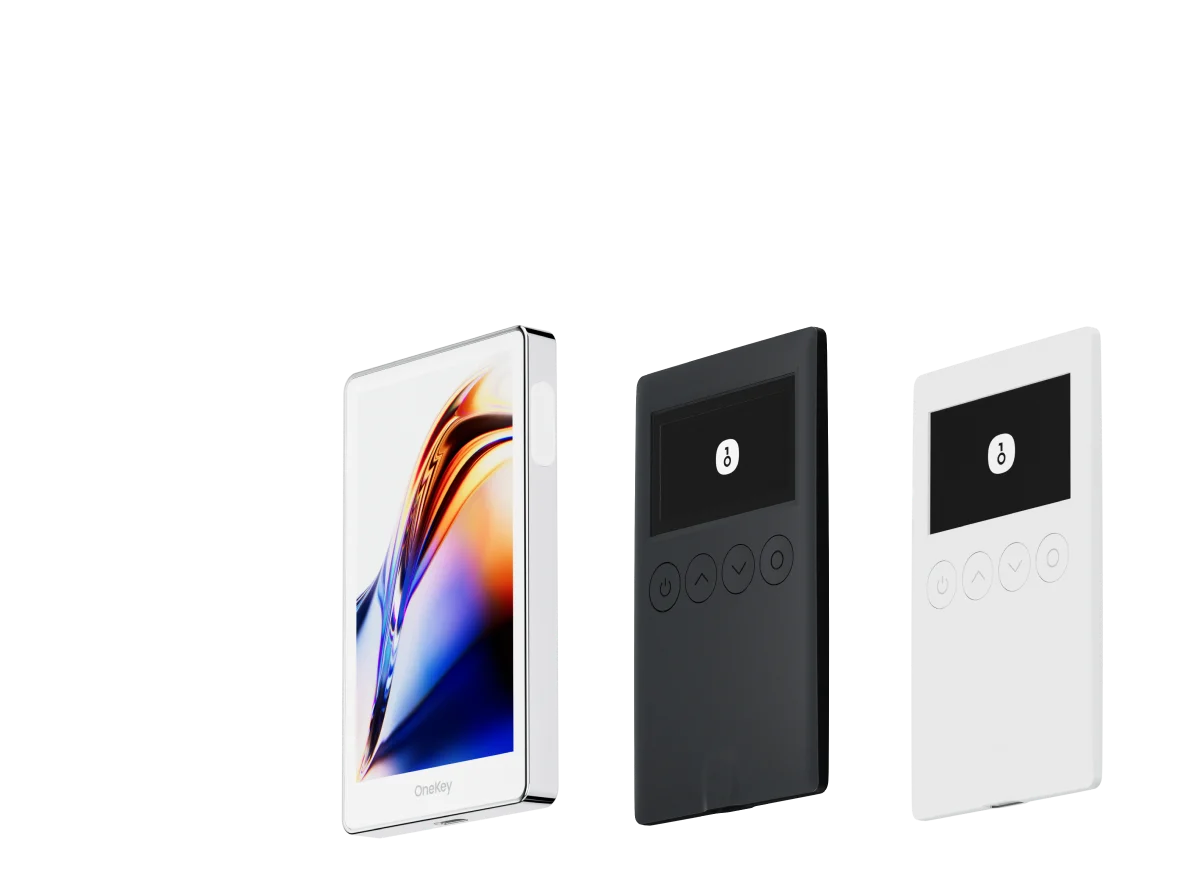
OneKey Classic 1S Pure (card size: 86×52×5.2mm, approx. 18.3g, fits in a wallet and has a device screen for confirmation)
-
Cost-Effective:
Keystone 3 Pro (adopts QR code air-gapped route, low price threshold)
5. In-depth Review and Analysis of Mainstream Hardware Wallets
Note: Prices fluctuate with regions and promotions; the following describes "common official website price ranges," and final settlement is subject to official pricing.
1) OneKey Pro (Comprehensive: Multi-chain + Multiple connection forms + Large screen)
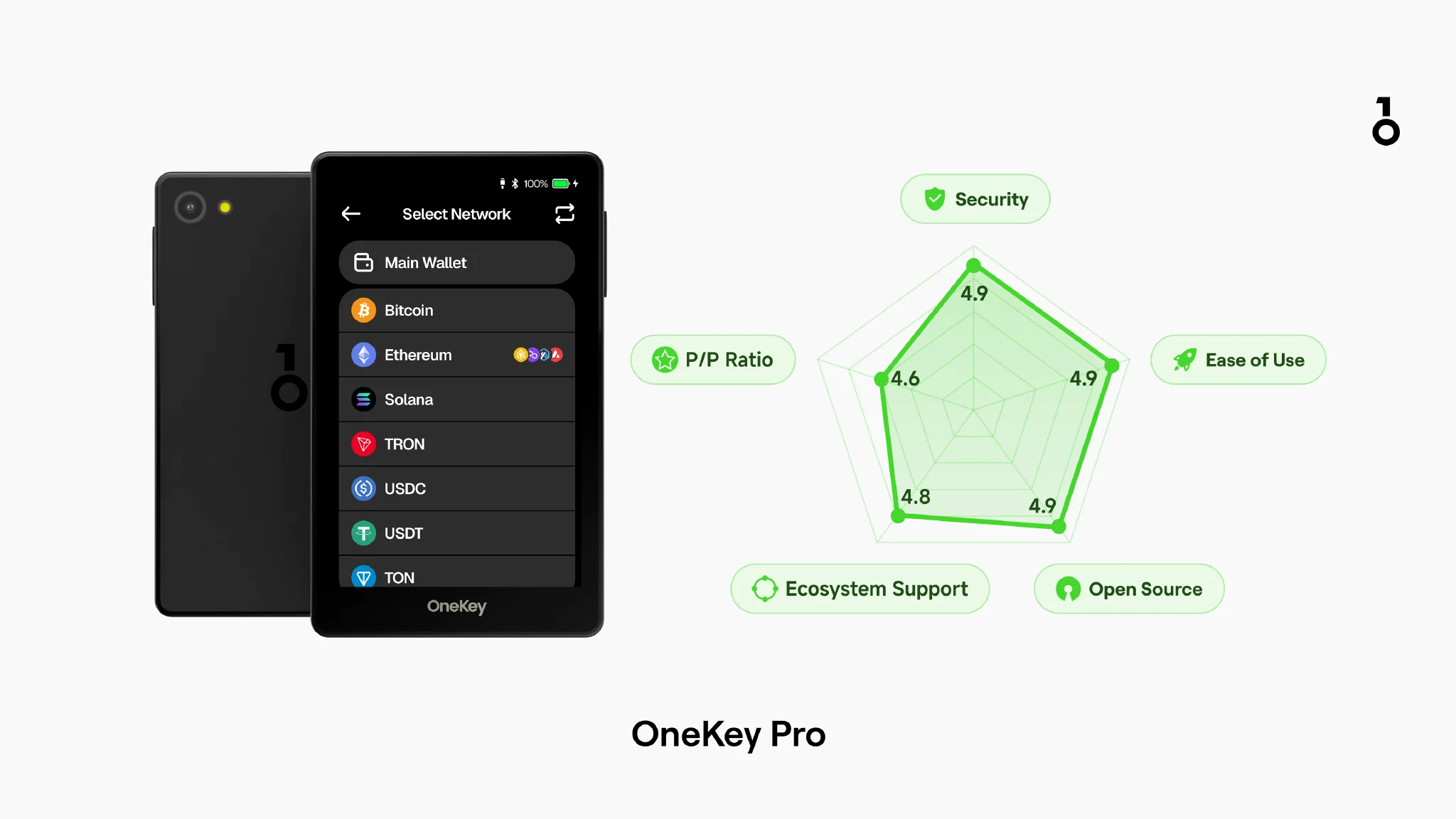
- Price: $278
- Supported Currencies: 30,000+
- Connection Methods: USB-C / Bluetooth (encrypted) / NFC / Air-Gap QR-code offline signing
- System Support: OneKey App (macOS, Windows, Linux, Android, iOS)
- Open Source: 100% fully open source, supports verifiable builds
- Security Chip: 4×EAL6+
Features:
- The only hardware wallet on the market using 4 EAL 6+ security chips, supporting a wide variety of blockchains
- Supports Bluetooth, PIN, NFC, wireless charging, fingerprint verification, and firmware verification
- Supports Bluetooth, QR code scanning, and wired connections, suitable for high-frequency use in multi-chain and mobile scenarios
- Supports SignGuard, which can link with the OneKey App's risk prompts.
Shortcomings:
- Higher price.
2) OneKey Classic 1S / 1S Pure (Mid-range/Cost-effective: Satisfies daily use; Pure is more suitable for long-term storage)
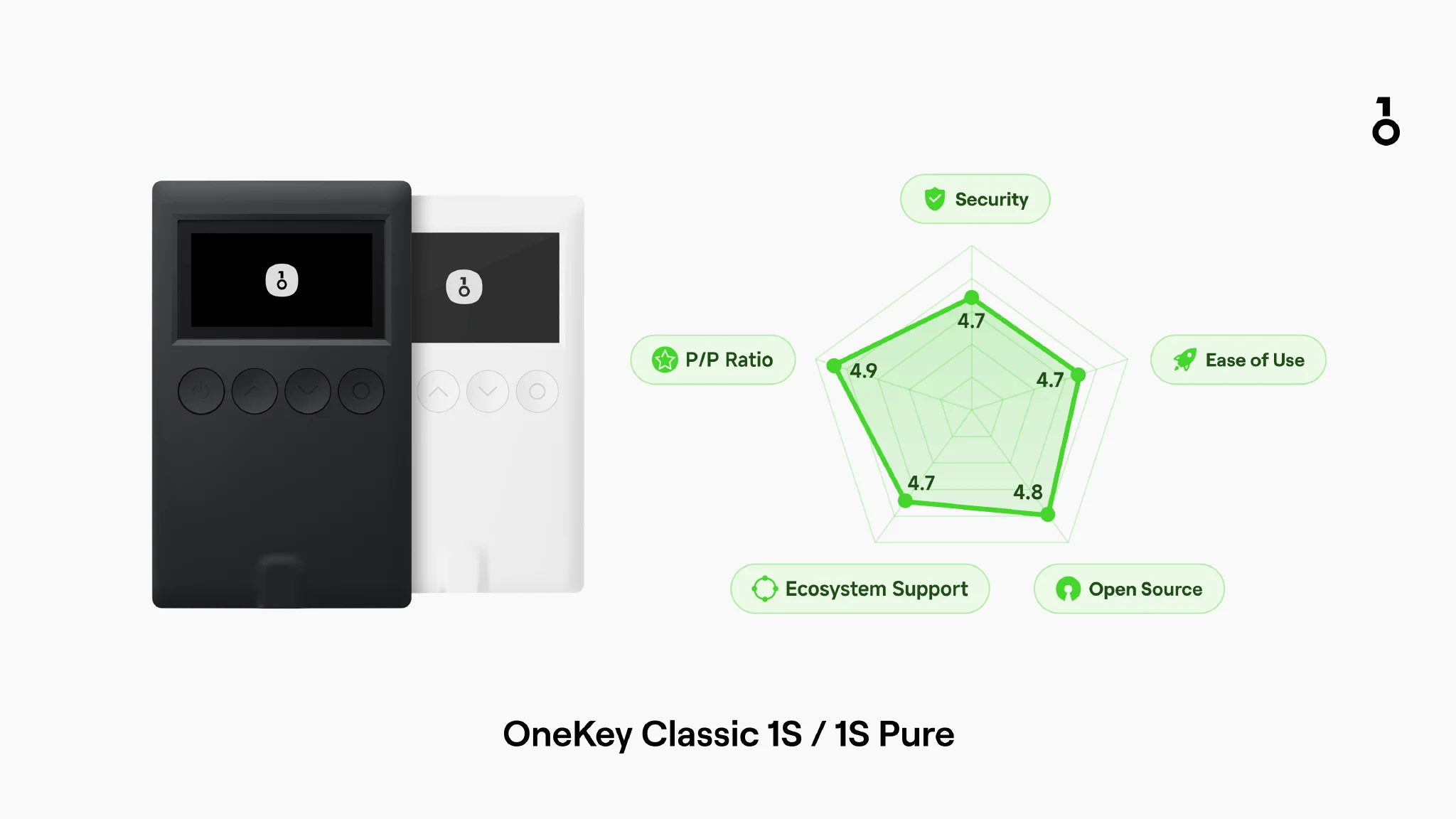
- Price: OneKey Classic 1S / Pure: $99 / $79 (no battery)
- Supported Currencies: 30,000+
- Connection Methods: Bluetooth / USB-C
- System Support: OneKey App (macOS, Windows, Linux, Android, iOS)
- Open Source: 100% fully open source, supports verifiable builds
- Security Chip: 1×EAL6+
Features:
- Balances price, functionality, and portability well, equipped with an EAL 6+ security chip
- OneKey Classic 1S: Retains main official features and is equipped with a screen for confirmation (rejecting "blind signing")
- OneKey Classic 1S Pure: Battery-free design, more suitable for low-frequency use and long-term storage; an official BTC-Only version is also available
- Paired with the App, it can complete one-click Swap, NFT, multi-chain browser, and air-gapped signing operations
- Supports SignGuard, which can link with the OneKey App's risk prompts.
Shortcomings:
- No fingerprint or air-gapped QR code scanning function
- No NFC, connection methods are limited
3) Trezor Safe 7 (Open Source Transparency: Emphasizes auditability and anti-quantum risk)
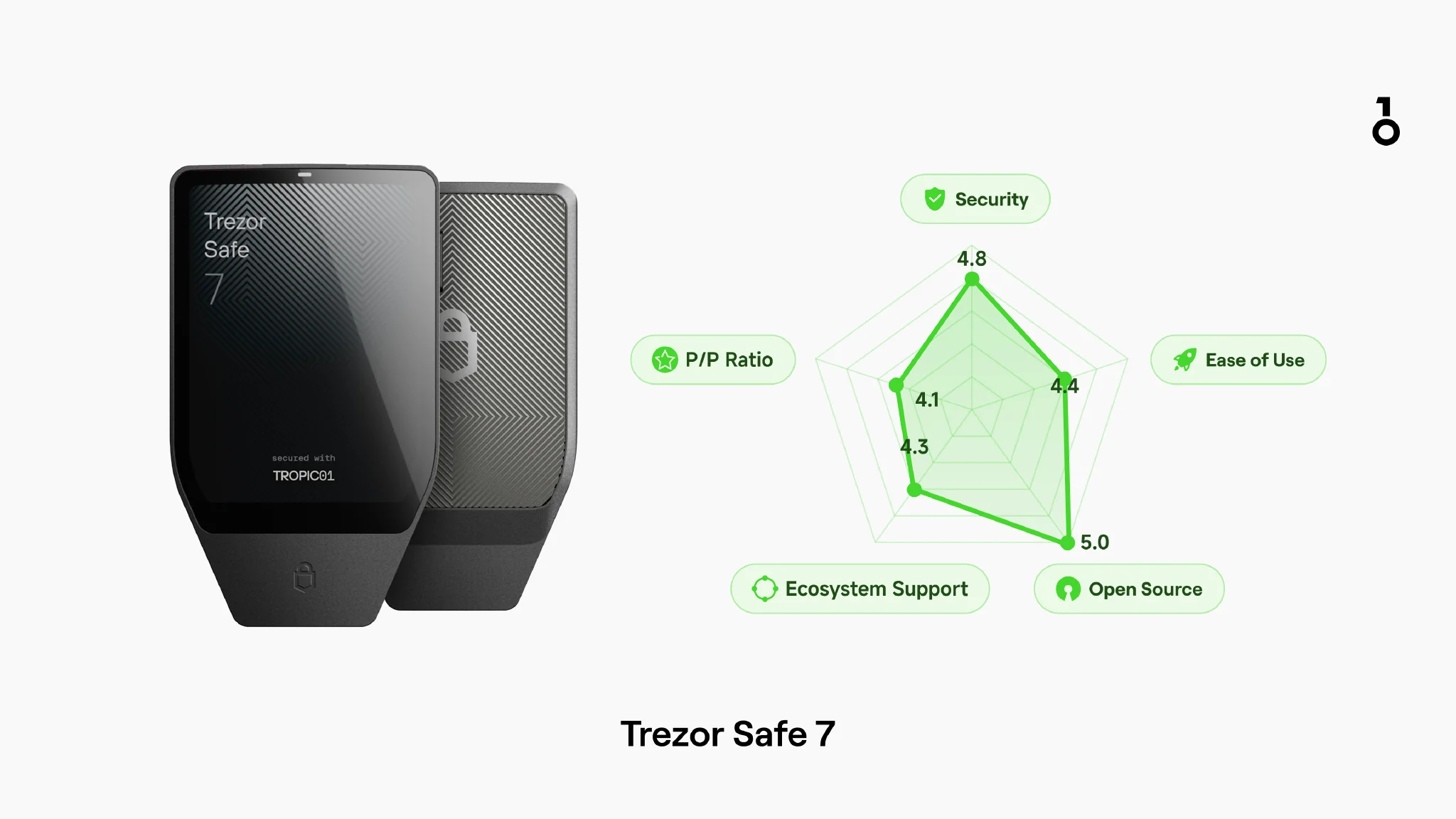 Trezor Safe 7
- Price: $249
- Supported Currencies: Thousands
- Connection Methods: USB-C / Bluetooth / NFC / Qi2 wireless charging
- System Support: Trezor Suite (Windows, macOS, Linux) / Trezor Suite Mobile
- Open Source: 100% open source, and provides reproducible builds for verification
- Security Chip: TROPIC01 + 1×EAL6+ Secure Element
Features:
- Dual-chip security architecture, one is the open and auditable TROPIC01, the other is the OPTIGA Trust M
- Supports USB-C / Bluetooth / NFC / Qi2 wireless charging, with rich connection methods
Shortcomings:
- Trezor Suite does not support advanced features like manually adding custom networks
- The software is more like a tool for advanced users, with a higher learning curve for beginners
4) Ledger Nano X (Convenient for mobile use, but heavier trust model)
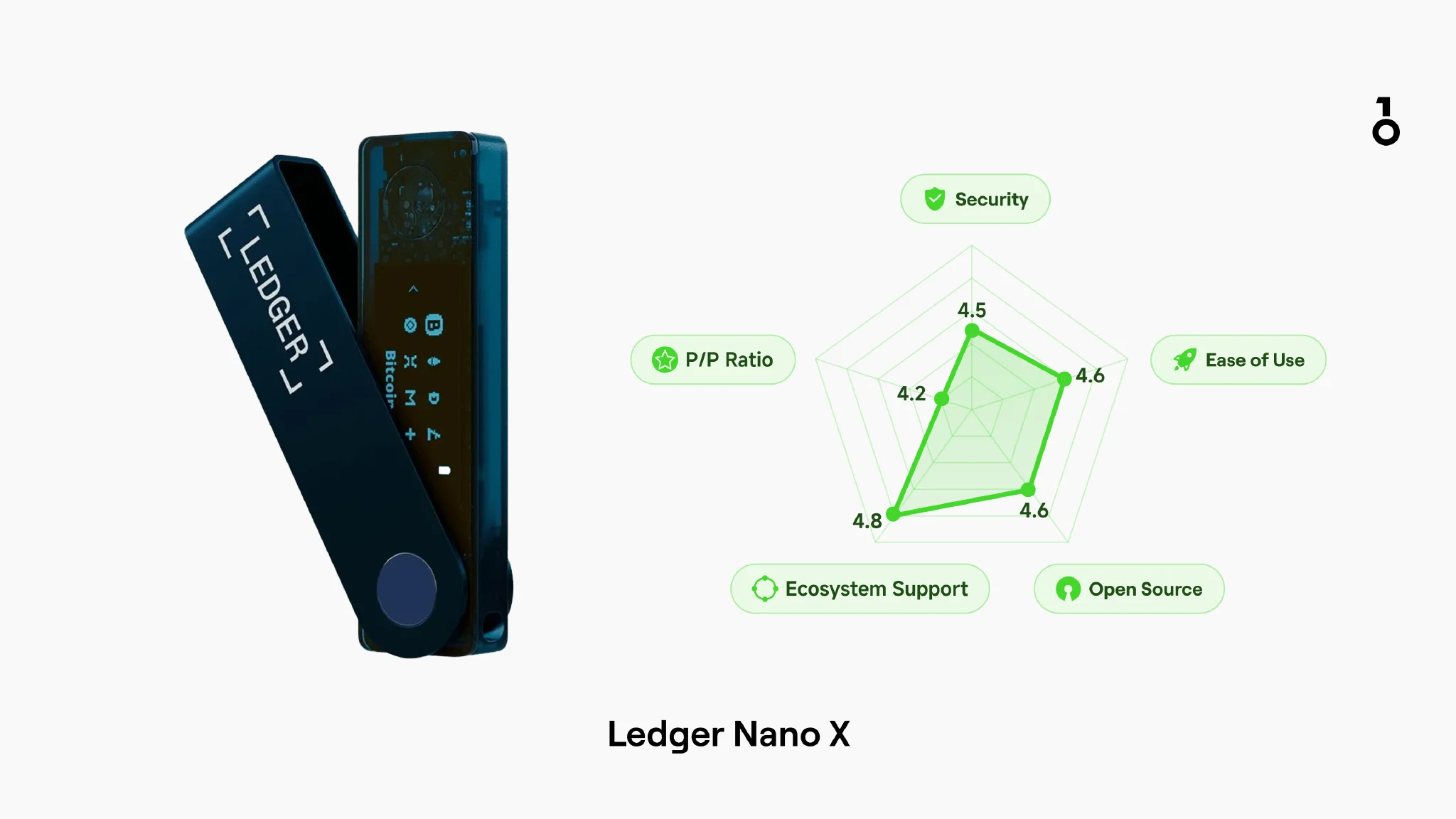 Ledger Nano X
- Price: $149
- Supported Currencies: 15,000+ (concurrent installation quantity limited by device storage space)
- Connection Methods: Bluetooth / USB-C
- System Support: Ledger official apps (macOS, Windows, Linux, Android, iOS)
- Open Source: Ledger uses an SE + OS layered architecture, partially closed source (firmware is not open source)
- Security Chip: 1×EAL5+
Features:
- Wide range of asset support, good compatibility with third-party wallets
- Entry-level model equipped with Bluetooth, convenient for mobile use
- Built-in EAL5+ security chip, mature Ledger Live software suite
Shortcomings:
- Software and firmware are not fully open source
- Historically experienced a major marketing data breach
- Ledger uses an app installation mode; different blockchains require installing corresponding apps, and device storage space is limited
- Ledger Recover and other recovery solutions have sparked controversy in the community, with the focus mainly on the trade-off between "recovery convenience" and "minimal trust model"
5) Ledger Nano Gen5 (Ledger entry-level touch model)
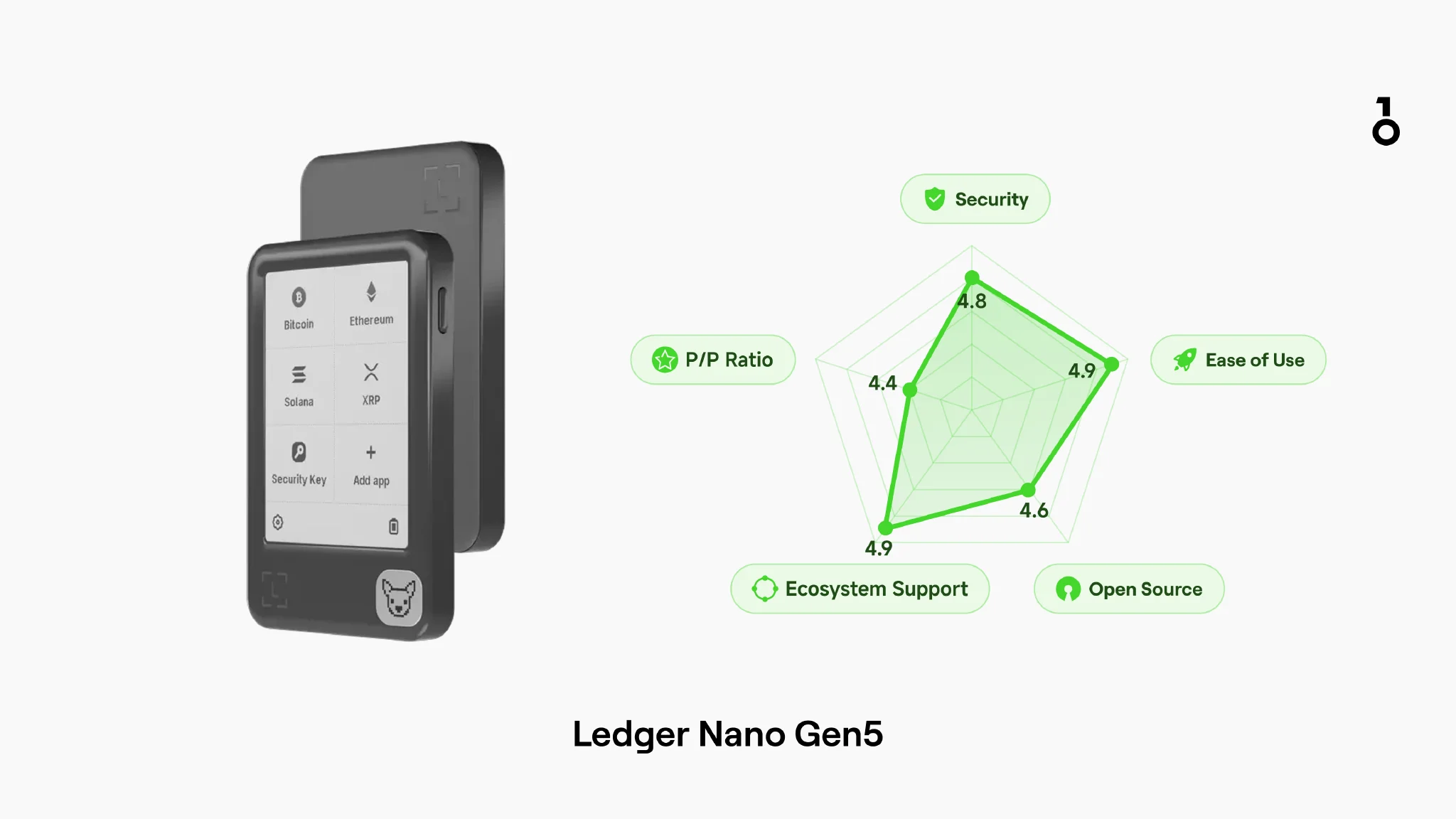 Ledger Nano Gen5
- Price: $179
- Supported Currencies: 15,000+ (concurrent installation quantity limited by device storage space)
- Connection Methods: USB-C / Bluetooth / NFC
- System Support: Ledger official apps (macOS, Windows, Linux, Android, iOS)
- Open Source: Partially open source
- Security Chip: 1×EAL6+
Features:
- 2.8-inch E-Ink touch screen, providing more comprehensive information display
- Wide range of asset support
- Mature Ledger Live software suite
- Provides USB-C / Bluetooth / NFC, with rich connection methods
- Supports Clear Signing, allowing more transaction information to be displayed on the screen
- Supports Transaction Check risk parsing
Shortcomings:
- Software and firmware are not fully open source
- Historically experienced a major marketing data breach
- Although the E-Ink screen is power-efficient, its refresh rate is low and response speed is slow, making the experience less smooth than OLED during high-frequency operations
- Ledger uses an app installation mode; different blockchains require installing corresponding apps, and device storage space is limited
- Single Secure Element architecture, which is relatively simple in terms of redundant security structure at the hardware level compared to some devices using multiple security chips or multi-isolation designs.
- Ledger Recover and other recovery solutions have sparked controversy in the community, with the focus mainly on the trade-off between recovery convenience and trust boundaries
6) Ledger Flex (Large E-Ink screen)
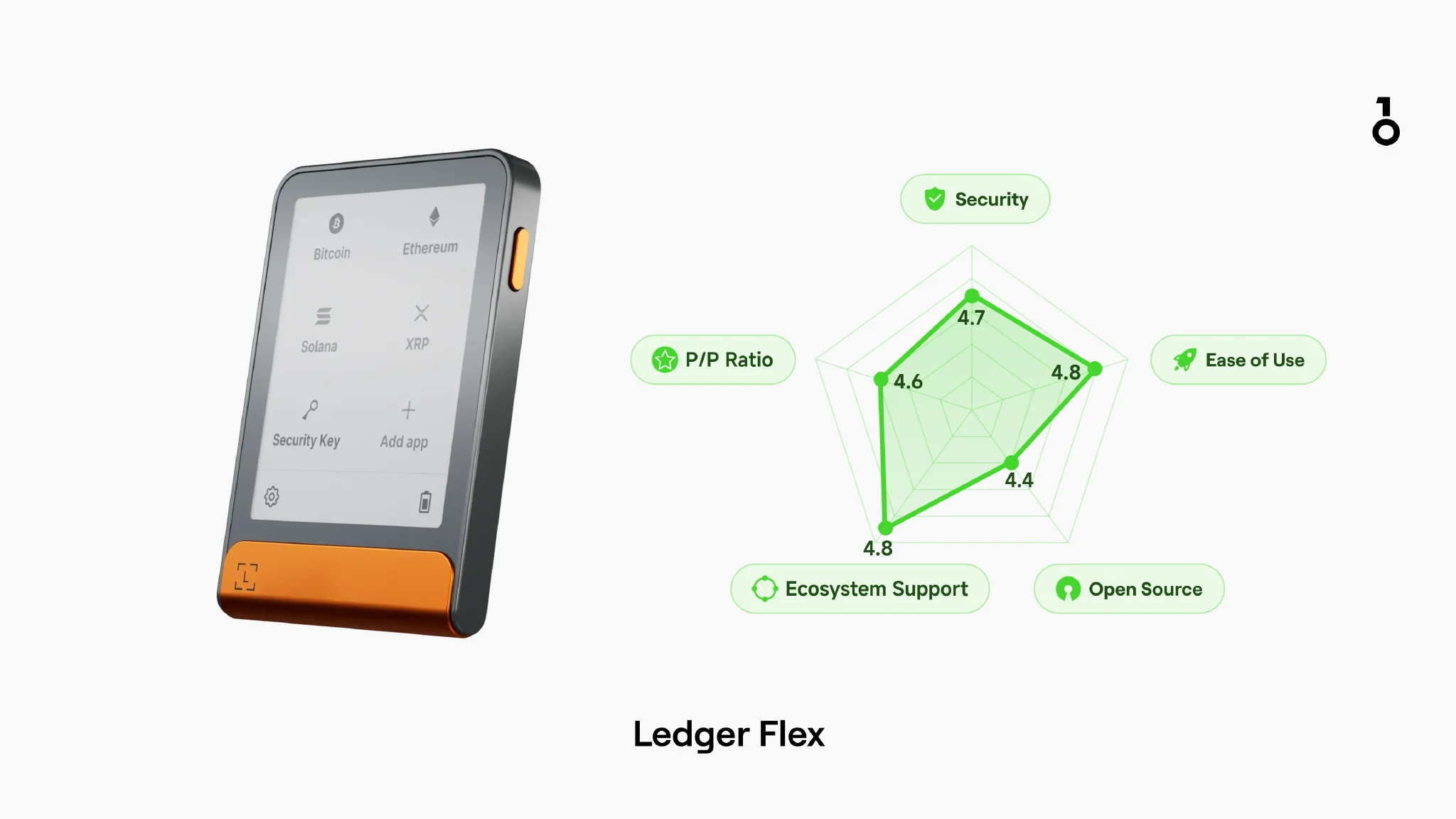 Ledger Flex
- Price: $249
- Supported Currencies: 15,000+
- Connection Methods: USB-C / Bluetooth / NFC
- System Support: Ledger official apps (macOS, Windows, Linux, Android, iOS)
- Open Source: Ledger uses an SE + OS layered architecture, partially closed source (firmware is not open source)
- Security Chip: 1×EAL6+
Features:
- E-Ink touch screen, better for reading transaction details and helps reduce accidental signing
- Wide range of asset support, good compatibility with third-party wallets
- Mature Ledger Live software suite
- Provides USB-C / Bluetooth / NFC, with rich connection methods
- Supports Clear Signing, allowing more transaction information to be displayed on the screen
- Supports Transaction Check risk parsing
Shortcomings:
- Software and firmware are not fully open source
- Historically experienced a major marketing data breach
- Although the E-Ink screen is power-efficient, its refresh rate is low and response speed is slow, making the experience less smooth than OLED during high-frequency operations
- Ledger uses an app installation mode; different blockchains require installing corresponding apps, and device storage space is limited
- Single Secure Element architecture, which is relatively simple in terms of redundant security structure at the hardware level compared to some devices using multiple security chips or multi-isolation designs.
- Ledger Recover and other recovery solutions have sparked controversy in the community, with the focus mainly on the trade-off between recovery convenience and trust boundaries
7) Ledger Stax (Large E-Ink screen)
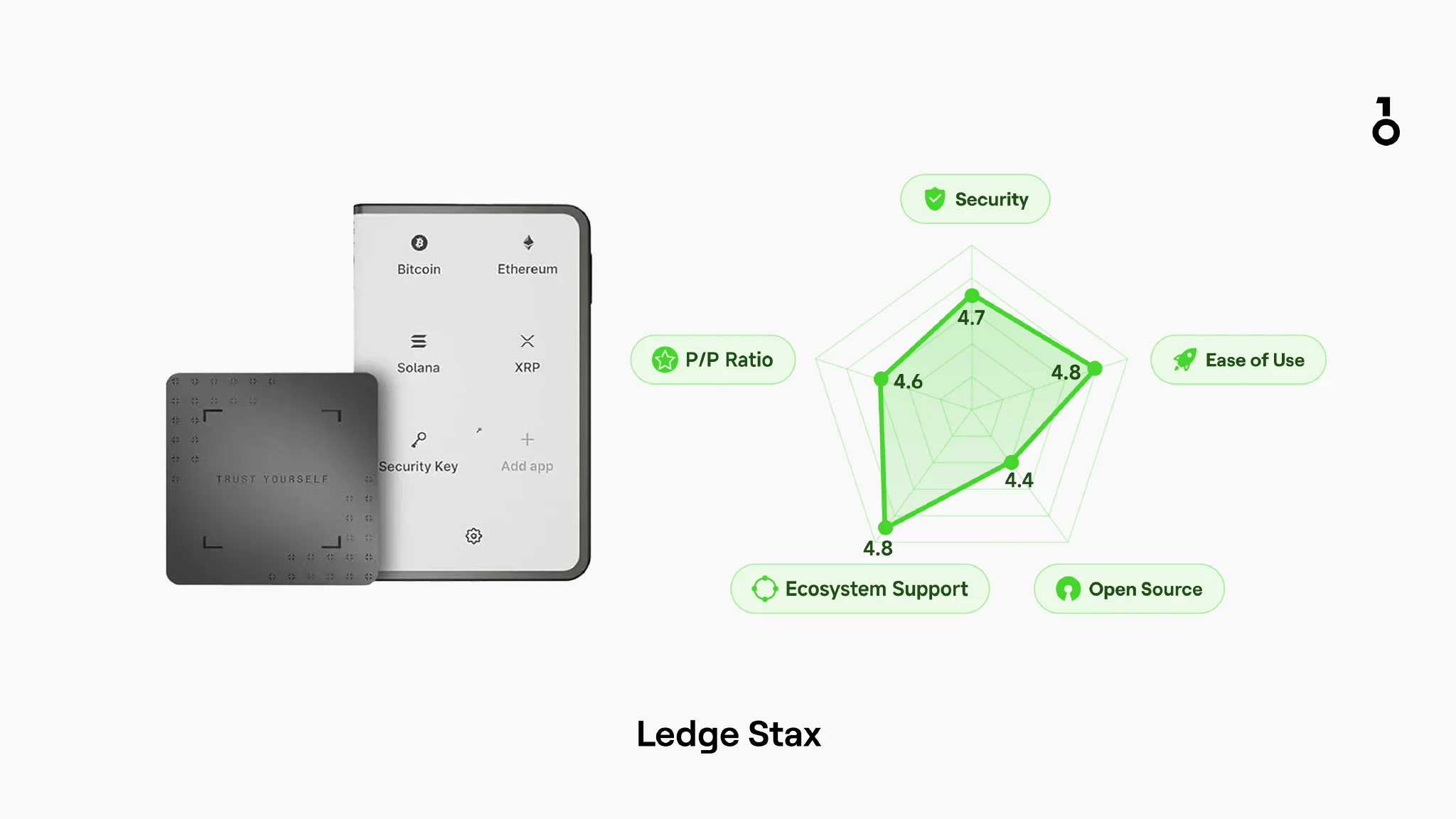 Ledger Stax
- Price: $399
- Supported Currencies: 15,000+
- Connection Methods: USB-C / Bluetooth / NFC
- System Support: Ledger official apps (macOS, Windows, Linux, Android, iOS)
- Open Source: Ledger uses an SE + OS layered architecture, partially closed source (firmware is not open source)
- Security Chip: 1×EAL6+
Features:
- 3.7-inch E-Ink touch screen, featuring a metal frame
- Wide range of asset support, good compatibility with third-party wallets
- Mature Ledger Live software suite
- Supports Bluetooth, PIN, NFC, Qi2, with rich connection methods
- Supports Clear Signing, allowing more transaction information to be displayed on the screen
- Supports Transaction Check risk parsing
Shortcomings:
- Software and firmware are not fully open source
- Historically experienced a major marketing data breach
- Although the E-Ink screen is power-efficient, its refresh rate is low and response speed is slow, making the experience less smooth than OLED during high-frequency operations
- Ledger uses an app installation mode; different blockchains require installing corresponding apps, and device storage space is limited
- Single Secure Element architecture, which is relatively simple in terms of redundant security structure at the hardware level compared to some devices using multiple security chips or multi-isolation designs.
- Ledger Recover and other recovery solutions have sparked controversy in the community, with the focus mainly on the trade-off between recovery convenience and trust boundaries
8) Tangem (Card/Ring form factor: No recovery phrase route)
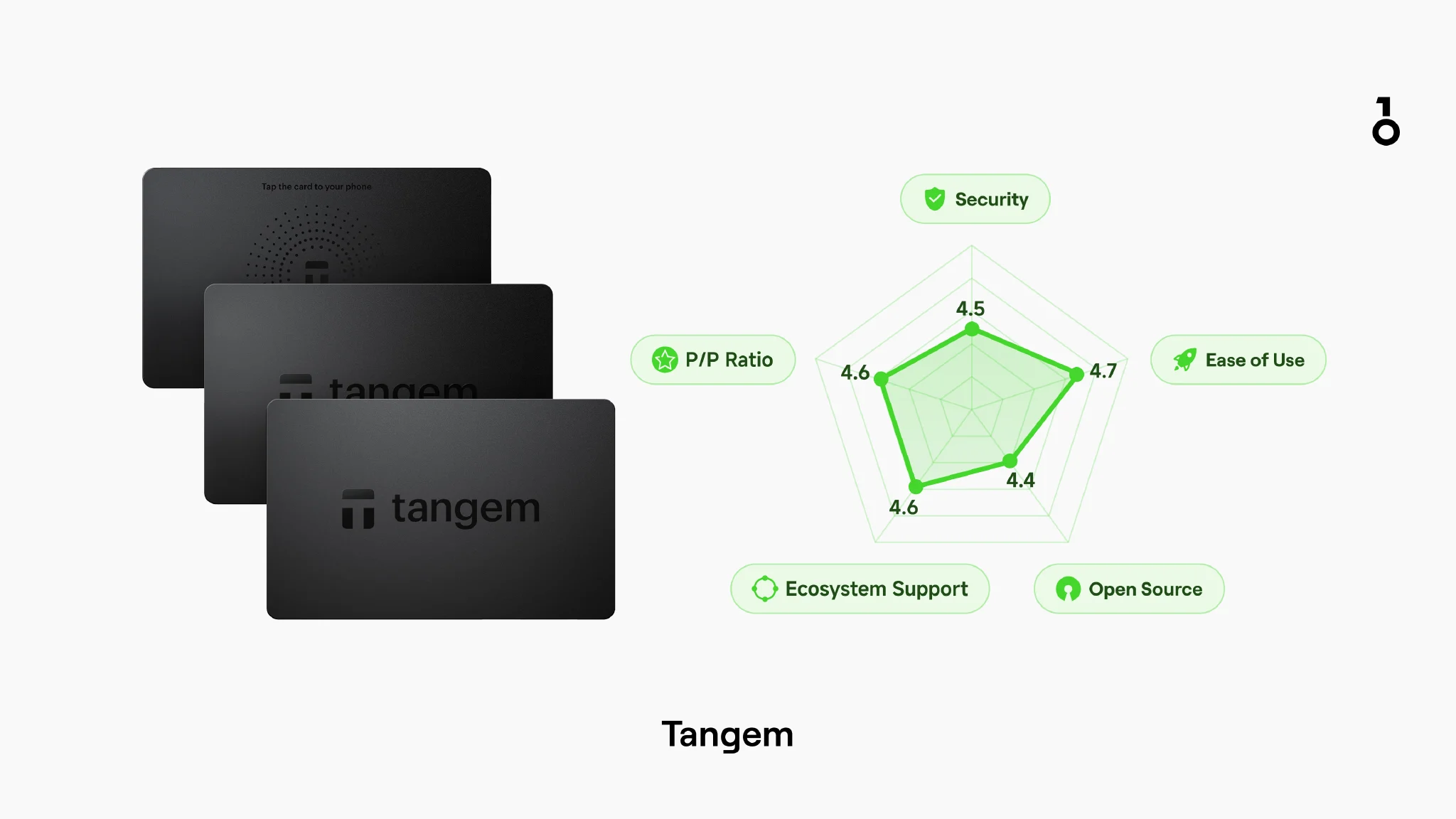 Tangem
- Price:
- Tangem 2-card set: $55
- Tangem 3-card set: $70
- Tangem Ring (Ring + 2 cards): $96
- Supported Currencies: 16,000+
- Connection Methods: NFC (mobile phone is the main interaction entry point)
- System Support: Tangem App (iOS / Android)
- Open Source: Firmware is not open source
- Security Chip: 1×EAL6+
Features:
- Credit card size, no battery required, no charging needed
- Adopts a card-based multi-backup design, with the card itself handling recovery
Shortcomings:
- The card form factor relies more on the mobile app for display and processes, leading to higher "blind signing" risks in complex authorization scenarios
- The two-factor verification mechanism differs from the experience of traditional "devices with independent screens"
- Must be used with a designated mobile App
9) SafePal S1 Pro (Budget air-gap: Pure QR code offline)
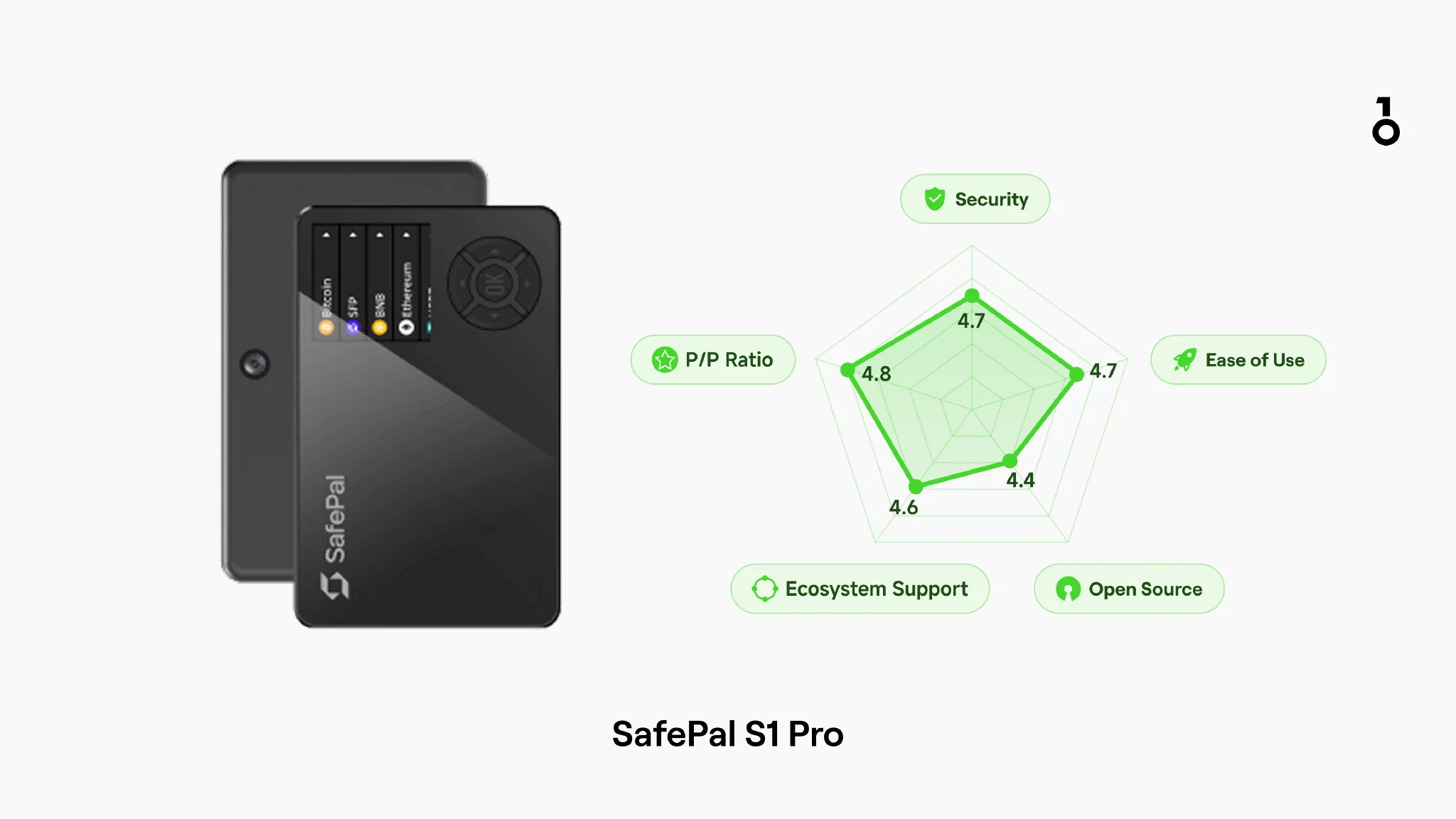 SafePal S1 Pro
- Price: $90
- Supported Currencies: 200+ public chains and their tokens (supports expansion for more tokens)
- Connection Methods: Air-gapped QR code scanning (USB-C mainly used for power/charging)
- System Support: SafePal App (Android / iOS) / SafePal Extension (Chrome / Edge / Firefox)
- Open Source: Officially labeled as open source; it is still recommended to check the specific open-source scope against their public repositories item by item
Features:
- Pure air-gapped offline interaction, with relatively clear security boundaries.
- Lower price threshold.
- Complete device form factor, with a basic user experience closer to daily hardware wallets than minimalist card forms.
Shortcomings:
- High-intensity multi-chain interaction is more tiring (the scanning process is not friendly enough for "high-frequency DeFi/NFT" users)
- Small screen + button interaction, limited reading experience for complex information.
- Interaction is primarily functional, with a plain interface and operation.
- Interface is traditional, and firmware update pace is relatively conservative
10) Keystone 3 Pro (Air-gapped multi-chain: Emphasizes open source and verification)
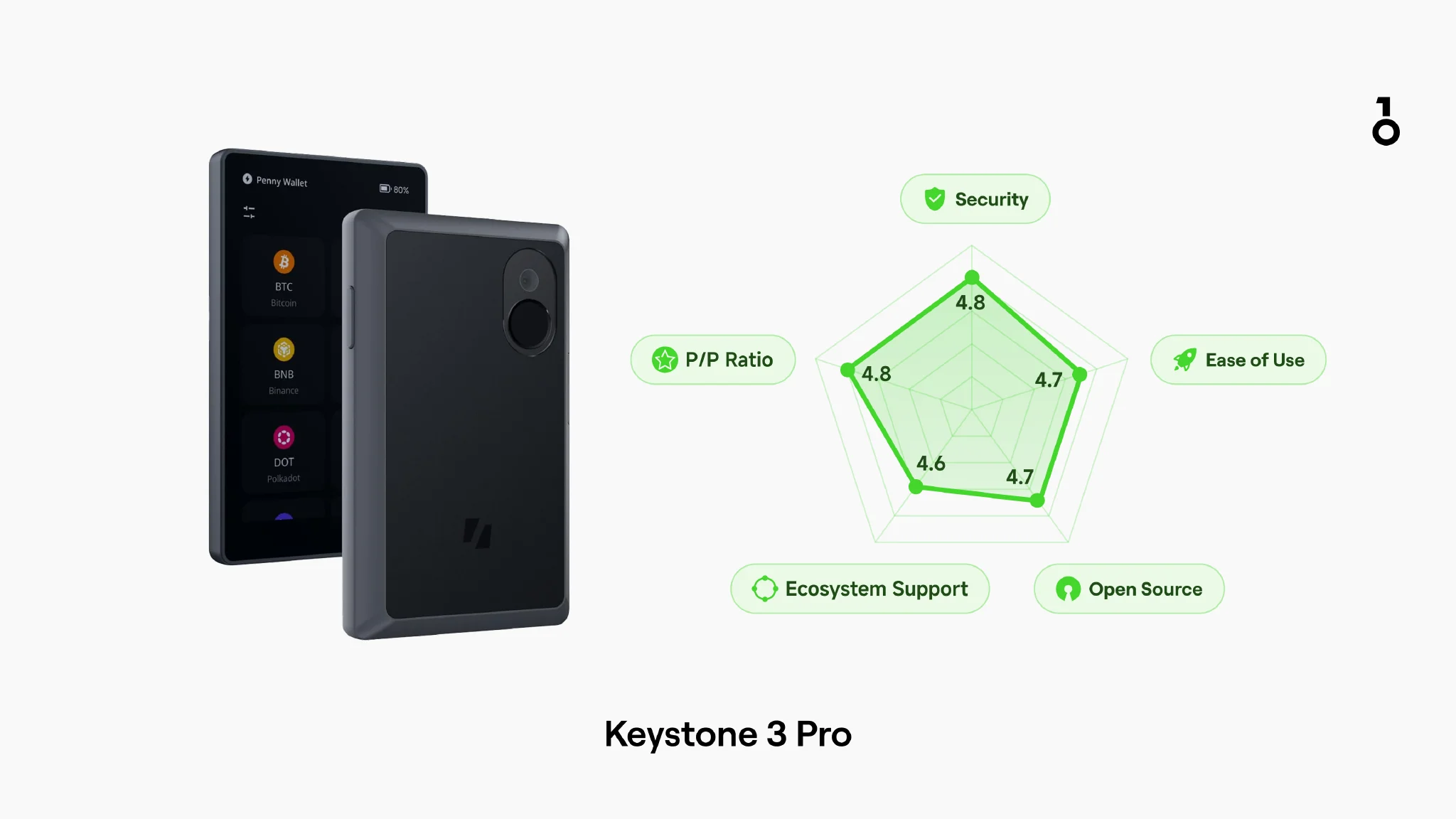 Keystone 3 Pro
- Price: $149
- Supported Currencies: 5,500+
- Connection Methods: Primarily air-gapped QR code scanning
- System Support: Keystone App (Android / iOS) / MetaMask extension and other compatible desktop wallets
- Open Source: Fully open source
Features:
- Open source and verifiable
- Core is air-gapped QR code scanning, keeping the signing process on the offline device as much as possible.
- More suitable for users willing to spend a little more operational effort in exchange for clearer security boundaries.
Shortcomings:
- Connection methods are relatively singular, not flexible enough for daily use.
- Not very suitable for ordinary beginners.
- Product design emphasizes security self-checks rather than the lightness and smoothness of daily use.
11) BTC-only Specialization (Single asset, smaller attack surface)
The following models focus on BTC-only / single-currency use. The commonality is "more singular asset types, more streamlined functions," making them more suitable for long-term storage; the cost is that they are not suitable for multi-chain/multi-asset management, and some models focus on PSBT/offline workflows, which have a higher learning curve.
6. Cold Wallet Comparison Overview (Comparison Table)
1) Quick Comparison
2) Security and Trust Detail Table
3) Comprehensive Scoring Table
7. In-depth Review (Key Differences Beyond Brand Narrative)
1) Ledger vs. Trezor/OneKey: Security Model Differences
A feature of Ledger is that when managing different chains, you usually need to install the corresponding blockchain App on the device first; whereas Trezor and OneKey usually do not. Ledger's official support documentation clearly states that different assets usually require installing corresponding apps, and if device space is insufficient, you need to uninstall unused apps and then reinstall them as needed.
In contrast, Trezor and OneKey are closer to a "unified device responsible for signing, software side responsible for display and interaction" model. Users manage assets and initiate transactions more within Trezor Suite, OneKey App, or third-party wallets, rather than installing apps one by one for different chains on the hardware device, making the operational path usually more direct and convenient.
2) Tangem's Features: Extremely portable, but "no screen" means higher risk
Tangem's pros and cons are very clear: extremely thin and light, but the hardware itself does not have a screen. The official team has even written specifically about "Why Tangem doesn't need a screen," with the core logic being to move key interactions to the mobile App.
The problem is: One of the most common and realistic risks in 2026 is blind signing—signing when you cannot clearly understand the transaction/authorization content.
One of the meanings of a hardware wallet having a screen is to try to achieve "what you see is what you sign": Ledger also emphasizes that its secure screen is controlled by a security chip, allowing you to verify key details even in an infected computer/mobile environment.
Against the backdrop of increasingly severe blind signing and authorization phishing, the lack of an independent, trusted screen means relying on the mobile environment to understand transaction details, which raises the risk boundary for large-amount or complex contract interactions.
3) The Practical Significance of Multiple Security Chips: Not just a difference in quantity, but architecture boundaries and expansion space
OneKey Pro is equipped with 4 EAL 6+ security chips. From an engineering perspective, the potential advantages of multiple security chips include:
- Larger design space for security boundaries: Multiple security chips make it easier for manufacturers to divide the isolation boundaries of "different sensitive materials/key operations" in engineering, for example, OneKey hardware-isolates biometrics/PIN from the core signing process.
- Stronger scalability: As multi-chain contracts become more complex, the data scale and algorithm differences for "parsing/displaying/verifying" will grow; more security chips also mean it is easier to support a wider blockchain ecosystem and future expansions.
4) The Barrel Effect of Cross-chain: Why long-term large amounts are more suitable for BTC-Only / Coin-Only
Cross-chain (bridges, wrapped assets, cross-chain routers) is very convenient, but it also expands security from "relying only on the native chain" to "also relying on the bridge and the counterparty chain." For long-term large positions, cross-chain bridges are often viewed as an additional risk connection layer.
For "long-term cold storage/vaults," the problem lies here: the weakest link will lower the overall security, which can be summarized in the following three points:
- Minimize cross-chain operations for large long-term positions (especially bridges);
- Coin-Only (e.g., BTC-Only) is a strategy to reduce the attack surface: BitBox's summary of the Bitcoin-only version is very clear—less code = smaller attack surface.
- OneKey Classic 1S Pure also provides a BTC-Only and battery-free version, which is aimed at long-term holding scenarios.
5) Battery: The cost of mobile convenience and best practices for long-term cold storage
Many hardware wallets have built-in lithium batteries for convenience, but a potential risk is: built-in batteries are usually not removable or replaceable. Taking the Ledger Nano X user manual as an example, it states that the battery has a lifecycle (design life of 5 years), and Ledger does not provide a battery replacement plan; however, when the battery ages, the device can still be used via USB power.
When purchasing, you might want to divide them into two categories:
Mobile high-frequency (with battery): You can prioritize whether battery information is transparent, whether maintenance suggestions are clear, and whether quality control is traceable. The OneKey Help Center clearly states the battery type, cycle life test criteria, and long-term storage suggestions (e.g., 40%–60% charge is better for battery health), and notes that even if the battery degrades, signing or wallet transfers can be completed via USB power.
In addition, OneKey battery cells carry UN38.3 lithium-battery transport certification.
Long-term cold storage/vault (low frequency, large amount): Try to choose a battery-free version to directly eliminate the risks of battery aging, swelling, or device instability caused by long-term power loss after many years.
Power-side risks (voltage / power disturbances): ordinary users do not need to overstate them, but large-position holders should understand them.
"Voltage/power supply attacks" usually belong to fault injection/power glitching in security engineering: attackers disturb the power supply in a very short time, causing the chip to enter an abnormal state to try to bypass certain verifications. Such attacks are generally high-cost and strongly rely on physical contact. For ordinary users, the more common ones are still phishing, blind signing, and seed phrase leaks; but it explains why hardware wallets emphasize security chips and circuit design. In other words, PCB design, power integrity, and production processes are also part of the security chain.
8. How to choose the hardware cold wallet that suits you? (Decision tree style)
A) You are a beginner, self-custody for the first time
Recommendation: OneKey Classic 1S / 1S Pure
Reason: The entry cost is relatively controllable, and it provides independent screen confirmation and relatively complete getting-started documentation. (onekey.so)
B) You often use mobile phones, often authorize dApps
Recommendation: Ledger Flex (frequent mobile use) or OneKey Pro (multiple connections + optional QR air-gap)
Reason: Mobile software support is mature, compatibility is broad, and it suits high-frequency authorization and multi-chain interaction scenarios. (Ledger)
C) You want long-term cold storage (vault scenario)
Recommendation: BTC-only (BitBox02 Bitcoin-only / OneKey 1S Pure BTC-Only / Coldcard / Passport)
Reason: Less code, fewer chains, fewer functions = smaller attack surface. (bitbox.swiss)
D) You are an open-source transparency preference user
Recommendation: Trezor Safe 7 / 5 / 3 and OneKey Pro / Classic
Reason: Both emphasize open source and auditable routes, but the specific open-source scope and verification paths should still be checked item by item against official documentation. (trezor.io)
9. Precautions
1) Security red lines for purchase and use:
- Never enter/upload your recovery phrase (most common in fake customer service/fake websites/fake recovery).
- Only buy from official/authorized channels, avoid second-hand and unknown sources.
- Firmware only via official channels, do not click on suspicious links.
- Large-amount assets are recommended to be managed in layers: daily small-amount hot wallet + large-amount cold storage.
- Any "incomprehensible authorization/signature" = default reject (blind signing is a high-frequency accident entry point).
2) Common scams and risk scenarios (still high-frequency in 2026):
- Fake customer service/fake recovery: Inducing you to hand over your recovery phrase
- Fake firmware/fake updates: Taking you to non-official channels
- Authorization phishing: Disguised as "claiming airdrops/verifying wallet" to get you to sign unlimited authorizations or malicious calls (blind signing)
- Supply chain risks: Counterfeits/pre-set recovery phrases/re-sealing after opening
- Recovery service/cloud backup controversies: Recovery convenience usually implies additional trust assumptions, it is recommended to clarify your trust boundaries first. (Ledger)
10. Conclusion
A hardware cold wallet is not necessarily safe just because you bought it; its value lies in moving the most critical gatekeeper of asset security from an untrusted online environment back to the device side that you can control. By 2026, rather than chasing "parameter maximization," it is more important to stick to long-term executable security habits: do not give out your seed phrase, do not blind-sign, use only official update channels, and trust only the device screen every time.
References:
- NIST: Post-Quantum Cryptography Standard Release Notes (2024). (NIST)
- Ledger Academy: Blind Signing risk explanation. (Ledger)
- Fireblocks: MPC basic explanation. (Fireblocks)
- Trezor official product page: Trezor Safe 7. (trezor.io)
- OneKey Help Center: Firmware consistency/verification path. (help.onekey.so)
- Nemko: Common Criteria / EAL explanation. (nemko.com)
- Ledger Recover explanation page. (Ledger)
- OneKey Classic 1S product page. (onekey.so)
- Ledger Flex product page. (Ledger)
- Trezor model comparison page. (trezor.io)
- BitBox02 Bitcoin-only page. (bitbox.swiss)
Disclaimer
This article does not constitute investment advice; hardware wallets cannot eliminate all risks.