What to Do When an OKX Deposit Is Locked by Transfer Rules
Key Takeaways
• First confirm that the on-chain transaction exists, then enter the additional information page from the OKX deposit records. • When transferring from OneKey, select "Private wallet"; when transferring from another exchange, select "Exchange or platform". • If the page asks for additional information, do not make another deposit or enter a false wallet type or name.
This article applies when assets have already been sent to OKX but cannot be used temporarily because the transfer information is incomplete. If the transaction cannot be found on the block explorer, the wrong network was selected, or a memo was omitted, please follow OKX's standard deposit not received process.
Step 1: Confirm which deposit it is
First check:
- The TxID, which is the on-chain transaction ID, can be found on the block explorer for the correct network.
- The receiving address is the deposit address OKX gave you at the time.
- The OKX deposit record clearly says that you need to submit information or complete extra verification.
If the transaction is still unconfirmed on-chain, wait for confirmation first. Do not send another transfer of the same amount just to "test whether it resumes."
Step 2: Enter the additional information page from the deposit record
- Open the assets page in OKX.
- Go to deposit records and find the locked transaction.
- Open the details and click the "Submit" option or the additional information entry on the page.
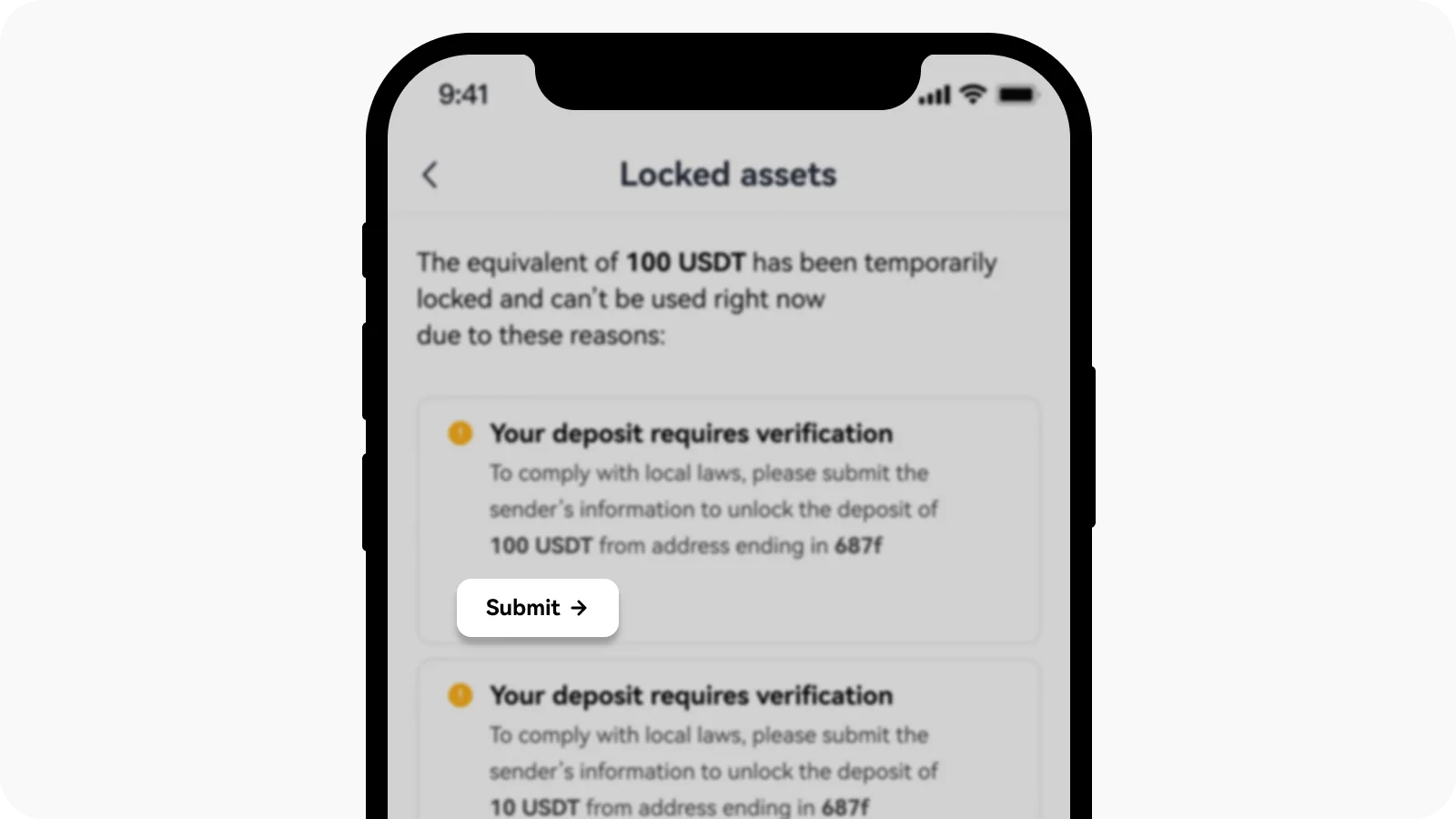 Submission entry in OKX deposit records
The status names shown in different accounts may vary, such as "Pending", "Missing information", or "Extra verification required". As long as the details page clearly asks for additional information, follow the steps below.
Step 3: Select the type based on the real source
OKX will ask where this funds came from.
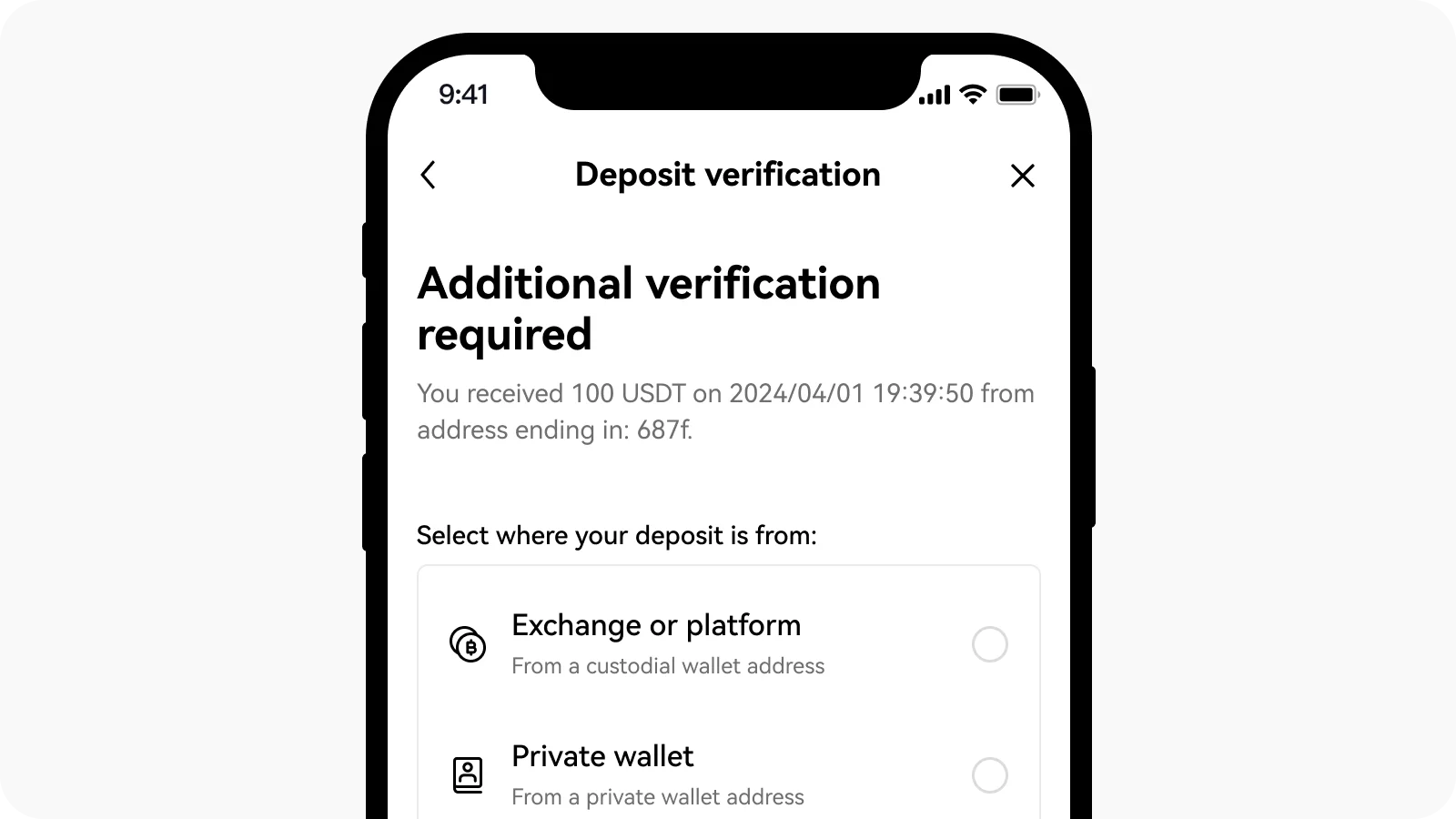 Funding source options on the OKX deposit unlock page
Transferred from OneKey or another self-custody wallet
Select "Private wallet", then fill in the real sender information.
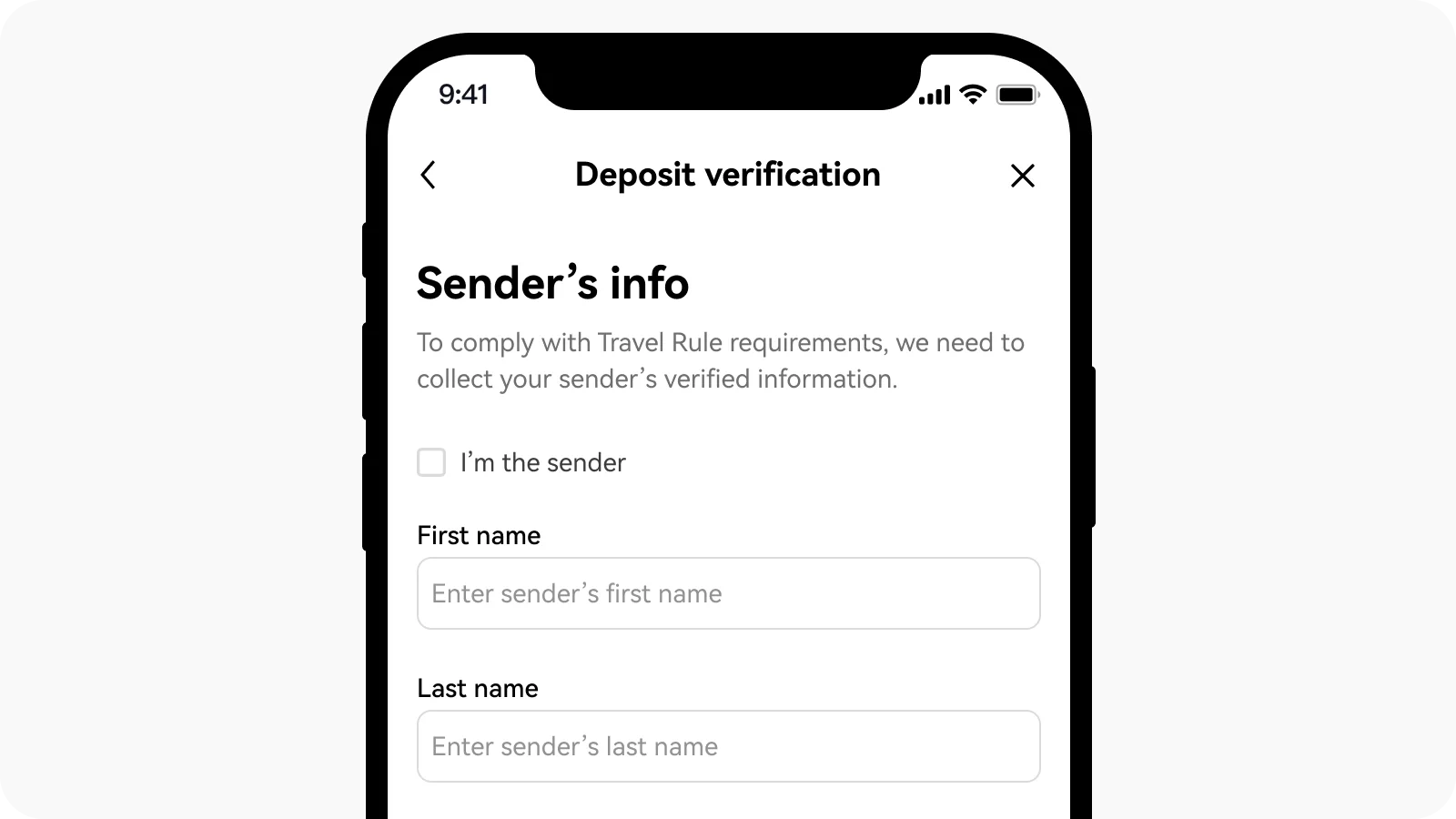 OKX private wallet deposit information form
- If you sent it from your own OneKey address: check "I am the sender" on the page and fill in your personal information.
- If someone else sent it from their OneKey address: fill in the actual sender's name and the country or region required by the page.
- The name must match the real identity information; do not enter a wallet nickname.
Before submitting, check the TxID, asset, amount, network, sending address, and receiving address.
Transferred from another exchange
Select "Exchange or platform":
- Choose the actual sending platform.
- Fill in the sender's legal name registered on that platform.
- If your own account sent the funds, check "I am the sender" on the page.
- Provide the country or region information requested by the page.
- After submitting, wait for OKX review.
Do not enter an exchange address as a private wallet. You usually do not have the private key for that address, and later verification will fail.
Transferred from a third-party coin purchase service
If the funds came from a third-party coin purchase service, select "Exchange or platform" and fill in the real service provider and buyer information. Do not write OneKey as the service provider name.
What if it still does not unlock after submission?
First check whether the page has any new requirements:
- If it shows it is under review: wait patiently, and do not keep submitting different names.
- If it still shows missing information: check whether the name, source, and country or region are complete.
- If it says the sending platform did not pass along transfer information: contact the sending exchange's customer service and ask them to help provide the missing information.
- If there is no submission entry on the page or you cannot modify it: save the TxID and page screenshot, then contact OKX official customer service.
If the problem comes from another exchange, prepare the TxID, asset, amount, and OKX deposit address when contacting customer service. OKX's current official instructions also require the sending platform to contact OKX through the channels provided on its help page.
Deposit locked after a failed Satoshi test
A failed test transfer can also be treated as a deposit awaiting additional information. Common reasons include an amount mismatch, exceeding the time limit, sending from the wrong address, or the actual Bitcoin funds not coming from the address under verification.
Handling order:
- Find the failed test transaction in the OKX deposit records.
- Select "Private wallet" based on the real source.
- Fill in the actual sender's information and submit it.
- After this deposit is handled, return to the withdrawal process and start the Satoshi test again.
- The new test should use only the address, amount, and countdown shown on the new page.
An old test cannot be used directly as a new test, and the network fee already paid will not be returned.
What if you selected the wrong wallet type or name?
If you have not submitted yet, go back to the previous step and make changes. If you have already submitted and the page has no edit option, do not repeatedly enter different information; save the TxID, network, asset, amount, and a screenshot of the error page, then contact OKX official customer service to correct it.
Check before submitting
- Does the network of the TxID match the OKX deposit network?
- Have you checked the sending address and the OKX receiving address?
- Have you avoided sending another test deposit again?
- Did you truthfully select a private wallet or the real exchange as the source of funds?
- Does the name match the actual sender and the platform identity information?
Related guides
- How to Withdraw Crypto from OKX to OneKey: A Guide for European Economic Area Users
- How to Do the OKX Satoshi Test: Verify a Wallet Address with OneKey
References
- OKX: How to unlock a deposit when additional verification is required
- OKX: EEA Transfer Rules FAQ
- OKX: What is a Satoshi test and how to complete it
- OKX: How to view deposit and withdrawal records
- Regulation (EU) 2023/1113
Risk reminder: On-chain transfers are irreversible. The network, address, amount, memo, or false source-of-funds information may cause assets to fail to be credited automatically or require manual handling. This article is for operational guidance only and does not constitute investment, legal, or tax advice. Please refer to the status of your OKX account and the latest official instructions.
FAQ's
If the page clearly asks for additional information, simply waiting usually will not solve it. You should enter the submission page from the deposit details.
If the funds were sent directly from a OneKey address you control, choose "Private wallet" and fill in the real sender information.
Choose "Exchange or platform", select the real platform, and fill in the sender's legal name registered on that platform.
It is a real on-chain transfer. The funds may reach OKX but be locked temporarily and require additional information; the network fee will not be returned.
Save the TxID, network, asset, amount, deposit address, and a screenshot of the page, then contact OKX official customer service. Do not keep trying with false information.